



“Simplicity is the ultimate sophistication.” — Leonardo da Vinci (probably didn’t mean git worktrees, but still)
When Brady Gaster created Squad, he built it around a principle I really liked: simplicity is key. Don’t add components unless you really need them. Don’t stand up a database if you can avoid it. Don’t introduce a message broker if GitHub Issues can do the job.
When I joined and started using Squad seriously, one of the things we discussed was this design philosophy and how far you can take it. We made Git the database. Issues are the message queue. GitHub Actions are the automation layer. Everything lives in one place. Versioned. Auditable. Free. It’s elegant.
But there’s a problem with this approach that everyone running Squad in an enterprise eventually hits. And honestly? I should have seen it coming.
In Part 6, I told you how I solved the rate limiting problem when 9 agents share one API quota. That post was about throttling. This one is about state. Because when your squad’s own internal memory files — decisions, agent histories, orchestration logs — live in the same repo as your code, things get weird.
Specifically: your agents need permission to remember things.
The Moment I Realized We Had a Problem
A couple of days after I started working with Squad, the agents were doing their thing — picking up issues, writing code, opening PRs. It was working great. Data picked up a feature request for our C# platform service, did his analysis, wrote a decision doc, implemented the changes, added tests, and opened a pull request. All autonomously, while I was doing other work.
I woke up, checked the PR, and saw this:
1
2
3
Files changed: 97
+ squad files: 40
+ actual code: 57
Ninety-seven files. Forty of them were squad state. For a feature that touched maybe a dozen actual source files.
I scrolled through the diff. The actual C# changes were reasonable — service configuration, some new classes, updated tests. Maybe 15 minutes to review properly.
But the other 731 files? All .squad/ state:
.squad/decisions/namespace-config-2026-03.md— Data’s decision analysis.squad/agents/data/history.md— updated with this work session.squad/agents/worf/history.md— Worf reviewed the security implications.squad/schedule-state.json— Ralph’s orchestration state.squad/ralph/work-log.json— work tracking metadata.squad/ceremonies/daily-sync/2026-03-19.md— sync notes- … 725 more files …
The PR was almost half squad memory, half actual work. And here’s the thing about Microsoft repos — you can’t push to main. Period. Every PR requires at least one other person to approve it. Not a bot, not yourself — another human. So my teammate Meir opened the PR, saw 97 files, and started reading through them — trying to figure out what actually changed. But 40 of those files had nothing to do with the code that was modified. The cognitive load was insane. He was reviewing the squad’s internal diary instead of the actual feature.
The squad couldn’t remember things without asking permission. And the humans who gave permission couldn’t find the actual work buried under the squad’s memory.
Why This Happens
Here’s the root problem. Squad’s design philosophy is “Git as database.” The .squad/ directory contains everything the squad needs to be self-sufficient:
- Decisions — architecture choices, technical tradeoffs, team agreements
- Agent histories — what each agent has learned from past sessions
- Ceremony logs — daily syncs, retrospectives, planning notes
- Orchestration state — Ralph’s work queue, scheduling metadata, coordination files
All of this lives in the same repo as the code. Which means when Data makes a code change on a feature branch, his branch includes both the code and the new squad state from this work session.
Meanwhile, Seven is working on documentation on feature/docs. Her branch has her own squad state updates — new decisions, updated history files, ceremony notes.
Both PRs go up. Both sit waiting for approval. And here’s the kicker: neither branch sees the other’s decisions until both PRs merge.
Data doesn’t know about Seven’s decision to standardize on a new doc format. Seven doesn’t know about Data’s feature decision. They’re working with stale state, making decisions in parallel that might conflict.
And when both PRs finally merge? Git tries to auto-merge .squad/schedule-state.json — a JSON file — using a line-based merge strategy. JSON doesn’t merge line-by-line. It corrupts. I’ve fixed three corrupted JSON files in the past month alone.
The rate of change is completely different. Code changes once a day. Squad state changes fifty times a day. It’s like storing your brain’s short-term memory in the same filing cabinet as your tax returns. Different update frequency. Different access pattern. Different lifecycle.
The Four Approaches I’m Evaluating
I’ve identified four ways to solve this. Each has tradeoffs. None is perfect. Here’s what I’ve learned.
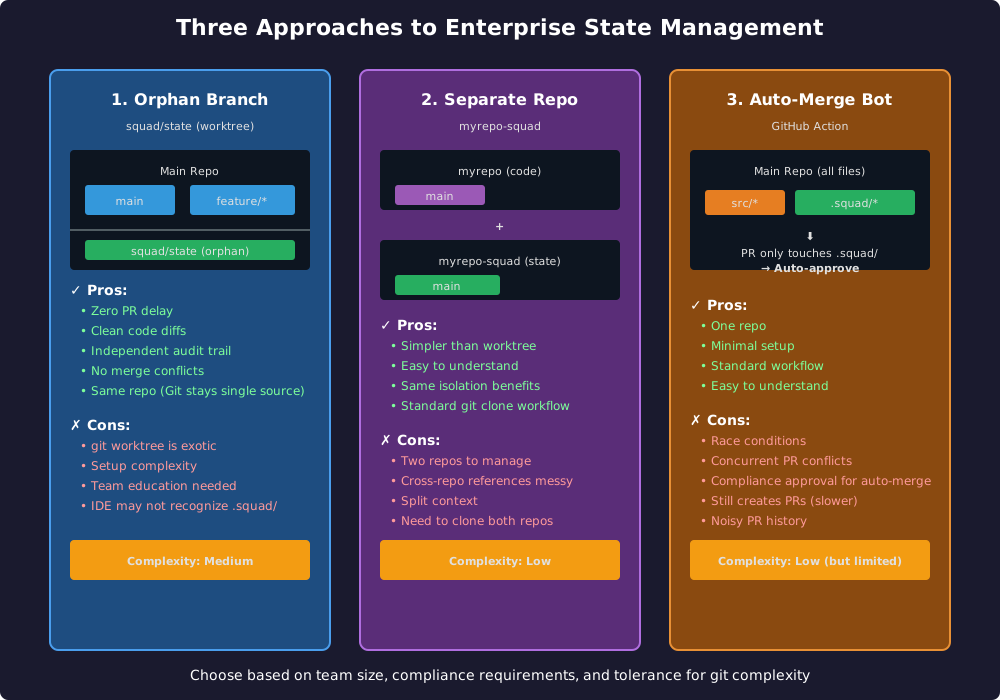
Approach 1: Orphan Branch
This is the most architecturally elegant solution — and the one that requires the most explanation.
The idea: create a separate Git branch called squad/state that has no parent commits. It’s an orphan — completely independent from your code history. Squad state lives there. Code lives on main and feature branches. They never mix.
Then use git worktree to mount the squad/state branch into .squad/ directory:
1
2
3
4
5
6
7
8
9
10
# One-time setup
git checkout --orphan squad/state
git rm -rf .
echo "# Squad State" > README.md
git add README.md
git commit -m "Initialize squad state branch"
git push -u origin squad/state

# Mount it into .squad/ (from your main branch)
git worktree add .squad squad/state
Now .squad/ is a worktree — it points to the squad/state branch. When you switch between code branches, .squad/ stays put. It’s always on squad/state, regardless of what code branch you’re on.
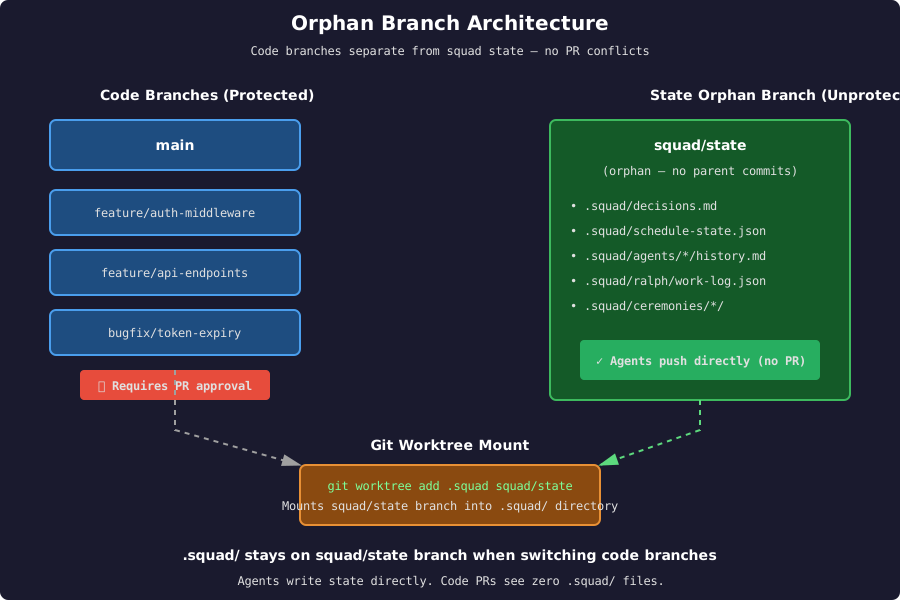
Agents write to .squad/, commit, and push directly to squad/state — no PR needed. Code PRs see zero .squad/ files. Clean diffs. No approval delay for squad memory. Independent audit trails.
The good:
- Zero PR delay for squad state
- Code diffs are clean — reviewers only see actual code
- Same repo — Git stays the single source of truth
- Independent versioning for state vs. code
- No merge conflicts between state and code
The weird:
git worktreeis exotic. Most developers have never used it.- Setup requires explanation. “Why is
.squad/not in my branch?” is a question you’ll answer multiple times. - Some IDEs don’t handle worktrees gracefully —
.squad/might show up as “untracked” even though it’s versioned. - If someone deletes
.squad/and runsgit checkout, it doesn’t come back automatically — they need to re-rungit worktree add.
This is the solution I’m leaning toward for teams that can tolerate the complexity. It’s technically sound. It scales. It just requires good documentation and some team education.
Approach 2: Separate Repository
The simpler version of Approach 1: create a completely separate repo — something like myrepo-squad — with no branch protection. Agents clone it into .squad/ and push freely.
1
2
3
4
5
6
7
8
9
10
# Clone the state repo into .squad/
git clone git@github.com:myorg/myrepo-squad.git .squad
cd .squad
git config user.name "Squad Bot"
git config user.email "squad@myorg.com"

# Agents commit and push directly
git add .
git commit -m "Update decisions and agent histories"
git push
Add .squad/ to .gitignore in your main repo so it doesn’t show up in code PRs. State and code are now completely independent.
The good:
- Conceptually simple — two repos, clean separation
- No worktree complexity
- Standard git workflows
- Easy to explain to the team
The tradeoffs:
- Two repos to manage instead of one
- Cross-references between code and decisions get messy (do you link to commit SHAs? branch names? how do you keep them in sync?)
- Split context — developers need to clone both repos
- Audit trail is split across two repositories
This is the lowest-friction option. If your team is already comfortable with multi-repo workflows (monorepo + infra repo, for example), this might be the easiest sell.
Approach 3: Auto-Merge Bot
The “minimal change” approach: keep everything in one repo, but add a GitHub Action that auto-approves PRs that only touch .squad/ files.
1
2
3
4
5
6
7
8
9
10
11
12
13
14
15
16
17
18
19
20
21
22
23
24
25
# .github/workflows/auto-merge-squad-state.yml
name: Auto-merge squad state
on:
  pull_request:
    paths:
      - '.squad/**'

jobs:
  auto-merge:
    runs-on: ubuntu-latest
    steps:
      - name: Check if PR only changes .squad/
        id: check
        run: |
          FILES=$(gh pr view $ --json files --jq '.files[].path')
          NON_SQUAD=$(echo "$FILES" | grep -v '^\.squad/' || true)
          if [ -z "$NON_SQUAD" ]; then
            echo "only_squad=true" >> $GITHUB_OUTPUT
          fi

      - name: Auto-approve and merge
        if: steps.check.outputs.only_squad == 'true'
        run: |
          gh pr review $ --approve
          gh pr merge $ --auto --squash
Now squad state PRs merge automatically. Code PRs still need human review.
The good:
- One repo — no split context
- Minimal setup — just add a workflow file
- Standard git workflow — no exotic features
- Easy to understand
The problems:
- Race conditions — if two agents create PRs at the same time, one will conflict and fail
- Still creates PRs — slower than direct push (GitHub PR creation + auto-merge takes 10-30 seconds)
- Noisy PR history — every squad state update is a PR in your history
- Compliance approval needed — in many enterprises, auto-merge workflows require security review and approval
- Doesn’t solve the stale state problem — agents still can’t see each other’s state until PRs merge
This works for small teams with low PR volume. At scale, the race conditions and PR overhead become a bottleneck.
Approach 4: Self-Bootstrapping Worktree (the clever way)
Here’s a thought I had while writing this post: what if we could combine the elegance of the orphan branch with the simplicity of “just clone and go”?
The problem with Approach 1 is the education burden. New contributors clone the repo, and .squad/ doesn’t exist. They need to know about worktrees. They need to run git worktree add .squad squad/state. That’s a barrier.
But what if the main branch contained a directive telling Squad to do this setup automatically?
The idea: put a small instruction in squad.agent.md on main that says, “On first run, create the worktree for squad/state and mount it.” The coordinator — Ralph or Picard — detects that .squad/ is missing, sees the directive, and runs the worktree command itself.
From the developer’s perspective: they clone the repo, start Squad, and it just works. No manual worktree setup. No exotic Git education. The squad bootstraps its own memory.
Combine this with the symlink pattern from my earlier post on using Squad without touching your repo, and you get something really slick: symlinks + git exclude can make the .squad/ directory appear seamlessly, even in repos where you don’t want Squad’s state directory versioned at all.
The good:
- Zero setup friction — cloning the repo is enough
- Same elegance as Approach 1 (orphan branch, clean PRs)
- Worktrees are invisible to humans — agents handle it
- Could support both “state in-repo” and “state external” patterns with the same mechanism
The questions:
- Does this make worktrees less confusing or more confusing? “Why did
.squad/appear after I ran Squad?” - What happens if someone manually deletes
.squad/? Does the coordinator re-bootstrap it? Every time? - Would Git hooks be better than agent logic for this?
This is the “maybe we can have our cake and eat it too” option. I haven’t implemented it yet, but it’s the direction I’m most excited about. If Squad can automate the worktree setup, the education problem disappears. And if we can make it work transparently, it might be the best of all three worlds.
What I’m Actually Doing
Right now? I’m running Approach 1 (Orphan Branch) in my personal repos and a hybrid of Approach 2 (Separate Repo) in the work repo while I socialize the worktree approach with the team.
The orphan branch works beautifully once it’s set up. The .squad/ directory just… stays there. Agents push directly. Code PRs are clean. No noise. No delays.
But I’ll be honest: explaining git worktree to a team that’s never used it is a lift. “Why doesn’t .squad/ show up when I git status?” is a question that requires a three-minute explanation, and three minutes is a long time when someone just wants to review a PR.
The separate repo is easier to explain (“it’s just another repo”) but splits the context. When you’re reviewing a code decision, you want the decision doc right there in the same history. Cross-repo references feel fragile.
I’m actively evaluating. The right answer probably depends on your team size and compliance requirements. Small team, relaxed compliance? Separate repo is fine. Large team, need audit trails? Orphan branch. Enterprise with strict auto-merge restrictions? You might be stuck with noisy PRs for now.
Honest Reflection
I wanted the “Git as database” philosophy to just… work. No external dependencies. No coordination layer. Just files and commits.
And it does work — for the code. But squad state has different characteristics. Higher update frequency. Lower review requirements. Different conflict patterns. Treating it like code creates friction.
The solutions exist. None are perfect. All require some tradeoff — either complexity (worktree), split context (separate repo), or race conditions (auto-merge).
This is one of those problems where the “right” answer depends entirely on your team’s tolerance for git complexity vs. operational overhead. And I’m still figuring out which side of that line my team falls on.
📚 Series: Scaling Your AI Development Team
- Part 0: Organized by AI — How Squad Changed My Daily Workflow
- Part 1: Resistance is Futile — Your First AI Engineering Team
- Part 2: The Collective — Organizational Knowledge for AI Teams
- Part 3: Unimatrix Zero — Many Teams, One Repo with SubSquads
- Part 4: When Eight Ralphs Fight Over One Login — Distributed Systems in AI Teams
- Part 5: Knowledge is Power — How an AI Squad Learns to Evolve Itself
- Part 6: 9 AI Agents, One API Quota — The Rate Limiting Problem
- Part 7: When Git Is Your Database — The Enterprise State Problem ← You are here