



“Agents can’t look at a screen. They need programmatic access to system state. Aspire MCP gives them exactly that.” — me, after watching five agents simultaneously query different aspects of the same running AppHost
I’ve been using Aspire since before it was cool. I wrote about solving npm authentication headaches back in November 2025. I wrote about port isolation for parallel AI development in December. I teach Aspire workshops. I have eight Aspire repos on GitHub. I’m a fan.
But here’s what I didn’t expect: Aspire was designed to simplify distributed development for humans, but it turns out it’s even more useful for AI agents.
Because humans can look at the Aspire Dashboard — a beautiful web UI showing logs, traces, metrics, and health checks. But AI agents can’t look at a screen. They need programmatic access to system state.
Aspire’s MCP server gives them exactly that. And Squad’s coordinator explicitly detects aspire_* tools and passes them to agents. This isn’t hypothetical. These are real tools, shipping in Squad right now.
Let me show you what happens when multiple AI agents share one running Aspire AppHost.
The Tools: What Agents Can Actually Do
When you run an Aspire AppHost and connect Squad to the MCP server, agents get access to these tools:
System-wide visibility:
aspire-list_resources— see all running services, their state, endpoints, health statusaspire-list_apphosts— list all running AppHost instances (useful when working with worktrees)
Observability:
aspire-list_console_logs— read stdout from any resource (containers, projects, executables)aspire-list_structured_logs— query structured logs across all resources with filtersaspire-list_traces— see distributed traces spanning multiple servicesaspire-list_trace_structured_logs— drill into logs for a specific trace ID
Operations:
aspire-execute_resource_command— restart or stop resourcesaspire-doctor— diagnose environment issues (Docker, .NET SDK, ports)
Documentation:
aspire-list_docs— browse Aspire documentationaspire-search_docs— search docs by keywordaspire-get_doc— retrieve full doc pages
These tools are available both as MCP tools (programmatic access via aspire mcp start) and through the Aspire CLI (shell commands like aspire logs, aspire resources). With 13.2, the CLI has full parity — agents can use whichever approach fits their workflow.
The Scenario: Multiple Agents, One System
Here’s what makes this interesting. When a Squad with multiple agents works on a distributed app orchestrated by Aspire, each agent queries different aspects of the same running system.
Let me show you what this looks like in practice.
Act 1: Data Makes a Code Change
Data (backend dev agent) is working on issue #342: “API response times are slow for user profile queries.”
He modifies UserService.cs to add database connection pooling:
1
2
3
4
5
services.AddDbContext<AppDbContext>(options =>
    options.UseNpgsql(connectionString, npgsqlOptions =>
        npgsqlOptions.MaxPoolSize(50)  // ← Data's fix
    )
);
Data commits the change, opens a PR. So far, this is standard AI agent work.
But here’s where Aspire comes in: the AppHost is running. Aspire sees the file change, automatically rebuilds the backend service, and restarts it. Data doesn’t have to manually restart anything — Aspire handles it.
Act 2: Multiple Agents Query the Running System
Now watch what happens. Four different agents, each with different roles, all query the same running AppHost to validate the change:
Worf (security agent) runs:
1
aspire-list_structured_logs resource="backend" level="error"
He’s checking: did the connection pool change introduce any auth errors? Any database permission issues? Worf sees clean logs. He comments on the PR: “Security review: no elevated permissions required, connection pooling uses existing credentials. ✅”
Seven (research agent) runs:
1
aspire-list_traces resource="backend"
She’s checking: did API latency actually improve? Seven queries distributed traces, sees that /api/users/{id} requests dropped from 450ms to 85ms. She comments on the PR with a trace ID and the performance delta.
Ralph (monitor agent) runs:
1
aspire-list_resources
He’s watching for unhealthy services. If the backend had crashed on restart, Ralph would see status: Unhealthy and immediately create a GitHub issue. But the service is healthy, so Ralph logs the observation and moves on.
B’Elanna (infrastructure agent) runs:
1
aspire-list_console_logs resource="backend" tail_lines=50
She’s checking: any warnings in the startup logs? Any resource contention? B’Elanna sees a warning about database connection timeouts during the first 10 seconds after restart (connection pool warming up), notes it in the PR, and suggests adding health check grace period configuration.
Act 3: The PR Gets Merged
Data’s change gets four different perspectives from four different agents — security, performance, operations, infrastructure — all based on querying the SAME running system via Aspire MCP.
No human looked at the Aspire Dashboard. No human ran kubectl logs. No human SSH’d into anything. The agents queried the system programmatically and provided targeted feedback.
That’s the breakthrough.
Why This Works: Aspire Orchestrates the Whole Polyglot Stack
Here’s the enabler: Aspire doesn’t just orchestrate .NET services. It orchestrates C#, TypeScript, Python, and Go as first-class citizens.
Which means an agent can:
- Modify a Python ML service (
ml-service/predict.py) - Aspire rebuilds and restarts it automatically
- Agent queries
aspire-list_tracesto see if predictions now flow correctly through the C# API gateway - Agent queries
aspire-list_structured_logsfrom the TypeScript frontend to verify UI rendering - Agent validates the entire flow across four languages and six services
Before Aspire, an agent could test ONE component. With Aspire orchestrating the whole polyglot stack from one place, agents test the ENTIRE distributed system.
That’s why I wrote that Aspire gives agents “the missing isolation layer.” It’s not just isolation — it’s system-wide observability across multiple languages and services.
How Squad Detects Aspire Tools
This isn’t magic. Squad’s coordinator (squad.agent.md) explicitly looks for MCP tools prefixed with aspire-* and routes them to agents based on their roles.
From the Squad source:
1
2
3
4
5
6
## Tool Routing Rules

When an MCP tool is available:
- aspire-* tools → route to Data, Worf, Seven, Ralph (system operators)
- azure-devops-* tools → route to Picard, Data, Ralph (work trackers)
- playwright-* tools → route to Data, Seven (UI testers)
When an agent loads, it checks which tools are available. If aspire-list_resources is present, the agent knows it can query running services. If aspire-list_traces is available, the agent knows it can analyze distributed traces.
This is first-class integration. Not a workaround, not a script — Squad was designed to work with Aspire. In fact, the Squad CLI even has a dedicated squad aspire command that launches the Aspire Dashboard container with the right OTLP configuration, and Squad’s squad.config.ts can include a dedicated Aspire & Observability specialist agent (named saul in the default config) who routes all observability concerns through Aspire’s tools.
The Architecture (How It Actually Works)
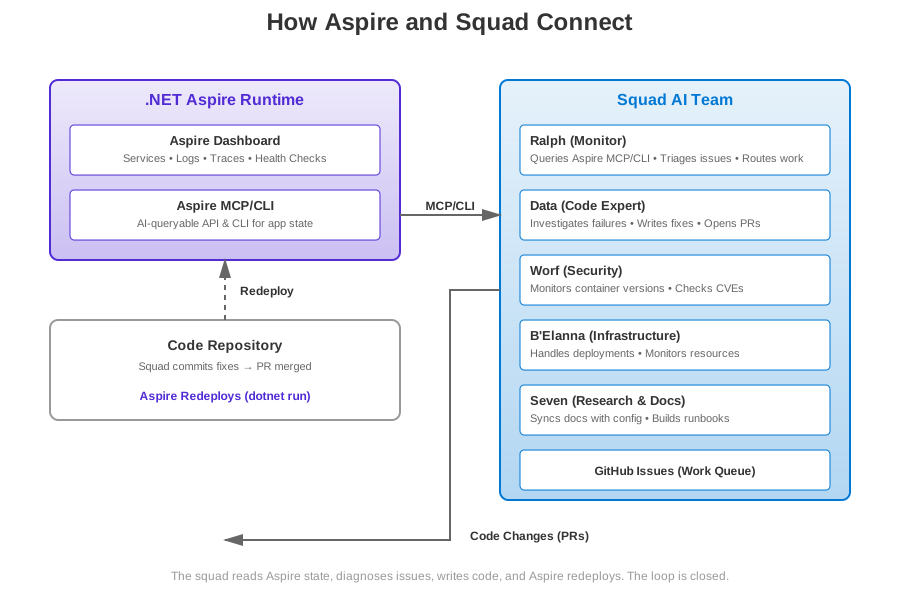
Here’s the flow:
- Aspire AppHost runs your distributed system (C#, Python, TypeScript, Go services)
- Aspire Dashboard collects logs, traces, metrics, health checks
- Aspire MCP Server exposes programmatic access via Model Context Protocol
- Squad agents query the MCP server to understand system state
- Agents act based on what they observe (comment on PRs, create issues, fix bugs)
- Aspire rebuilds when code changes, agents re-query to validate
The key insight: agents don’t just read files. They observe the running system, across all services and languages.
What I’m Building With This
Since connecting Squad to Aspire MCP, here’s what’s running autonomously in my repos:
Post-Deploy Validation (Ralph): After a PR merges, Ralph queries aspire-list_resources to verify all services come back healthy. If anything stays degraded for more than two health check cycles, he bisects recent commits and identifies the breaking change.
Performance Regression Detection (Seven): Seven queries aspire-list_traces after every backend deployment. If P95 latency increases by >20%, she opens an issue with trace IDs showing the slow requests. Data investigates.
Security Audit on Config Changes (Worf): When connection strings or secrets configuration changes, Worf queries aspire-list_structured_logs with filter level="warning" to check for authentication failures or permission errors. Catches misconfigurations before they reach production.
Automatic Issue Triage from Unhealthy Resources (Ralph): Ralph runs every 5 minutes, queries aspire-list_resources. If a service is unhealthy, he pulls console logs via aspire-list_console_logs, extracts the error, searches past issues for similar failures, and either:
- Auto-fixes if it’s a known issue (e.g., database connection pool exhausted → increase pool size)
- Creates a new issue with full diagnostic context if it’s novel
Documentation Sync (Seven): When Seven updates the docs, she queries aspire-search_docs to check if Aspire’s official docs have changed. If a new feature was added to Aspire, she opens an issue to update our internal documentation.
What’s Next: Ralph as an Aspire Resource
Here’s where it gets really interesting. I’m exploring making Ralph itself an Aspire resource.
Imagine this: when you run the Aspire AppHost, Ralph shows up in the Aspire Dashboard as a resource with a health endpoint. The dashboard displays:
- Ralph’s last run timestamp
- How many issues Ralph has triaged
- Whether Ralph is healthy (connected to GitHub, MCP working, no rate limit errors)
And Squad Monitor becomes an Aspire Dashboard extension — a custom UI panel showing:
- Which agents are working on which issues
- Agent-to-agent communication (Data → Worf for security review)
- Work queue status (5 pending, 3 in progress, 12 done)
The Aspire Dashboard becomes the control plane for both your distributed app AND your AI team.
That’s the vision.
What’s Coming in Aspire 13.2: CLI Over MCP
I’ve been playing with the daily Aspire builds ahead of the 13.2 release (yes, I’m brave enough to run daily builds), and there’s a shift coming that makes the Squad integration even simpler.
The big change: the recommendation is now to use the Aspire CLI instead of the MCP server.
The CLI has full parity with the MCP tools — and for AI agents, this is actually better because you don’t need to set up MCP at all. Agents just shell out to aspire logs myservice or aspire resources. No proxy scripts, no port configuration, no MCP endpoint discovery.
The New CLI Commands
| What Agents Need | Aspire CLI Command |
|---|---|
| Start the app | aspire start |
| Start isolated (worktrees) | aspire start --isolated |
| See all running services and health | aspire resources [<resource>] |
| List running AppHosts | aspire ps |
| Read console output | aspire logs [<resource>] |
| Query structured logs | aspire otel logs [<resource>] |
| Query traces | aspire otel traces [<resource>] |
| Stop the app | aspire stop |
| Add an integration | aspire add |
| Browse docs | aspire docs list |
| Search docs | aspire docs search <query> |
| Get specific doc | aspire docs get <slug> |
| Diagnose environment | aspire doctor |
What this looks like for Squad agents:
Data needs to check backend logs:
1
2
aspire logs backend
# Streams console output, no MCP setup required
Ralph wants to see all resource health status:
1
2
aspire resources
# Lists all services with health (Healthy, Degraded, Unhealthy)
Seven needs to query structured logs for errors:
1
2
aspire telemetry logs backend --level Error
# Filters structured logs by severity
B’Elanna wants to restart a crashed service:
1
2
aspire start myservice
# Restarts the resource directly
That’s it. No MCP proxy. No port allocation. No settings.json files. Just CLI commands that work anywhere the Aspire CLI is installed.
Why This is Better for Agents
The MCP approach (what I described earlier in this post) works great, and in 13.2 it got even better. Remember the custom MCP proxy script I wrote for port isolation with worktrees? That’s now built into Aspire itself. The aspire start --isolated flag handles port isolation out of the box — separate ports, separate dashboard, no conflicts between worktrees. No more custom proxy scripts. Just aspire start --isolated and your agents connect.
The CLI approach is simpler: agents just run shell commands. Works in CI/CD environments. Works on teammate machines. Works on DevBoxes. No per-environment MCP configuration.
The MCP server still exists and still works — if you’re building custom integrations or need programmatic access from non-CLI tools, it’s there. But for most Squad workflows, the CLI is now the simpler path.
One More Thing: aspire agent init and the Auto-Generated Skill
In 13.2, setting up agent integration is as simple as running aspire agent init in your project directory. It auto-detects your agent environment (VS Code with Copilot, Copilot CLI, Claude Code, OpenCode) and creates the right config file AND generates a skill file that teaches your agent all the CLI commands. No more manually crafting JSON — the CLI handles it.
1
2
3
4
aspire agent init
# Detects VS Code → creates .vscode/mcp.json + skill file
# Detects Copilot CLI → creates ~/.copilot/mcp-config.json + skill file
# Detects Claude Code → creates .mcp.json + skill file
The generated skill teaches agents crucial workflow rules: always use aspire start (never aspire run), use --isolated when working in a worktree, and aspire start auto-stops the previous instance so you don’t need explicit stop/start sequences.
This is exactly the kind of “just works” setup I was hoping for. The custom proxy I wrote? Obsolete. The --isolated flag does what it did, but better and with official support.
Honest Limitation: Log Filtering
One caveat: aspire logs currently filters by level but not by category or message content. So if you need to search logs for a specific error string, you’re piping to grep:
1
aspire logs backend --level Error | grep "connection timeout"
There’s room for improvement here. But it’s still simpler than configuring an MCP endpoint.
The Honest Version
This isn’t production-ready “set it and forget it” automation. Ralph sometimes over-files issues (I’ve had mornings with 12 notifications for the same root cause because five agents all independently detected the same unhealthy service). The agents occasionally mis-diagnose a problem — they see an error in the logs and assume causation when it’s just correlation.
And the Aspire MCP integration is still rough around the edges. Not every API surface is exposed yet. Some queries are slower than I’d like (retrieving 10,000 structured log entries takes ~3 seconds). The tooling is evolving.
But the direction is right. Aspire gives me system-wide observability. Squad gives me autonomous agents that can act on what they see. And the MCP/CLI bridge connects them.
If you’re running Aspire and you’re curious about AI-assisted development, this is the combo I’d recommend trying. The agents go from “code readers” to “system operators,” and that’s transformative.
Getting Started
1. Run an Aspire AppHost:
1
2
3
cd your-app/AppHost
aspire run // or simply 'dotnet run'
# Aspire Dashboard starts on https://localhost:18888
2. Configure Squad agents to use Aspire CLI (recommended for 13.2+):
Agents automatically detect when the Aspire CLI is installed and can run commands like:
1
2
3
4
aspire resources          # List all services and health
aspire logs backend       # Stream console logs
aspire telemetry logs api # Query structured logs
aspire start myservice    # Start a stopped resource
No MCP configuration needed. The CLI works anywhere it’s installed.
Alternative: Using the MCP Server (recommended for programmatic agent access):
Setting up MCP is now a one-liner. In your Aspire project directory:
1
aspire mcp init
This auto-detects your agent environment and creates the right config. For Copilot CLI, it generates ~/.copilot/mcp-config.json:
1
2
3
4
5
6
7
8
9
{
  "mcpServers": {
    "aspire": {
      "type": "local",
      "command": "aspire",
      "args": ["mcp", "start"]
    }
  }
}
No custom proxy scripts needed — aspire mcp start handles endpoint discovery, port coordination, and session management natively. If you’re working with worktrees, it handles the dynamic port allocation that I previously needed a custom proxy for.
3. Watch agents query the system:
Open a GitHub issue, assign it to an agent (e.g., Data), and watch the agent use aspire logs and aspire resources to diagnose and fix issues.
Links and Resources
- Aspire Documentation — official docs
- Aspire MCP/CLI Configuration — how to set up
aspire mcp init - Aspire CLI Reference — install and use the CLI
- My Aspire Workshop — 3-day hands-on course
- Squad Framework — open-source autonomous AI team
- Scaling AI Agents with Aspire: Port Isolation — my previous Aspire post (foundation for this one)
- Seamless Private NPM Feeds in Aspire — polyglot support in practice
- Part 1: Your First AI Engineering Team — how I set up Squad
If you’re experimenting with Aspire + Squad, I’d love to hear what you find. Tag me on Twitter/X or LinkedIn or open a discussion in the Squad repo.