


“We are the Borg. We will add your technological distinctiveness to our own.” — The Borg, Star Trek: The Next Generation
In Part 1, I set up my first Squad on an internal project called the provisioning wizard — with a Matrix-themed squad: Morpheus, Trinity, Switch, Dozer (Star Trek was already taken by my personal repo) — and watched them tear through 52 Planner tasks in parallel. It was incredible. Then I did what any excited engineer does: I set up Squad on a second repo.
And the second team didn’t know anything the first team had learned.
Trinity in the provisioning wizard had figured out our PR format, our doc conventions, our MCP integration patterns. The agents in ConfigurationGeneration — same org, same team — stared at me blankly when I mentioned any of it. Each repo’s Squad was an island. An isolated drone without a Collective.
That’s when I realized: the hard problem of scaling AI teams isn’t making them work in one repo. It’s making them share knowledge the way a real engineering organization does.
 “We will add your organizational distinctiveness to our own.”
The Real Shape of Software Orgs
Most real engineering organizations don’t live in a monorepo. They have layers:
- Organization — Architecture standards, coding conventions, security policies. “All services use managed identity.” “OpenAPI spec for every API.”
- Team — Domain expertise spanning multiple repos. “Our .NET SDKs follow this pattern.” “ADRs go in
docs/decisions/.” - Repo — Implementation details. The specific context files, the local decisions, the repo-specific quirks.
Each level produces knowledge that should flow down. Architecture standards are universal. Domain expertise is team-wide. Implementation details are repo-specific. This isn’t overhead — it’s how engineering organizations actually function.
When you set up Squad on each repo, each team gets its own AI squad. But without shared context, those squads are drones without a Collective.
The Problem: Copy-Paste Knowledge
Here’s what actually happened to me. I’d spent weeks building up context in ConfigurationGeneration — a .NET SDK that generates deployment artifacts. It has .roo/context/ with 8 topic files covering everything from the SDK’s architecture to our deployment patterns. It has docs/decisions/ with 70+ ADRs. It has docs/designs/ with detailed design documents. The agents working in that repo know things. They know our naming conventions, our error handling patterns, our test structure.
Then I opened the provisioning wizard repo. Different repo, same team. I started a new Squad session. The agents there had their own .squad/skills/ with 3 shared skills — docs-hygiene, fabric-rti-mcp, and pr-format. But they knew nothing about the organizational patterns I’d painstakingly documented in ConfigurationGeneration.
I was repeating myself. Across every repo, for every new Squad I spun up, I was re-explaining the same org-wide conventions. It’s the AI equivalent of writing coding standards in a wiki that nobody reads.
Upstream Inheritance
Squad’s answer is upstream inheritance — a hierarchical knowledge system that mirrors how real organizations work. Each repo has its own .squad/ directory, and you connect repos to shared knowledge sources using squad upstream add:
1
2
3
4
# In your repo:
squad init
squad upstream add https://github.com/my-org/platform-squad.git --name org
squad upstream add https://github.com/my-org/my-team-squad.git --name team
This creates a hierarchy:
1
2
3
4
5
6
7
8
9
10
11
12
13
14
15
16
17
my-org/platform-squad.git             ← Org level (a regular repo with .squad/)
  .squad/
    decisions.md                       ← "Always use managed identity"
                                         "APIs follow OpenAPI spec"
    skills/                            ← Shared patterns: error handling,
                                         logging, API conventions
    routing.md                         ← Default routing rules

my-org/my-team-squad.git              ← Team level (another repo with .squad/)
  .squad/
    decisions.md                       ← "ADRs in docs/decisions/"
                                         ".NET SDK naming conventions"
    skills/                            ← Team-specific patterns

my-repo/.squad/                        ← Repo level
  decisions.md                         ← Repo-specific decisions
  agents/                              ← This repo's team
When Squad starts a session, it reads the repo’s own .squad/ context, then reads each upstream in order. An agent working in your repo knows about org-wide policies AND team-level conventions AND repo-specific decisions. All without you saying a word.
The resolution model is closest-wins: the repo’s own context always takes priority. If the org says “TypeScript for all new services” but your repo is a Go CLI tool, the repo-level decision overrides the org-level one — for that repo only. Org-wide defaults still apply everywhere else.
Decisions cascade down. Overrides are local. You get organizational consistency with team-level autonomy.
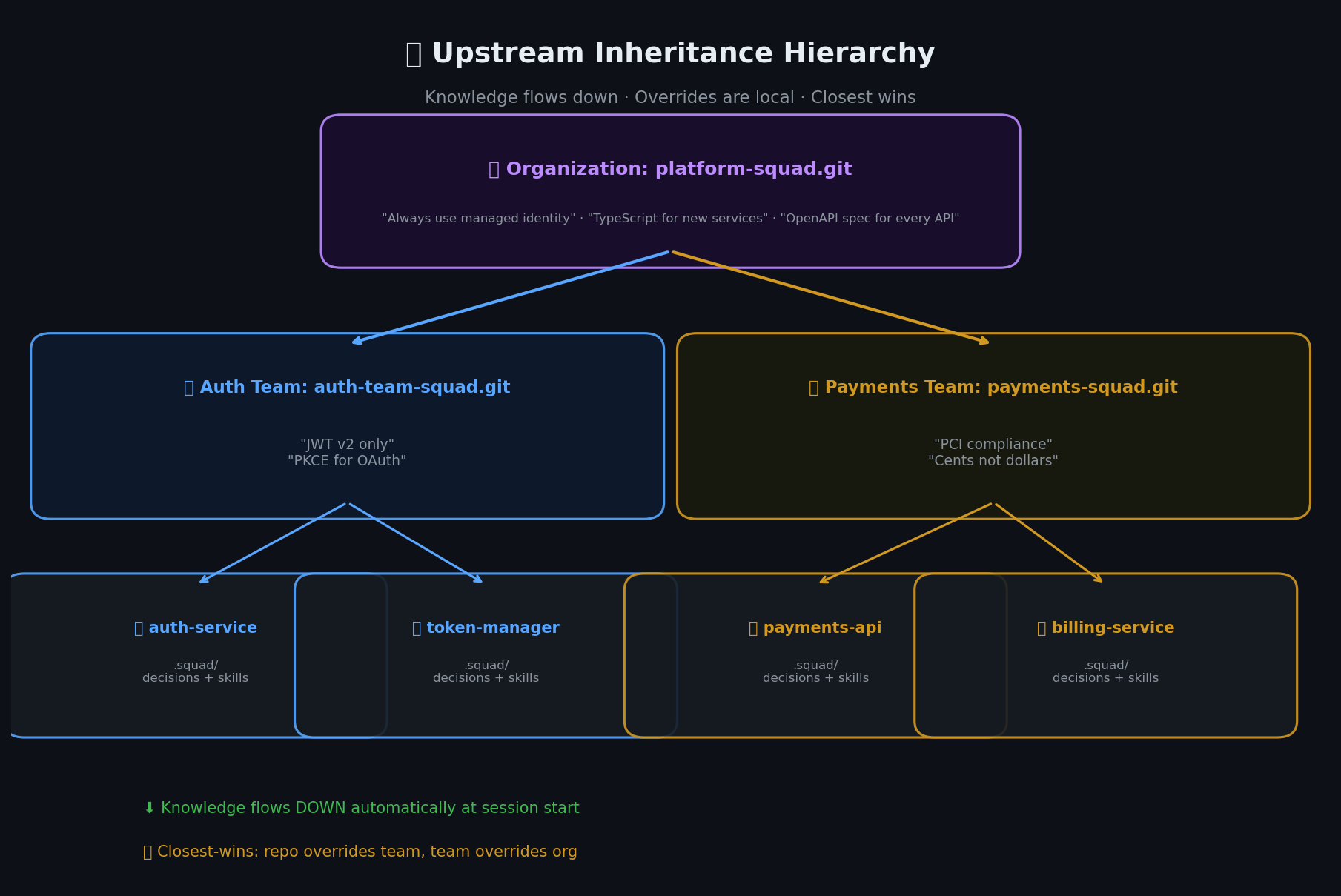 Knowledge flows down through the hierarchy: org → team → repo. Each level can override with closest-wins resolution.
Connecting a Repo to Its Upstream
Upstream inheritance isn’t automatic. When you run squad init in a new repo, Squad doesn’t magically know where to look. You tell it:
1
2
3
4
5
# Git repository — cloned and cached locally
squad upstream add https://github.com/my-org/platform-squad.git --name org

# Local directory — read live at session start
squad upstream add ../org-practices/.squad --name org-local
You manage upstreams with a small set of commands:
1
2
3
4
squad upstream list              # See what's connected
squad upstream remove org        # Disconnect an upstream
squad upstream sync              # Update all git-based upstreams
squad upstream sync org          # Update a specific upstream
Under the hood: Git upstreams get cloned to .squad/_upstream_repos/{name} (gitignored). They update when you run squad upstream sync. Local upstreams are read live — change the source, and the next session picks it up.
On each session start: Squad reads the repo’s own .squad/ context, then reads each upstream in order and merges using closest-wins. The repo always wins.
The flow is one-directional: upstream flows DOWN. Agents in a repo can read upstream decisions and skills, but they never write back. If an agent discovers a great pattern and you want the whole team to benefit, you export it and contribute it back manually:
1
2
3
4
5
# Export a skill from this repo
squad export --skill azure-keyvault-identity -o keyvault-skill.json

# Then add the exported skill to the team's upstream repo
# (commit it there so every downstream repo picks it up on next sync)
This is deliberate. Upstream knowledge is curated, not crowdsourced. Promotion is a conscious decision — like a code review for organizational knowledge.
What Gets Shared (And What Doesn’t)
| Shared via upstream | NOT shared |
|---|---|
| Decisions — Policies, conventions, architectural principles | Agent identities — Each repo casts its own team |
| Skills — Reusable patterns with confidence levels | History — Conversation history stays per-repo |
| Wisdom — Accumulated context and lessons learned | Orchestration logs — Task state, session artifacts |
| Casting Policy — Default team shapes and roles | |
| Routing rules — Work distribution patterns |
Think of it like the Borg: individual drones have their own hardware and local task state. The Collective shares directives, tactics, and accumulated knowledge. No drone needs to know what another drone had for breakfast.
Skills and the Confidence Lifecycle
Here’s where the Collective analogy gets real.
An agent discovers a pattern — say, the right way to format PRs for your team’s code review process. It captures it as a skill: a reusable pattern with steps, context, and confidence metadata.
Skills have a confidence lifecycle:
- Low — One observation, one repo. The pattern works here but hasn’t been validated elsewhere.
- Medium — Used successfully in multiple contexts. Looks like a real pattern, not a one-off.
- High — Validated across repos, reviewed by humans. This is an established practice.
I have a real example of this. In the provisioning wizard repo, the .squad/skills/ directory has a pr-format skill. It defines exactly how PRs should be structured — title format, description sections, checklist items. After being used across multiple PRs and validated by the team, it reached confidence: high:
1
2
3
4
5
6
7
8
# .squad/skills/pr-format/skill.yml
name: pr-format
description: Standard PR format for team repos
confidence: high
steps:
  - title follows conventional commits format
  - description includes context, changes, and testing sections
  - checklist includes review items for security, docs, tests
That confidence: high means this skill has been battle-tested. It started as a low-confidence observation — “this PR format seems to work well” — and graduated through usage and human validation.
Once a skill hits high confidence, you promote it. Export it from the repo, commit it to the team’s upstream. Every repo that lists that upstream picks it up on the next squad upstream sync. Any new repo the team creates just needs one squad upstream add command and the pattern is there from day one.
Skills flow UP manually (export → commit to upstream) but flow DOWN automatically (read at session start). The Collective learns. One drone’s adaptation becomes everyone’s advantage.
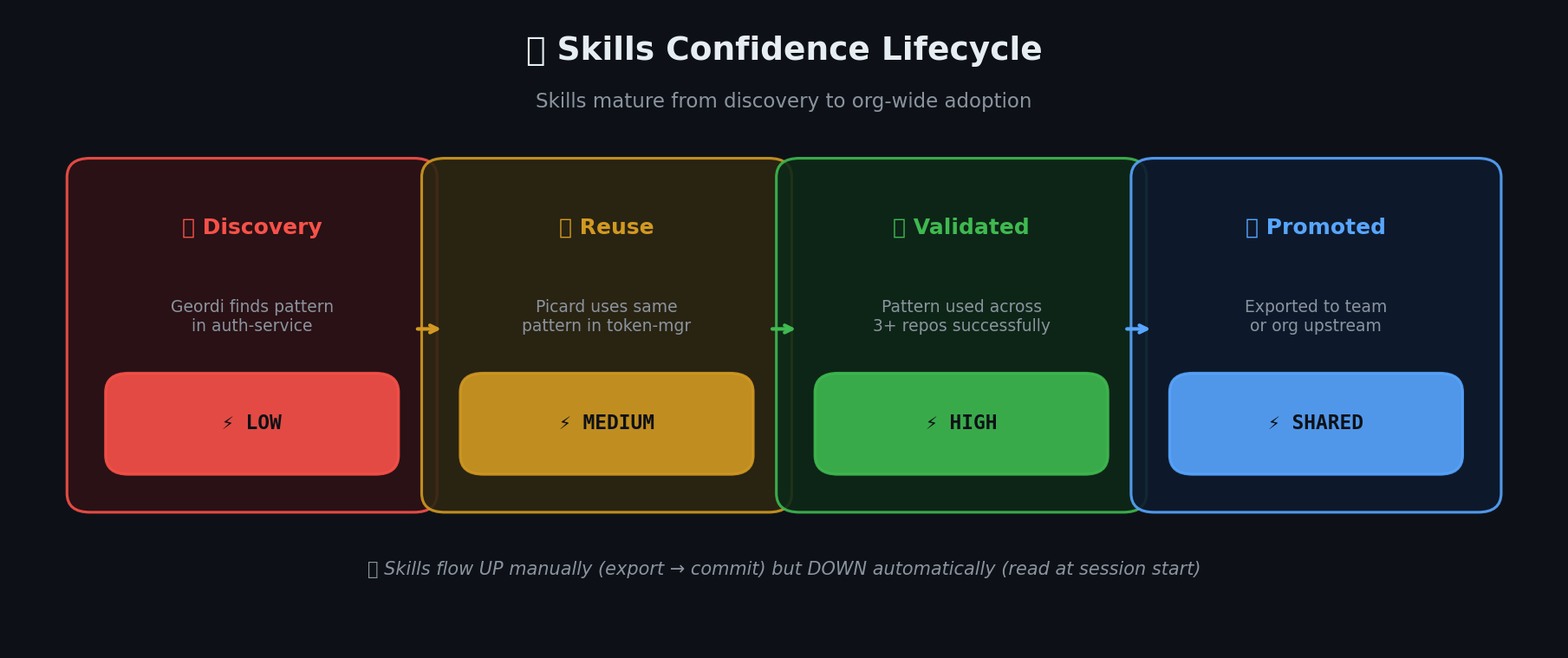 Skills mature from discovery to org-wide adoption: low → medium → high confidence, then promoted upstream.
Real Example: ConfigurationGeneration + Provisioning Wizard
Let me walk through my actual scenario.
ConfigurationGeneration is our .NET SDK for generating deployment artifacts. Over months of working with Squad, that repo accumulated serious organizational knowledge:
.roo/context/— 8 topic files covering the SDK architecture, deployment patterns, naming conventions, error handling, and test structuredocs/decisions/— 70+ Architecture Decision Records documenting why we chose specific patternsdocs/designs/— Design documents for major features
That’s a lot of knowledge. And most of it isn’t repo-specific — it’s team-level or even org-level. Things like “ADRs go in docs/decisions/”, “use this error handling pattern”, “PR descriptions follow this format” — those apply to every repo our team owns.
Provisioning wizard is our internal provisioning tool. It has its own .squad/skills/ with 3 skills (docs-hygiene, fabric-rti-mcp, pr-format). Different domain, but same team conventions.
Before upstream inheritance, setting up Squad on a new repo meant:
- Copy the relevant context files manually
- Re-explain organizational conventions
- Hope you didn’t miss anything
- Repeat for the next repo
With upstream inheritance, it’s two commands:
1
2
squad init
squad upstream add https://github.com/my-org/my-team-squad.git --name team
Done. The team-level upstream repo contains the distilled organizational knowledge — the conventions from ConfigurationGeneration’s context files, the validated skills from the provisioning wizard, the ADR templates, the PR format. Every new repo our team creates inherits all of it immediately.
The 70+ ADRs stay in ConfigurationGeneration (they’re repo-specific implementation decisions). But the pattern — “we write ADRs, here’s the template, here’s where they go” — that lives in the team upstream. The pr-format skill with confidence: high from the provisioning wizard? Already in the upstream. The error handling conventions from ConfigurationGeneration’s context files? Extracted and committed to the team upstream.
Setting up a new repo went from hours of manual context building to two commands and a squad upstream sync.
What’s Next
Upstream inheritance solves the organizational knowledge problem. Your AI teams share context the way real engineering orgs should — hierarchically, deliberately, with local autonomy and global consistency.
We’re also working on making the upstream more dynamic and auto-synced — just like normal human teams work. Today you run squad upstream sync manually, but the vision is continuous synchronization where upstream knowledge flows to downstream repos automatically, keeping every Squad in the org up to date without human intervention.
But there’s another scaling challenge I haven’t addressed:
What happens when multiple teams need to work on the same repo simultaneously?
Right now, one Squad per repo works. But what if you need a frontend workstream, a backend workstream, and an infrastructure workstream — all in the same codebase, all running in parallel? If you spin up three Squad sessions, will they step on each other’s toes? Will merge conflicts bring everything crashing down?
In Part 3: “Unimatrix Zero”, I’ll show you SubSquads — how to run multiple AI teams on one repo with isolated workstreams. What worked, what broke, and why it broke spectacularly before it worked beautifully. 🟩⬛
📚 Series: Scaling AI-Native Software Engineering
- Part 0: Organized by AI — How Squad Changed My Daily Workflow
- Part 1: Resistance is Futile — Your First AI Engineering Team
- Part 2: The Collective — Organizational Knowledge for AI Teams ← You are here
- Part 3: Unimatrix Zero — Many Teams, One Repo with SubSquads
- Part 4: When Eight Ralphs Fight Over One Login — Distributed Systems in AI Teams