


I’m Not an Organized Person
Let me start with a confession: I’m not an organized guy. Never have been.
I’ve tried everything. Notion with its beautifully nested pages and databases. Microsoft Planner with color-coded tasks. Outlook tasks synchronized to my calendar. Dozens of todo apps promising “the one system that will finally work.” I even scheduled meetings with myself to force focus time.
None of it lasted more than a week or two.
The problem wasn’t the tools — they were fine. The problem was me. Every productivity system requires two things I’m not good at: willpower (to maintain the habit) and remembering to use the tool (which is ironic, since that’s what the tool is supposed to help with).
I’d set up elaborate task hierarchies, feel productive for three days, then forget to check the app. Two weeks later, I’d discover a backlog of overdue tasks mocking me from a notification badge I’d learned to ignore.
Then AI Changed Everything
Here’s what’s different about AI: AI doesn’t forget. AI doesn’t need willpower. AI just works.
Unlike a todo app that sits there passively waiting for me to remember it exists, AI agents can:
- Remember things I forget (like that decision I made three weeks ago about cluster architecture)
- Discuss things with me (not just execute commands, but reason through trade-offs)
- Research and explore (while I’m in meetings or sleeping)
- Keep working when I stop (because they don’t get tired or distracted)
That last point is the breakthrough. I don’t need to maintain the system. The system maintains itself.
This is Part 0 of a series about scaling AI-native software engineering. The later parts dive into team composition (Part 1: The First AI Engineering Team), knowledge sharing (Part 2: Organizational Knowledge for AI Teams), multi-team coordination (Part 3: Scaling Squad with SubSquads), and distributed systems problems at scale (Part 4: When Eight Ralphs Fight Over One Login). This post is the personal story — how I got here, what my daily workflow looks like, and why it works when nothing else did.
🔗 The full setup is open source: squad-personal-demo — ralph-watch loop, squad-monitor, Outlook COM automation, podcaster, and more.
Squad — My Force Multiplier
As you know from my previous blog posts, Squad really gave me a force multiplier. I love how easy it is to adjust the team to what I need — to teach it the work methodologies, the domain expertise, and the skills I want it to use. It’s not a rigid framework; it’s more like hiring employees you can reshape on the fly.
I started initially by just creating my own private Squad and gave it access to the other repos I wanted it to scan so it could get more knowledgeable about what I’m working on. Using the upstream command from Squad helped me get the structure right — inheriting decisions, skills, and team context from parent squads without having to copy-paste everything.
And here’s where it gets fun: I like Star Trek. I like the personas there. I wanted my Squad to behave like real Star Trek characters, so… I did 🙂. My team roster (in .squad/team.md) has Picard as the Lead, B’Elanna on Infrastructure, Worf on Security, Data as the Code Expert, Seven on Research and Docs, plus Kes handling Communications and Scheduling, Neelix as the News Reporter, and Ralph watching the issue queue 24/7. Each one has a charter file — a markdown document defining exactly who they are, what they own, and how they think. It’s like writing character sheets for a tabletop RPG, except these characters actually do work.
Onboarding the Squad
But creating the roster is only half the story. There’s a whole onboarding phase that I think most people skip — and it makes a huge difference.
When I first set up the Squad, I didn’t just accept the default cast and move on. I told the squad to actually think about whether extra team members were needed. What expertise does this project require that the initial roster doesn’t cover? Don’t just take the defaults — evaluate the gaps. It’s the same thing you’d do when staffing a real team: you look at the problem space and figure out who you need.
And that’s exactly what happened. I knew I’d be working with Azure infrastructure, so I added an Azure expert. I knew regulatory and compliance work was coming, so I added a compliance person. The team grew based on what the project actually needed, not some pre-baked template. Every expert I added was there because the work demanded it.
The other big piece is tooling. A squad without the right integrations is like an engineer without access to the systems they need to work on. So during onboarding, I specified exactly which MCP servers — Model Context Protocol servers — the squad should have: Azure DevOps, GitHub, Playwright, EngineeringHub, and others. I told the squad to configure them both globally on my machine (~/.copilot/mcp-config.json) and repo-specific (.github/copilot/ settings). Same thing with skills — I installed the ones the squad would need for this particular project.
This is how the squad gets its “toolbox.” The MCPs and skills are what let the agents actually interact with real systems — create PRs, query pipelines, browse web pages, search docs. Without them, you’ve got smart agents that can’t do anything. With them, the agents can reach out into the real world and get things done.
Setting up a squad isn’t “hire and go.” It’s more like onboarding a new team: you assess what you need, bring in the right specialists, and make sure everyone has access to the right tools. The difference is it takes minutes instead of weeks.
GitHub Issues + Project Board — My Todo System
Squad already knows how to run tasks based on issues in GitHub, so I built my own system of labels and issue statuses on top of that. It turned out to be the productivity system I’ve been failing to maintain for 20 years — because this time, I’m not the one maintaining it.
I start a task by creating an issue and setting it to “Todo.” Squad picks it up, moves it to “In Progress” automatically, and if it needs me to review something or make a decision it can’t make on its own, it sets the status to “Pending User” or “Blocked” or “For Review.” I never have to move cards around on a board. The board just reflects reality.
To make it even easier for me to create tasks, I asked Squad to build an issue template (squad-task.yml in .github/ISSUE_TEMPLATE/) that pre-fills everything with the right labels. Now creating a task is literally: title, description, submit. Done.
And here’s the thing that made this click for me: GitHub works great on mobile. Browser or app, doesn’t matter. I can add tasks from my phone while walking the dog, and I can see how they progress even when I’m nowhere near my machine. For the first time, I have a task system that I actually use — because it requires almost zero effort from me.
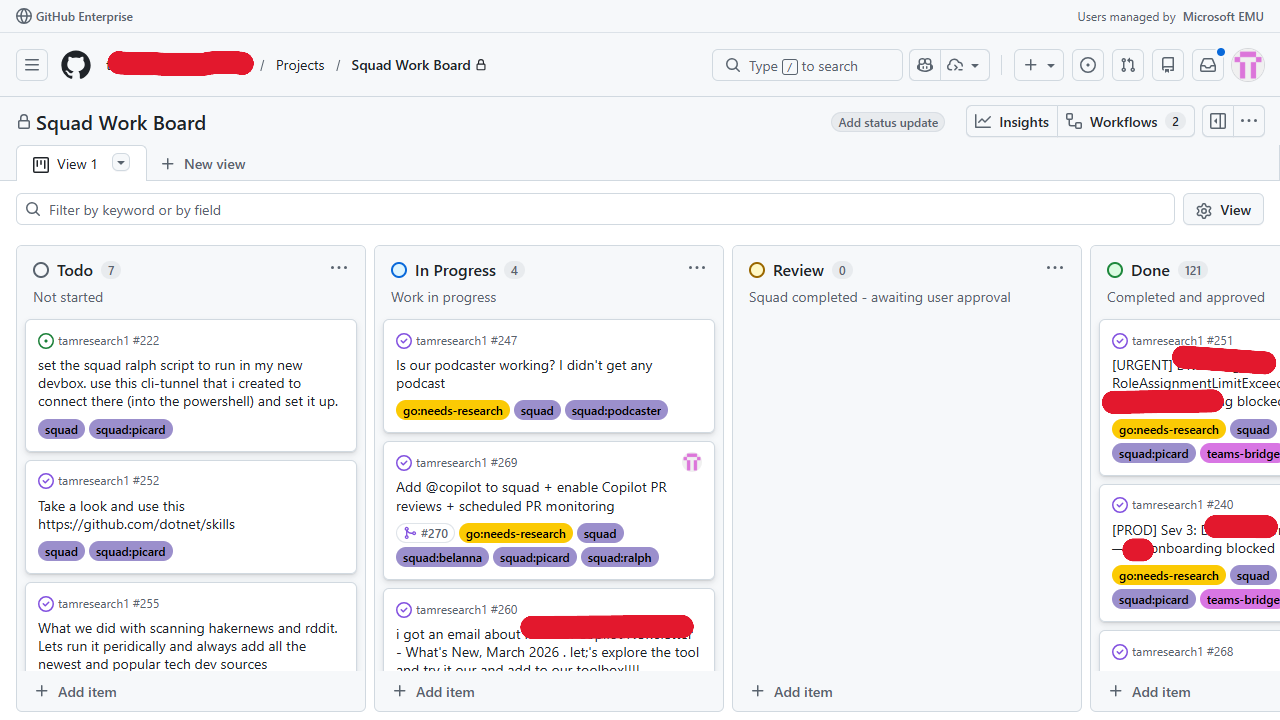 My GitHub Project Board — the first task system I’ve actually stuck with
Talking With My Squad
Another nice thing about using GitHub issues as the backbone: I told my Squad to always write their comments there — their analysis, their questions to me, their progress updates. Everything in one thread per task.
I also told them to always put a TLDR for me at the beginning of every comment. Because let’s be honest, sometimes an agent writes a 2,000-word analysis and I just need the three-sentence version. The TLDR is always there. If I want to dig in, the full context is right below.
So now my workflow is: I read the TLDR, I write my instructions or give better guidance right in the issue comments, I set the status back to “Todo,” and they pick it up again. It’s like a running conversation — except it’s all documented, searchable, and nothing gets lost in a chat scroll.
For my personal repo, I allow my Squad to create and approve their own PRs. That might sound scary, but honestly it works great. They write code, they create the PR, they review it, they merge it. I only jump in when something touches areas I care about or when an issue is flagged for my review.
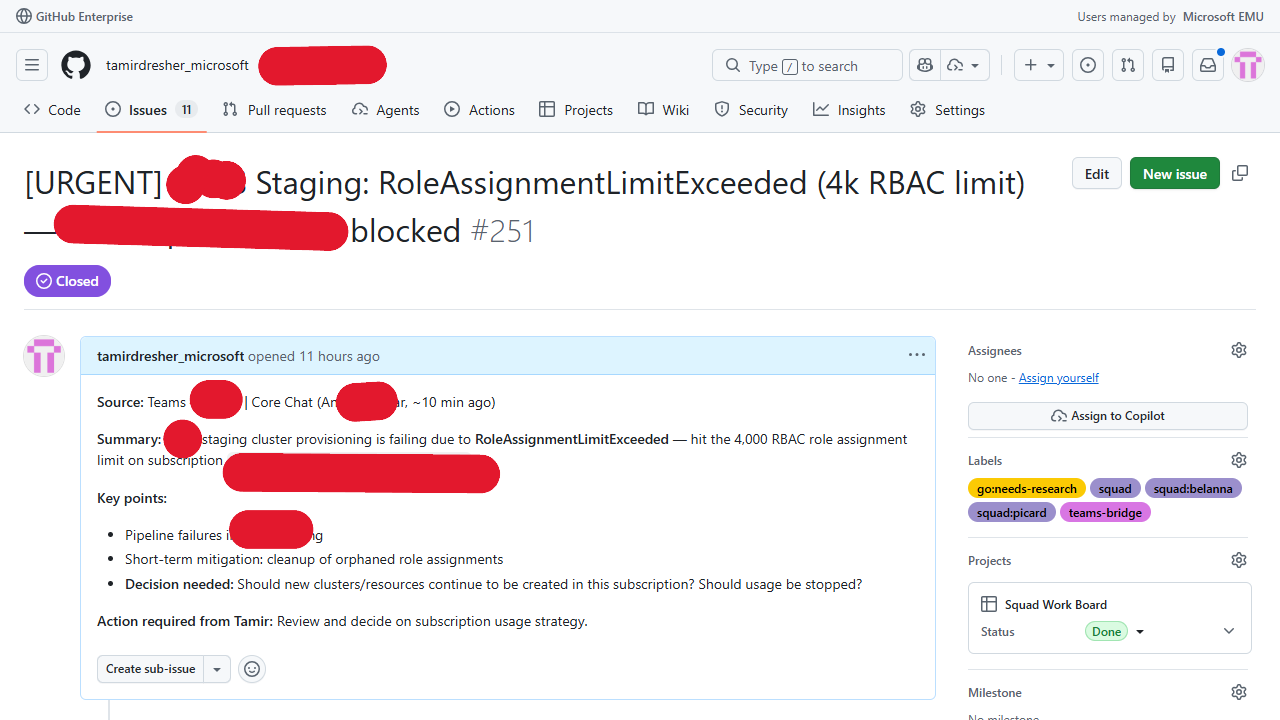 A real conversation with my Squad in a GitHub issue — TLDR at the top, full analysis below
Side Projects
Sometimes my Squad decides they need to develop a tool or test something or generate artifacts like reports and docs that shouldn’t sit in the main Squad repo. And I get that — you don’t want your primary repo cluttered with experimental dashboards and utility scripts.
So I taught my Squad to manage their own repos when needed. Just like any engineer on a real team would! If they need a standalone tool, they create a repo, build it there, and link back to the main project.
A couple of examples:
- squad-monitor — a real-time monitoring dashboard for watching what the Squad is doing. My Squad built it, I asked them to open source it, and it’s now live at github.com/tamirdresher/squad-monitor.
- cli-tunnel — a tool for remote terminal access during demos and presentations.
- squad-personal-demo — my full sanitized Squad setup, including ralph-watch, scripts, skills, and config: github.com/tamirdresher/squad-personal-demo.
It feels weirdly natural. They spin up repos the same way an engineer would say “hey, I’m going to build this in a separate repo so it doesn’t clutter the main project.”
The Ralph Loop
Everybody already knows what Ralph is, right? Squad comes with Ralph built in — he’s the work monitor who knows how to check for issues and solve them. But here’s the thing: when there are no more pending tasks because they all wait for me, Ralph just… stops. Mission accomplished, nothing to do.
So I added another layer around Squad’s Ralph — an outer loop that basically knows how to keep things going. It pulls the latest code from the repo, checks if there are pending tasks, and starts a fresh Copilot process. You can see the full script in my demo repo: ralph-watch.ps1.
1
agency copilot --yolo --autopilot --agent squad -p $prompt
A note:
agencyis a Microsoft-internal CLI wrapper around Copilot. It’s not important for this post — everything here works the same with the standard Copilot CLI directly.
Two key design decisions here. First, I always pull latest before each round — because the Squad’s prompts, decisions, tools, skills, and everything else live in the repo. Between rounds, my agents might have updated a charter, learned a new skill, or changed a routing rule. Pulling ensures Ralph always works with the freshest context. Second, I always spawn a fresh Copilot process rather than reusing one — this lets the Copilot itself pick up any updates to agent definitions, MCP servers, or tool configurations that changed since the last round.
The prompt I pass to Ralph is pretty detailed. Here’s what it looks like (trimmed for readability):
1
2
3
4
5
6
7
8
9
10
11
12
13
14
15
16
17
18
19
20
21
Ralph, Go! MAXIMIZE PARALLELISM: For every round, identify ALL actionable
issues and spawn agents for ALL of them simultaneously — do NOT work on
issues one at a time. If there are 5 actionable issues, spawn 5 agents
in one turn.

MULTI-REPO WATCH: In addition to tamresearch1, also scan
tamirdresher/squad-monitor for actionable issues.

TEAMS & EMAIL MONITORING (do this EVERY round):
1. Use WorkIQ to check Teams messages mentioning me in the last 30 minutes
2. Check emails sent to me in the last hour with action items
3. For each actionable item: create a GitHub issue or comment on existing one
4. Do NOT create duplicates. Do NOT spam.

NEWS REPORTER (Neelix): When you find important updates, send a styled
Teams message via webhook. Only when genuinely newsworthy — not every round.

PODCASTER: After any significant deliverable, generate an audio version.

TECH NEWS SCANNING: On the first round after 7 AM, scan HackerNews and
Reddit for relevant stories.
But ralph-watch.ps1 is way more than a simple while (true) loop. Let me walk through what it actually does:
Single-instance guard. It uses a system-wide named mutex (Global\RalphWatch_tamresearch1) to make absolutely sure only one Ralph is running on the machine. If a stale instance is hanging around from a crash, it detects that and kills it. Plus there’s a lockfile (.ralph-watch.lock) that external tools like the Squad Monitor can read to see Ralph’s status.
The main loop. Every 5 minutes, Ralph:
- Runs the Squad Scheduler (
Invoke-SquadScheduler.ps1) to fire any scheduled tasks — cron-based or interval-based - Pulls latest code from the repo (with stash/unstash to avoid conflicts with local changes)
- Runs a Teams message monitor (every 3rd round, weekdays only) to scan for messages needing attention
- Spawns a full agency copilot session with a detailed prompt that tells Ralph to maximize parallelism — if there are 5 actionable issues, spawn 5 agents simultaneously
Structured logging. Every round gets a log entry with timestamp, round number, exit code, duration, and parsed metrics (issues closed, PRs merged, agent actions). Logs rotate at 500 entries or 1MB, whichever comes first.
Heartbeat. A JSON heartbeat file (~/.squad/ralph-heartbeat.json) gets updated before and after every round with the current status, metrics, and PID. The Squad Monitor reads this to show real-time health.
Teams notifications on failures. If Ralph hits 3 or more consecutive failures, it fires off a Teams alert via webhook with an Adaptive Card showing the failure count, last exit code, and timestamp. That way I know something is wrong even if I’m not watching the terminal.
Background activity monitor. While the agency copilot session is running (which can take anywhere from 2 to 30+ minutes), a background runspace tails the agency session logs every 30 seconds and prints status lines showing what’s happening — so the terminal isn’t just sitting there silently.
Here’s the core of the loop:
1
2
3
4
5
6
7
8
9
10
11
12
13
14
15
16
17
18
19
20
21
22
23
24
while ($true) {
    $round++

    # Run Squad Scheduler for scheduled tasks
    & .squad\scripts\Invoke-SquadScheduler.ps1 -Provider "local-polling"

    # Pull latest code
    git fetch; git pull

    # Update heartbeat: status = running
    Update-Heartbeat -Round $round -Status "running"

    # Run the actual Copilot session
    agency copilot --yolo --autopilot --agent squad -p $prompt

    # Log results, update heartbeat, check for failure alerts
    Write-RalphLog -Round $round -ExitCode $LASTEXITCODE

    if ($consecutiveFailures -ge 3) {
        Send-TeamsAlert -Round $round -ConsecutiveFailures $consecutiveFailures
    }

    Start-Sleep -Seconds ($intervalMinutes * 60)
}
It’s not fancy architecture. It’s a PowerShell script that runs forever. But the observability, the guard rails, the scheduler integration — those are what make it reliable enough to leave running unattended for days.
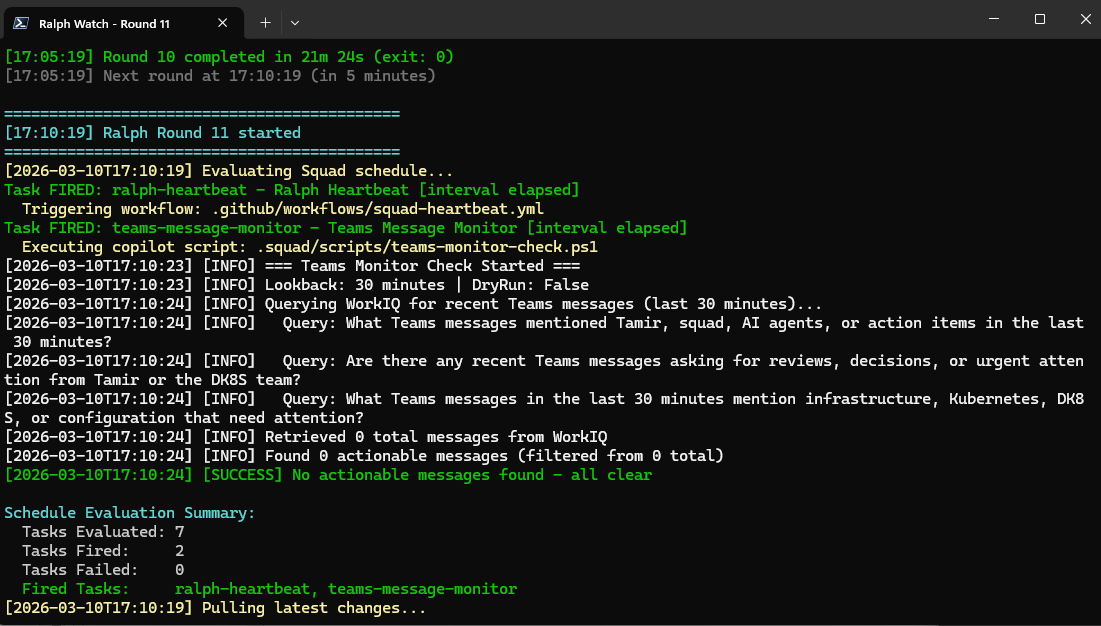 Ralph’s watch loop in action — continuously scanning for work
Auto-Scanning Emails and Chats
I wanted my Squad to be proactive. Not just wait for me to create issues — I wanted them to bring things to my attention that I need to know about, remind me about things I forget, and learn what my group is working on so I can always stay up to date.
If there’s a new ADR (Architecture Decision Record) from another team, I want my Squad to review it and see if I need to do something too. If there’s an incident, I want them to try to find a solution and learn from the discussion thread. If someone mentions me in Teams or sends me an email with action items, I want that captured.
So using the WorkIQ MCP server and Playwright, I taught my Squad how to periodically read everything that happens around me — and there is a lot going on. They scan Teams channels, parse emails, check for mentions, and process it all. Kes (my communications agent) uses Outlook COM automation on Windows to read and manage emails directly, or falls back to Playwright with Outlook web when COM isn’t available.
Here’s the cool part: based on this scanning and learning and insights, Squad just automagically opens more issues to itself and the work continues. If a Teams message looks like something I need to act on, they create a GitHub issue with a “teams-bridge” label and a short summary. If it’s just informational, they skip it. The Ralph prompt explicitly says “Do NOT spam — only surface items that genuinely need Tamir’s attention.”
I didn’t have to build a complex integration platform. I just told my Squad “read my stuff and let me know what matters” and taught them the tools to do it.
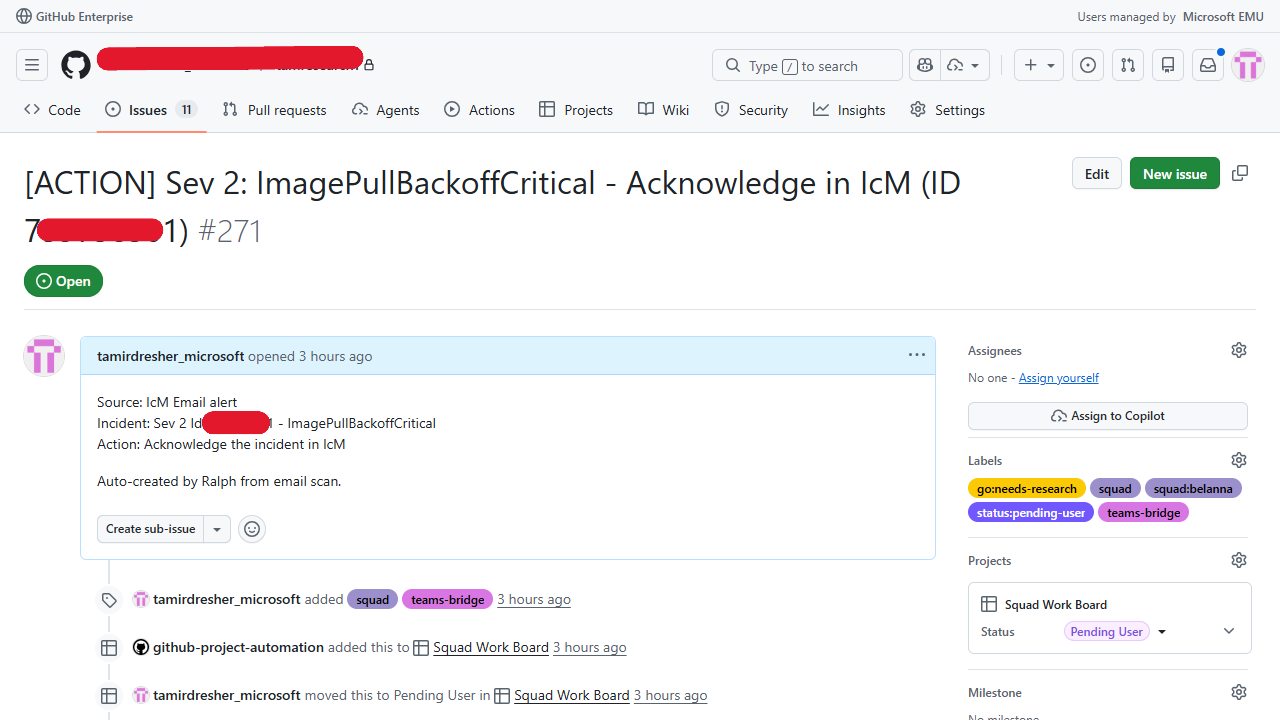 A GitHub issue auto-created from a Teams message — with the teams-bridge label
Two-Way Communication
The discussion in GitHub issues is working great for async stuff, but sometimes I want to be notified and interrupted. If something critical happens — a CI failure, a blocking issue, an important PR merge — I don’t want to discover it the next time I casually open GitHub.
So I taught Squad how to send me messages using Teams webhooks. It’s dead simple: there’s a webhook URL stored at ~/.squad/teams-webhook.url, and any agent can POST an Adaptive Card to it. Neelix (yeah, I like Star Trek) is the reporter. His whole job is to watch for newsworthy events and send styled Teams messages that look like little news broadcasts — with emoji headers, section dividers, and a “reporter sign-off” personality touch.
From Neelix’s charter:
“Your daily briefing, coming to you live from the Squad newsroom. Breaking stories, key updates, and everything you need to know — delivered with style.”
He’s got different formats too: ⚡ Breaking News for critical events, 📰 Daily Briefings for full summaries, 📊 Weekly Recaps with stats and highlights, and 🎯 Status Flashes for quick board snapshots. All delivered to my Teams chat.
The key rule is: only send when there’s genuinely newsworthy activity. Not every round. Nobody wants to be spammed by their own AI team.
Too Much Info
With so many things going on — emails being scanned, issues being worked, reports being generated, Teams messages flowing in — it becomes really hard to read everything. I was drowning in my own system’s output.
So I added a Podcaster to the team. The scripts/podcaster.ps1 script takes any markdown document, strips out all the formatting, and converts it to an audio file using Microsoft Edge TTS (neural quality voices, no API keys required). If edge-tts isn’t available, it falls back to Windows System.Speech and optionally converts to MP3 via ffmpeg.
1
2
./scripts/podcaster.ps1 -InputFile RESEARCH_REPORT.md
# → Generates RESEARCH_REPORT-audio.mp3
Now instead of reading a 3,000-word research report, I can listen to it while walking or driving. The Ralph prompt even has a rule: after any agent completes a significant deliverable (research report, blog draft, design doc — anything over 500 words), run the Podcaster automatically and mention the audio file in the Teams notification so I know it’s available.
Different medium for different consumption patterns. Not everything needs to be text.
Scheduling Stuff
At some point I realized I wanted the team to keep tracking things over time, or postpone some tasks to later. “Check back on this in a week.” “Run this scan every morning at 7 AM.” “Do this once a day on weekdays.”
GitHub issues don’t have a built-in mechanism for deferring or scheduling issues. So I told my Squad to build their own scheduling system.
The result is Invoke-SquadScheduler.ps1 — a full cron-based scheduler engine that reads a schedule.json file and evaluates triggers every round. It supports both interval-based triggers (“every N seconds”) and standard cron expressions (with timezone support!), and it can dispatch three types of tasks: PowerShell scripts, GitHub Actions workflows, or Copilot agent instructions.
The scheduler maintains its own state file so it knows when each task last ran, and it integrates directly into the Ralph loop — every round, before Ralph does anything else, the scheduler evaluates all pending triggers and fires what’s due.
It even has a dry-run mode for testing. My Squad built themselves a scheduling system because they needed one. That still blows my mind a little.
What Is Going On Now — Squad Monitor
My Ralph loop of loops is now running on my machine (or in my remote DevBox, or possibly in my Codespace). But I want to know what the Copilot agents and sub-agents are actually doing. Are they stuck? Are they making progress? How long has this round been running?
So I asked Squad to build me a Squad Monitor — a real-time dashboard that could show me what’s going on live in the background. They built it as a standalone .NET tool: a C# console application that reads Ralph’s heartbeat file, tails the structured logs, and shows agent activity in real-time.
I even asked them to add data on the token usage and the cost. Although I was blessed to have unlimited tokens at Microsoft, it’s always nice to know what things would cost. Observability matters even when you’re not paying per token.
And then I asked them to open source it:
👉 https://github.com/tamirdresher/squad-monitor
Install it with:
1
dotnet tool install -g squad-monitor
It’s a small thing, but it’s also a thing my AI team built, published as a NuGet package, and maintains. That’s… kind of wild.
Staying Updated on What’s Going On Outside
Now that I have a scheduler and the Squad has access to the internet and all the sources I wanted, I told them to keep scanning the outside world too. Not just my emails and Teams — the broader tech ecosystem.
Every morning (on the first round after 7:00 AM), Ralph runs a tech news scanner that checks Hacker News, Reddit, dev.to, Microsoft blogs, and other sources for stories about AI, .NET, Kubernetes, and developer tools. If it finds something relevant, it creates a GitHub issue titled “Tech News Digest: {date}” with a summary of the top stories and links.
Then Neelix sends a Teams notification with the highlights.
This way I’m always aware of what’s going on in the ecosystem without having to manually browse five different sites every morning. My Squad does the reading for me and only surfaces what’s actually relevant to my work.
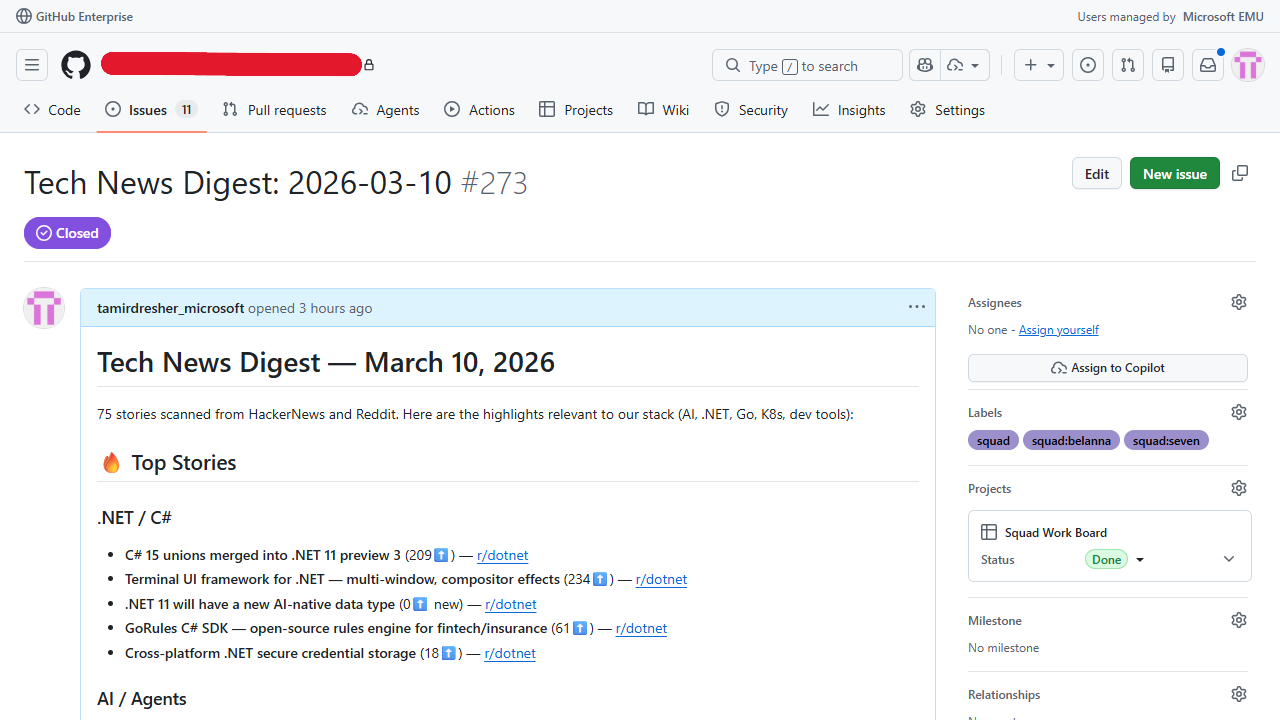 An automated tech news digest — Squad scans the web so I don’t have to
GitHub Workflows and Actions
To stitch everything together, I also created a set of GitHub Actions workflows that automate the stuff that should happen at the platform level, outside of Ralph’s loop:
- squad-triage.yml — Automatically routes new “squad” labeled issues to the right team member based on the team roster and keyword matching
- squad-heartbeat.yml — Runs every 5 minutes to execute Ralph’s smart triage, applies triage decisions, and auto-assigns @copilot to actionable issues
- squad-daily-digest.yml — Sends a daily digest to Teams showing closed issues, merged PRs, and open issues from the last 24 hours
- squad-docs.yml — Auto-generates a documentation index by scanning agent charters, skills, and docs whenever changes hit the main branch
- drift-detection.yml — Runs weekly to detect configuration drift: checks agent charters for required sections, validates skill docs, and creates an issue if something’s off
- squad-archive-done.yml — Archives closed issues that have been done for more than 7 days (adds “archived” label, posts a summary comment, locks the issue)
- squad-issue-notify.yml — Sends a Teams notification whenever an issue is closed, with details about who closed it
- squad-label-enforce.yml — Enforces label consistency by managing mutual exclusivity across namespaces (like
go:,type:,priority:) - sync-squad-labels.yml — Syncs repo labels based on the team roster in
.squad/team.md, creating labels for each squad member and standard categories
Plus the issue template (squad-task.yml) that makes it trivial to create properly labeled tasks.
These workflows mean the repo itself is alive. Even without Ralph running, the basics keep working — triage, notifications, label management, documentation updates.
Cross-Repo Contributions
Using Squad didn’t just change how I work on my own repos — it changed how I contribute to other projects. My team started contributing back to the Squad repo itself:
- ADO Platform Adapter (PR #191) — Made Squad work with Azure DevOps, not just GitHub
- CommunicationAdapter (PR #263) — Abstracted communication so Squad can talk through different channels
- SubSquads (PR #272) — Renamed and restructured how nested squad teams work
- Upstream & Watch commands (PR #280) — Wired up the watch loop and upstream sync natively in the CLI
- Test resilience (PR #283) — Improved test stability across CI environments
- Remote Control — The squad start –tunnel feature that lets you control your Squad from your phone
These contributions weren’t planned. They emerged from daily use — I’d hit a limitation, my Squad would research a solution, Data would implement it, and I’d submit the PR upstream. The boundary between “using a tool” and “building a tool” dissolved completely.
My Day to Day Now
So now my day-to-day is basically sitting in front of the GitHub project board and giving instructions to my Squad team and overseeing what they do. I review their work, I make decisions they can’t make, I point them in the right direction when they’re stuck.
I always have the Squad agent running in my CLI as well, so I can always ask them why they’re doing something or work through a decision together. It’s like having a senior engineer always available to pair with — except they never say “I’m in a meeting” or “let me get back to you tomorrow.”
Sometimes the Squad decides to open an issue for itself — like “hey, I noticed our documentation index is out of date, I should fix that.” That’s real fun. It’s proactive in a way that I, the disorganized human, never manage to be.
I really feel like it is my brain extension. Not a replacement — I still make all the important decisions. But it remembers everything I forget, it does the tedious stuff I procrastinate on, and it keeps the whole system running while I focus on the parts that actually need a human.
What’s Next
I’m working with Brady to see how squads can talk to each other and delegate tasks across squad boundaries. Think of it like different teams in your org that sometimes need to work together — each with its own expertise, abilities, and access. One squad handles infrastructure, another handles docs, and they can hand off work items to each other without a human playing traffic cop.
Also — and this one’s a bit funny — I asked my Squad to create a mechanism where my wife could send me tasks and my Squad could start performing them for me. Shhhh, don’t tell her 😄
Honest Reflection
I don’t know how far I can take this. Some days it feels like I’m genuinely 10x more productive. Other days, I spend more time correcting agent mistakes than I would have spent doing the task myself.
But here’s what I know for sure: my relationship with productivity tools has fundamentally changed. For twenty years, every system required me to change — to become more disciplined, more organized, more consistent. AI is the first approach that meets me where I am. It adapts to my chaos instead of demanding I adapt to its structure.
Squad isn’t perfect. The agents sometimes go down rabbit holes. Token costs can spike on complex research tasks. The Ralph loop occasionally picks up an issue that should have been left alone. But the trajectory is clear: every week, the system gets a little smarter, a little more autonomous, a little more like the brain extension I always wanted.
I don’t manage tasks anymore. I manage decisions. The squad does everything else — research, code, PRs, merging, closing issues, sending messages. I just review and approve.
If you want to see how all of this works in practice, you can see my full setup here: squad-personal-demo.
I’m organized by AI now. And I never thought I’d say that. 🖖
📚 Series: Scaling AI-Native Software Engineering
- Part 0: Organized by AI — How Squad Changed My Daily Workflow ← You are here
- Part 1: Resistance is Futile — Your First AI Engineering Team
- Part 2: The Collective — Organizational Knowledge for AI Teams
- Part 3: Unimatrix Zero — Many Teams, One Repo with SubSquads
- Part 4: When Eight Ralphs Fight Over One Login — Distributed Systems in AI Teams