


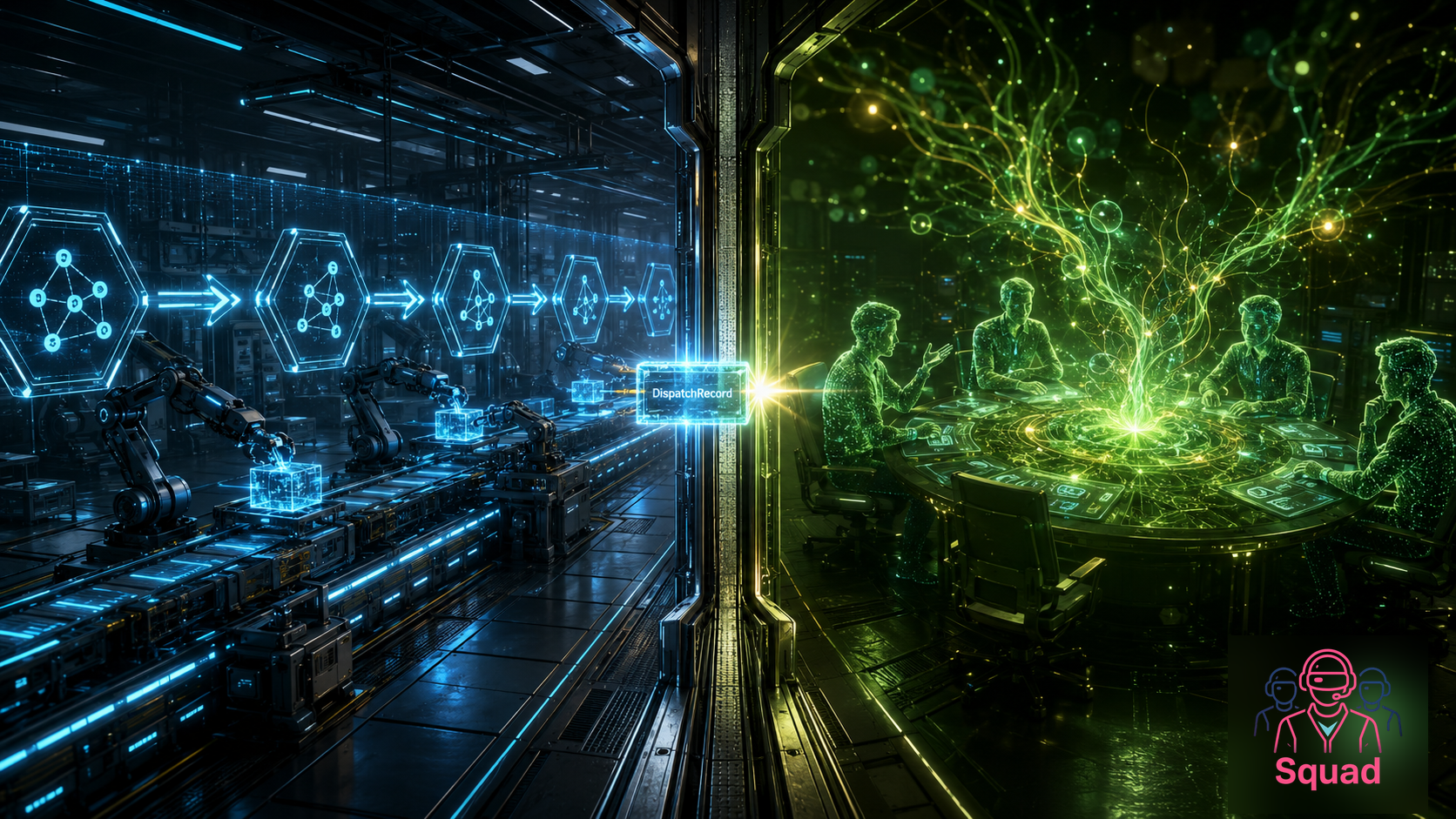
This week I had to help a Node.js team use Squad inside their app.
They do not have the Microsoft Agent Framework, which is inconvenient for my C# heart but completely normal for the real world. The Node.js team was standing there with TypeScript, LangGraph, package-lock.json, and a very reasonable desire not to rewrite their product just because I like different tooling.
But this is the real world. Teams already have stacks. They have TypeScript services, React frontends, deployment pipelines, and very strong feelings about where npm install belongs in the build.
And if I am honest, that is exactly why this example matters.
In the previous post, I talked about deterministic workflows with non-deterministic AI Squads: code owns the process, AI owns the judgment. This post continues that thread, but inside a Node.js application. The team wanted Squad in their app, and the answer could not be “please rewrite your product in C# first,” even if a tiny part of me wanted to try.
The good news is that Node teams do not need to wait. LangGraph already gives them a deterministic graph. Standalone agents can handle specific judgment steps. Plain TypeScript can handle predictable-but-important mechanical steps. Squad can handle the deeper technical-design conversation behind one explicit boundary. The trick is to connect each thing at the right level instead of stuffing the whole architecture into one heroic prompt and making future-you reverse-engineer it later.
So this post is about putting those pieces together.
Nodes deserve a deterministic Squad as well.
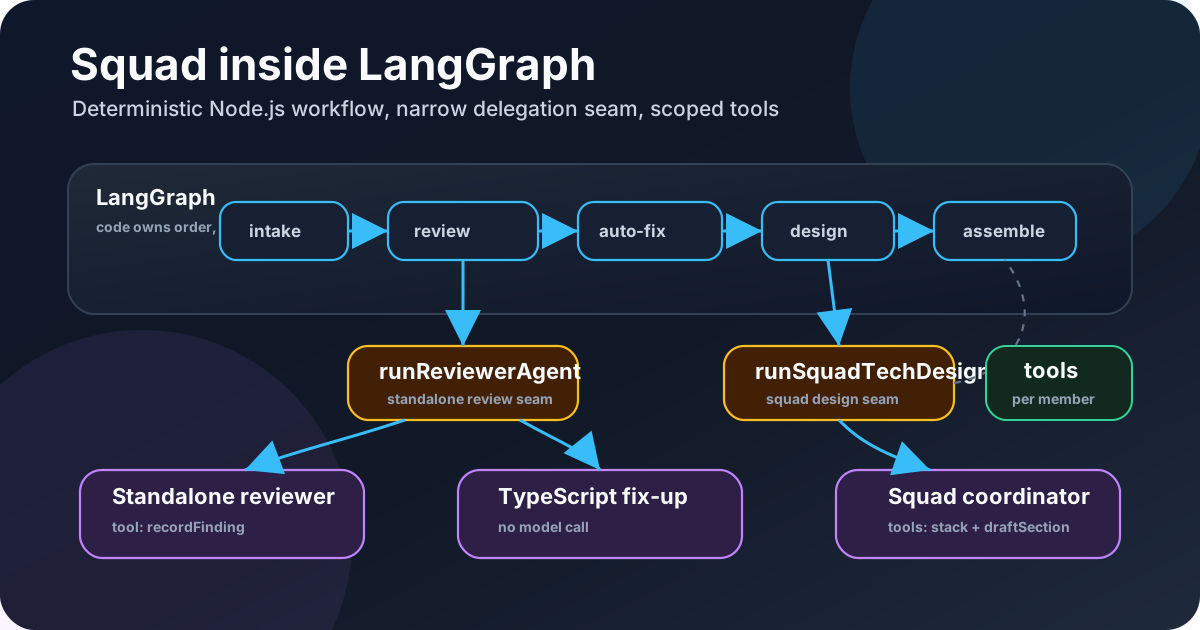
A deterministic LangGraph pipeline with three visibly different step types: a standalone reviewer agent, a non-AI TypeScript fix-up step, and one Copilot SDK custom agent named squad for technical design. Very normal. Very civilized. The prompt does not get more authority than the boundary allows.
The companion sample is tamirdresher/squad-langgraph-factory: a fictional Contoso-style software factory, with no customer names, no internal project details, and no secret sauce pretending to be a tutorial.
TL;DR: Running Squad Inside LangGraph
If you only take one pattern from this post, take this one.
Quick definition, because names matter: in this article, Squad is not a LangGraph concept and not a Node.js framework. It is a repo-local AI team definition: coordinator rules, routing rules, agent definitions, skills, and knowledge stored under .squad/*. The Copilot SDK exposes that team through a single custom agent named squad.

The seam in one picture: LangGraph keeps the workflow explicit, Copilot SDK exposes one squad agent, and the repo-local .squad/* context stays behind that boundary.
- Create a LangGraph
StateGraph. - Add a standalone
reviewerAgentstep. - Add a deterministic
applyApprovedStackFixesstep for mechanical changes. - Add a
squadTechDesignnode where the design judgment happens. - Inside the runner behind
squadTechDesign, create a Copilot SDK session. - Register and select the custom agent
squadfrom.github/agents/squad.agent.md. - Let
squaduse.squad/*as internal team context, then return aDispatchRecordinto graph state.
That is the whole shape: LangGraph owns orchestration, TypeScript owns deterministic changes, and Squad owns the messy technical judgment humans usually pretend is “just one more requirement.”
The Made-Up Enterprise Problem
The sample is fictional.
Imagine a software factory inside a large enterprise. Internal teams bring ideas to the factory:
“We need a Power Apps intake app for field inspections.”
“We want an Azure Functions backend that reads from Dataverse and posts summaries into Teams.”
“Can we use this shiny random database I found on a blog?”
That last one is where the architecture review starts earning its keep.
The organization already has an approved technology stack, security rules, integration patterns, and best practices. The factory’s job is not just to say yes or no. The job is to help teams turn rough ideas into something buildable:
- Normalize the idea.
- Review the requirements and proposed platform against approved patterns.
- Auto-fix obvious requirements gaps when possible.
- Produce the technical design.
- Assemble the design package.
That is a perfect place for deterministic AI.
The graph should decide the sequence. The code should decide when a step is allowed to run, when it retries, what state is saved, and what happens if something fails. The AI should do the judgment work: reading messy requirements, spotting missing non-functional requirements, challenging tech choices, and drafting the design in a way humans can actually read.
In other words:
LangGraph controls the factory line. Code handles the mechanical work. Squad handles the technical-design conversation.
The Shape of the Graph
The sample workflow is deliberately explicit in the best possible way:
1
2
3
4
5
intakeNormalize
  → reviewerAgent
  → applyApprovedStackFixes
  → squadTechDesign
  → assembleDesign
No magic. No “agent decides what the enterprise process should be today.” No workflow that turns into spaghetti after the second demo.
The graph state carries the intake request, design review findings, auto-fixes, and the generated design. Each node has a narrow job.
The intakeNormalize node normalizes the team’s idea. The standalone reviewer-agent node looks for missing information and platform problems: a short goal statement, missing constraints, and approved-stack mismatches. This is an agent step, but it is not Squad. It is a deliberately visible reviewer in the LangGraph workflow.
Then the deterministic TypeScript node does the safe mechanical work. No model. No tool call. No “please infer the policy intent from vibes.” Just code. applyApprovedStackFixes applies deterministic replacementMap substitutions directly to requestedTechnologies: MySQL -> Azure SQL, Auth0 -> Microsoft Entra ID, or Zapier -> Power Automate.
Then squadTechDesign drafts the actual design sections through Squad.
That is the seam where the architecture gets interesting. The graph calls squadTechDesign, passes the current specification and graph state into one Copilot SDK custom agent named squad, and gets a design result back. Squad can use .squad/* internally to understand its team rules and context, but that does not turn the reviewer into a hidden Squad member and it does not make LangGraph manage Squad’s internal routing.
The graph does not hand the entire application to an agent and hope for the best. It calls one node, with one payload, and expects one structured result back.
That sounds less glamorous than “autonomous agentic platform.” Good. Production systems need clarity more than glamour.
Minimal Wiring
Here is the smallest useful version, trimmed on purpose.
1
2
3
4
5
6
7
8
9
10
11
12
13
14
15
16
17
18
19
20
// trimmed from src/graph.ts
return new StateGraph(FactoryStateAnnotation)
  .addNode("intakeNormalize", intakeNormalize)
  .addNode("reviewerAgent", reviewerAgent)
  .addNode("applyApprovedStackFixes", applyApprovedStackFixes)
  .addNode("squadTechDesign", squadTechDesign)
  .addNode("assembleDesign", assembleDesign)
  .addEdge(START, "intakeNormalize")
  .addEdge("intakeNormalize", "reviewerAgent")
  .addEdge("reviewerAgent", "applyApprovedStackFixes")
  .addEdge("applyApprovedStackFixes", "squadTechDesign")
  .addEdge("squadTechDesign", "assembleDesign")
  .addEdge("assembleDesign", END)
  .compile();

// trimmed from src/sdkDemo.ts
const result = await runFactoryWorkflow(sampleRequest, {
  runReviewerAgent: createCopilotSdkReviewerAgentRunner(),
  runSquadTechDesign: createCopilotSdkCustomAgentsRunner()
});
Inside the graph node, squadTechDesign does not know the whole Squad roster. It calls the injected SDK runner and appends the returned DispatchRecord to state:
1
2
3
4
5
6
7
8
9
10
11
12
13
// trimmed from src/graph.ts
async function squadTechDesign(state: FactoryGraphState) {
  const baseState = withDefaults(state);
  const designer = await runSquadTechDesign({
    objective: "Draft design sections after review and auto-fix.",
    state: baseState
  });

  return {
    dispatches: [...baseState.dispatches, designer],
    designSections: [...baseState.designSections, ...designer.sections]
  };
}
The SDK details are below, but the boundary is already visible here: LangGraph calls the injected runSquadTechDesign runner, and the runner returns a DispatchRecord. The graph does not learn the internal Squad roster. It gets typed state back.
That small seam is the point. Both AI-facing nodes use injected runners: in the local demo they can be deterministic, and in the live SDK demo they can be backed by the Copilot SDK. LangGraph only sees the same typed shape come back.
The reviewer stays visible as its own graph step, the approved-stack fix-up stays predictable TypeScript, and squadTechDesign is the one place where Squad owns the technical-design reasoning. The result becomes graph state instead of a mysterious chat transcript, which is exactly the amount of drama I want from production architecture.
What Ships With the App
The sample ships a small Squad bundle with the application:
1
2
3
4
5
6
7
8
9
10
11
12
13
14
15
.github/
└── agents/
    ├── reviewer.agent.md     # standalone reviewer used by reviewerAgent
    └── squad.agent.md        # Squad coordinator used by squadTechDesign

.squad/
├── coordinator.md
├── team.md
├── routing.md
├── agents/
│   └── ...
├── skills/
│   └── approved-stack.md
└── knowledge/
    └── factory-patterns.md
The important part is that the app carries the Squad context with it.
That means the public Copilot custom-agent entry point and the internal Squad context are versioned with the code. .github/agents/squad.agent.md is the door the Copilot SDK opens for the technical-design step. .squad/team.md, .squad/routing.md, and .squad/agents/* are what the Squad coordinator reads after it walks through that door. They can be reviewed in a PR. They can be diffed. They can be tested. If the design step suddenly changes behavior, you can inspect the commit.
The standalone reviewer-agent step is separate from the Squad coordinator bundle. Its prompt lives in .github/agents/reviewer.agent.md, and the SDK runner is src/reviewer/copilotSdkReviewerAgent.ts. The architecture requirement is now grounded in code: reviewerAgent is visible in LangGraph; squadTechDesign is where Squad enters for technical design.
For the short demo sample, the knowledge base lives in the repo and deploys with the Squad. That is the right tradeoff for a small demo: self-contained, reproducible, and easy to understand.
For production, I would not hard-code the entire enterprise memory into a sample repo and call it a day. A managed knowledge layer makes more sense. The direction I like here is Knowledge as a Service — for example, the Knowledge as a Service for Azure Logic Apps announcement. In a real enterprise setup, the graph could retrieve approved standards from a governed knowledge service and pass the relevant slice into the Squad step.
But in the sample, repo-local knowledge keeps the moving parts small enough that you can understand the flow without turning the demo into an infrastructure project.
The Copilot SDK Seam
The key integration point is a narrow dispatch seam. Actually, three seams. That sounds like a lot until you compare it to the alternative: one large, unclear integration point.
The reviewer seam is a standalone agent step. The deterministic seam is not an agent at all. And the Squad seam is where the Copilot SDK enters:
1
2
3
4
5
6
7
8
9
10
11
12
13
14
LangGraph
  → reviewerAgent
  → standalone reviewer custom agent
  → graph state
  → applyApprovedStackFixes
  → TypeScript function
  → graph state
  → squadTechDesign
  → injected runSquadTechDesign runner
  → CopilotClient
  → custom agent "squad" from .github/agents/squad.agent.md
  → .squad internal team context
  → DispatchRecord
  → graph state
The squadTechDesign node does not create the SDK client itself. It calls the injected runSquadTechDesign runner. The live runner is createCopilotSdkCustomAgentsRunner(...), and that runner is where the SDK work happens.
Trimmed down to the parts that matter, the runner does this:
1
2
3
4
5
6
7
8
9
10
11
12
13
14
15
16
17
18
19
20
21
22
23
24
25
26
27
28
29
30
31
32
33
34
35
36
37
38
39
40
41
42
// trimmed/adapted from src/squad/copilotSdkCustomAgents.ts
const clientOptions: CopilotClientOptions = {
  workingDirectory: repoRoot,
  logLevel: "error",
  useLoggedInUser: true
};

const client = new CopilotClient(clientOptions);
await client.start();

const customAgents = [
  {
    name: "squad",
    displayName: "Squad Coordinator",
    prompt: await readFile(
      path.join(repoRoot, ".github/agents/squad.agent.md"),
      "utf8"
    ),
    tools: squadCoordinatorToolAllowlist,
    infer: true
  }
];

session = await client.createSession({
  clientName: "squad-langgraph-factory",
  workingDirectory: repoRoot,
  tools: createFactoryTools(captured),
  availableTools: createAvailableTools(),
  customAgents,
  agent: "squad",
  onPermissionRequest: approveAll
});

if (session.rpc?.agent?.select) {
  await session.rpc.agent.select({ name: "squad" });
}

const finalResponse = await session.sendAndWait({
  prompt: createNodePrompt(input)
});

return buildDispatchRecord(input, captured, finalResponse);
There are a few important details hiding in that very unglamorous code, which is exactly where important details should hide.
First, the SDK runner creates CopilotClient, and the workingDirectory is the repo root. That matters because the selected agent prompt lives at .github/agents/squad.agent.md, and the Squad coordinator can read the repo-local .squad/* context from the same working tree.
Second, the session registers customAgents with exactly the public SDK custom agent LangGraph needs for this node: { name: "squad", ... }. The session config then sets agent: "squad". And when the runtime exposes the RPC helper, the runner also calls session.rpc.agent.select({ name: "squad" }). That is intentionally redundant-looking, because this is one of those seams where being explicit beats being clever.
Third, LangGraph does not select RequirementsReviewer, PlatformValidator, or TechDesigner as SDK agents for the design node. Those can exist as internal Squad context if the coordinator uses them, but from LangGraph’s point of view the node is simply: call squad, pass the current state, and store the returned DispatchRecord.
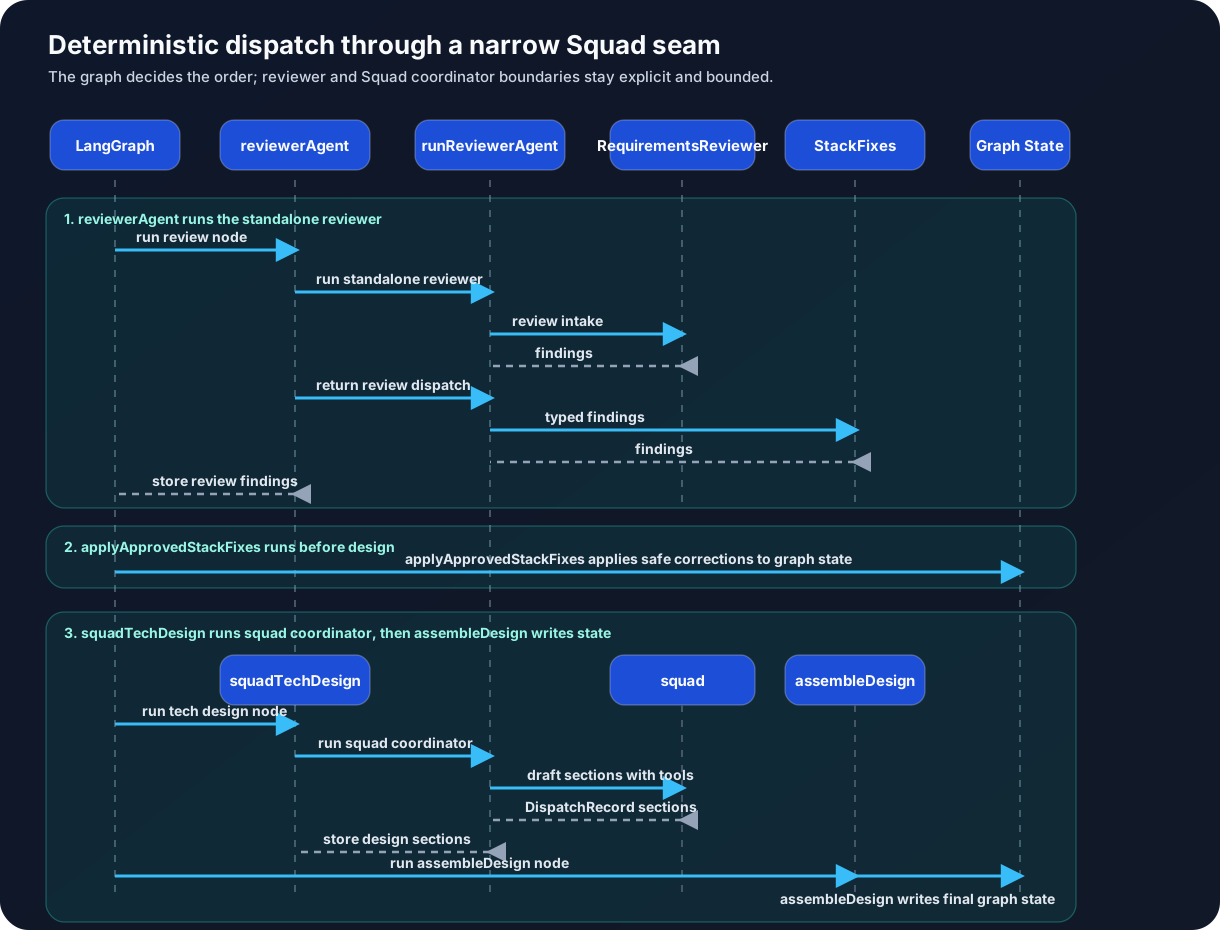
Grounded sequence for the implementation: standalone reviewer agent, deterministic TypeScript fix-up, then one SDK custom agent named squad for technical design. The graph keeps authority scoped to the step that needs it.
That is the whole pattern. The coordinator is not a side character here. The coordinator is the abstraction boundary. LangGraph owns the factory line. Squad owns the internal architecture conversation. The graph does not leak the internal Squad roster into the SDK path.
Real delegation buys you traceability, tool budgeting, smaller blast radius, and clear boundaries. The graph has nodes. Squad has charters, routing, skills, and team context. Mixing those layers makes the system harder to reason about.
One giant prompt is seductive because it is easy. It is also how you end up debugging a long monologue where “architecture review” and implementation policy blur together.
I prefer doors with labels.
The Tool Surface
For the sample, the app tools should be predictable in the best possible way. They are not fake names the prompt pretends to call. They are SDK tools created with defineTool(...), and their handlers call actual TypeScript functions in the app.
The grounded shape is a narrow SDK wrapper around real code:
1
2
3
4
5
6
7
8
9
10
11
12
13
14
15
16
17
18
19
20
21
22
23
24
25
26
27
28
29
30
31
defineTool("readApprovedStack", {
  description: "Return the fictional approved factory technology stack.",
  parameters: {
    type: "object",
    properties: {},
    additionalProperties: false
  },
  skipPermission: true,
  handler: () => {
    assertToolAllowed(allowedTools, "readApprovedStack");
    return JSON.stringify(readApprovedStack());
  }
});

defineTool<{ technology: string }>("validateTechnology", {
  description: "Validate one requested technology against the fictional approved factory stack.",
  parameters: {
    type: "object",
    properties: {
      technology: { type: "string" }
    },
    required: ["technology"],
    additionalProperties: false
  },
  skipPermission: true,
  handler: (args) => {
    assertToolAllowed(allowedTools, "validateTechnology");
    const result = validateTechnology(args.technology);
    return JSON.stringify(result);
  }
});
That is the approved design principle made concrete: the tool is a narrow SDK wrapper around real code, not a prompt decoration with a nice name tag.
The important part is not the exact names. The important part is the allowlist per step.
The standalone reviewer agent should get only the tools it needs to review. The deterministic TypeScript node gets no AI tools because it is not AI. The Squad technical-design custom agent gets the tools needed to produce the design, wired through defineTool(...) and backed by real functions.
That gives you a system you can reason about.
If the reviewer misses a requirement gap, inspect the reviewer step. If the approved-stack substitution is wrong, inspect the deterministic TypeScript function. If the final design is confused, inspect the squadTechDesign SDK step and the tools exposed to squad. If everything is wrong, inspect the boundaries between the steps first.
Prerequisites
Before the SDK command, the plain prerequisites matter. You need:
- Node.js 20+ for the SDK path because
@github/copilot-sdk@1.0.0package-lock requires Node>=20.0.0. - npm, and a clean install with
npm ci. - GitHub Copilot access.
- The Copilot CLI/runtime installed and available in
PATH. - A GitHub login the SDK can use, or an explicit
GITHUB_TOKEN/GH_TOKEN. @github/copilot-sdk, which is already independenciesand installed bynpm ci.
Please do not debug authentication by blaming LangGraph. It is almost certainly not the graph.
The repo gives you two ways to run it:
1
2
3
npm ci
npm run demo       # deterministic local path
npm run demo:sdk live   # Copilot SDK path through reviewer + squad custom agents
Here is the short excerpt I care about:
1
2
3
4
5
6
7
8
# LangGraph factory demo
Graph path: intakeNormalize -> reviewerAgent -> applyApprovedStackFixes -> squadTechDesign -> assembleDesign

## reviewer agent and Squad coordinator outputs
- RequirementsReviewer: tools=recordFinding; findings=none; sections=none
- squad: tools=readApprovedStack, validateTechnology, recordFinding, draftSection; findings=none; sections=Solution Overview | Approved Stack Alignment

Final requested technologies: Power Apps, Azure SQL, Microsoft Entra ID, Power Automate
That is the local run. The proof point is not “LangGraph selected a pile of internal members.” The proof point is that LangGraph ran a visible reviewer step, a non-AI TypeScript step, and then only the squadTechDesign node through the Squad coordinator shape.
1
2
3
4
5
6
7
8
9
10
11
12
13
14
# LangGraph factory demo using Copilot SDK
Mode: live
Graph path: intakeNormalize -> reviewerAgent -> applyApprovedStackFixes -> squadTechDesign -> assembleDesign
LangGraph ran reviewerAgent through a standalone reviewer SDK custom agent, then squadTechDesign through the squad SDK custom agent.
The squad coordinator used .squad/team.md, .squad/routing.md, and .squad/agents/* as internal context.
No PlatformValidator/TechDesigner internal .squad members or dispatch_member tool are exposed as LangGraph-selected SDK agents.

Sub-agent lifecycle events:
- subagent.selected: Squad Coordinator

- RequirementsReviewer: tools=recordFinding; findings=<n>; sections=<n>
- squad: tools=readApprovedStack, validateTechnology, recordFinding, draftSection; findings=<n>; sections=<n>

Final requested technologies: Power Apps, Azure SQL, Microsoft Entra ID, Power Automate
That is the live SDK shape in the sample: reviewer is a standalone SDK custom agent, deterministic fix-up is code, and the technical design goes through the squad SDK custom agent. The exact finding and section counts can vary by model and run; the useful signal is the boundary shape.
Why Not Just Use One Agent?
Because “one agent does everything” is the architectural equivalent of “one method handles all requests.” We have all seen that method. It starts convenient and eventually becomes the place every unrelated concern goes to hide.
A single agent can look magical in a demo, but it blurs the three responsibilities I want separated:
The workflow is not judgment. The order of operations is a product decision. Normalize the request, review it, apply safe substitutions, ask Squad for design, then assemble the output. That belongs in LangGraph, not in a prompt that wakes up every run and rediscovers the process from scratch.
Mechanical fixes are not judgment either. Replacing MySQL with Azure SQL in the sample’s approved-stack map is deterministic code. If the rule is fixed, write the rule. Don’t ask a model to role-play a switch statement.
Judgment is where Squad earns its keep. The design step is where context, tradeoffs, and technical taste matter. That is where I want the squad custom agent reading .squad/*, using bounded tools, and returning a structured DispatchRecord.
So no, this is not one giant agent with more responsibility. The thesis is smaller and, I think, more useful: LangGraph owns orchestration; code owns deterministic changes; Squad owns judgment.
Why LangGraph Fits This Pattern
LangGraph is a good host because it is deterministic where I want determinism.
It decides:
- What runs first.
- What state is passed forward.
- What can retry.
- What gets checkpointed.
- What happens when a node fails.
- When the workflow is done.
AI agents are useful because they are non-deterministic where I want judgment.
A standalone reviewer can read messy requirements and say, “You forgot data retention.” Squad can take the reviewed, normalized spec and produce a design that explains tradeoffs instead of just listing services like a cloud buffet. It can notice that the proposed Power Apps solution needs Dataverse security roles, not just a pretty form. It can challenge the use of Azure Functions when Logic Apps would be more appropriate, or the other way around.
The trick is not choosing between deterministic workflows and AI agents.
The trick is putting them in the right places.
LangGraph controls the process. Code controls the mechanical changes. Agents control the judgment.
That is the same pattern as before, expressed in TypeScript.
What This Sample Is Really Proving
The companion sample is not trying to publish a perfect enterprise platform. It is trying to make the pattern obvious enough that a Node.js team can reuse it:
1
intakeNormalize → reviewerAgent → applyApprovedStackFixes → squadTechDesign → assembleDesign
With a repo-local knowledge base for the demo.
With a clean path toward managed knowledge.
With per-step tool boundaries.
With a standalone reviewer agent where the graph needs review, plain TypeScript where the graph needs deterministic fix-up, and SDK-native customAgents where the graph needs one public squad agent for technical design instead of leaking the internal team roster into LangGraph.
That is the part I like most. It is not flashy. It is not a giant agent with unlimited responsibility. It is a small, explicit boundary that lets a Node.js app borrow the Squad pattern without surrendering the application design.
Node.js developers, congratulations. You get deterministic Squad orchestration.
Please use this power responsibly.
What’s Next
This is the first post in a three-part trilogy on putting the architecture into Azure.
- Part 2 — Sandboxing the Dangerous Part: Squad Tools in Azure Container Apps Dynamic Sessions — where the risky tool execution actually goes.
- Part 3 — Giving the Agent a Workshop: Squad Workspaces in Azure Container Apps Sandboxes — when the agent needs a persistent workspace, not just one command.
Both ship a couple of days after this one. I will link them up here when they go live.