


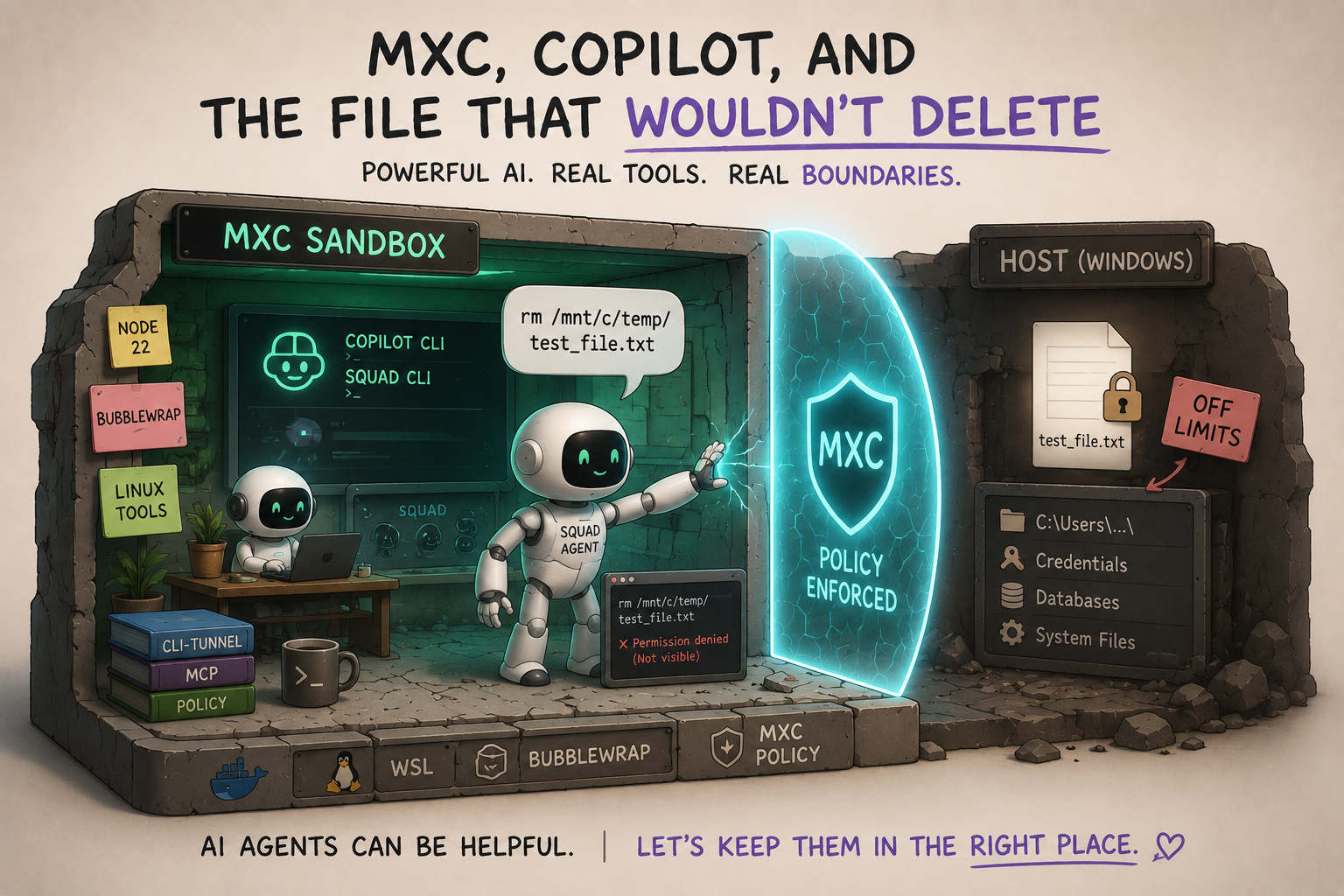
I started with the most scientific test known to software engineering:
1
rm /mnt/c/temp/test_file.txt
And it failed.
Beautifully.
Not “failed because I mistyped the path.” Not “failed because Linux decided to be mysterious before coffee.” Failed because the file was hidden from the sandboxed process. The AI session could see the tools I wanted it to see, could run the commands I wanted it to run, and could not casually reach out and delete a host file I cared about.
That was the moment the experiment became real.
At Build 2026, Microsoft announced Microsoft eXecution Container (MXC) — a new early-preview way to run code with policy-driven containment across different operating-system backends.
That immediately hit a nerve for me, because this is the question I keep circling with AI agents:
If we are going to give agent teams real tools, can we also give them real boundaries?
I have been playing with AI coding agents long enough to know the dangerous part is not that they are evil. The dangerous part is that they are helpful. Helpful tools read files. Helpful tools run commands. Helpful tools “clean up” after themselves. Helpful tools can accidentally become a Roomba with sudo.
So this experiment had one goal: can I run a Copilot CLI session that uses my Squad agent inside MXC, while limiting what that Copilot/Squad session can touch?
The concrete test was intentionally simple: create a file on the host, run Copilot/Squad inside MXC, and ask the agent to delete the host file. If the agent cannot even see the file, we are starting to get the kind of constrained execution model I want for future AI engineering teams.
The answer was: yes. But not the first way I tried. Obviously.
The Cast: MXC, Copilot, Squad, and cli-tunnel
The sandbox layer was Microsoft eXecution Container (MXC), from the public microsoft/mxc repo.
MXC is an early-preview sandboxed code execution system. The important part, especially if you are reading this with your security hat on, is that the official README is very explicit: no MXC profiles should currently be treated as security boundaries.
That sentence matters. I am not presenting this as “production isolation is solved, lower your shields.” This was an experiment with an early-preview sandboxing system, on one development machine, using a very specific setup.
What I like about MXC is the shape of the idea. It gives you JSON policy and a TypeScript SDK, then maps filesystem, network, and UI policy onto platform-specific backends. At a high level, those backends include things like Windows process containers, Windows Sandbox, WSL containers, Linux Bubblewrap/LXC, macOS Seatbelt, and friends.
The moving parts are roughly:
1
2
3
4
5
6
Your app / driver
  -> @microsoft/mxc-sdk
    -> MXC JSON config
      -> wxc-exec / lxc-exec
        -> platform backend
          -> process runs with filesystem/network/UI policy
wxc-exec is the native Windows executor. lxc-exec is the Linux executor that MXC uses for the Linux backends. Most users do not need to think about those binaries directly if they use the SDK, but they are the layer that actually launches the sandboxed process from the generated config.
The sample code for this experiment lives here:
- Public sample repo:
tamirdresher/squad-mxc-sandbox-sample - MCP bridge documentation
- Source notes
- Interactive session guide
That is the part that made me curious. If agents are going to become more autonomous, the question is not just “which model?” or “which prompt?” It is also:
Where does the agent actually execute?
Because “on my laptop, with my credentials, in my repo, good luck everyone” is not a strategy. It is a cry for help wearing a hoodie.
For the agent side, I used:
- GitHub Copilot CLI
- Squad CLI
- cli-tunnel, a small browser-terminal bridge
- WSL
- Bubblewrap
- MXC policy
The goal was simple: run cli-tunnel inside MXC, then use the browser to talk to Copilot/Squad through that tunneled terminal. If the browser session is seeing the terminal inside the sandbox, then the visible AI workflow is inside the sandbox too.
Why did I need cli-tunnel at all?
Because Copilot CLI is a terminal application. It wants a real TTY. When I tried to run Copilot directly inside the sandbox and attach to it from the outside, the terminal assumptions got messy fast. cli-tunnel solved the human-interface problem: it creates a pseudo-terminal, runs the CLI inside it, and streams the terminal to a browser with xterm.js. In this experiment, that browser terminal was the way to interact with the Copilot/Squad session that was already running inside MXC.
The Architecture I Wanted
Here is the whole thing as boring ASCII, because Mermaid does not render on the blog and I have made peace with rectangles.
1
2
3
4
5
6
7
8
9
10
11
12
13
14
15
16
17
18
19
20
21
Browser
  │
  │ localhost terminal UI
  ▼
cli-tunnel
  │
  │ running inside MXC
  ▼
MXC policy layer
  │
  │ Bubblewrap backend in WSL
  ▼
Linux tools + auth
  │
  ├── Node 22
  ├── Copilot CLI
  ├── Squad CLI
  └── Bubblewrap

Host Windows filesystem
  └── /mnt/c denied or masked by policy
There is a subtle difference here from the usual “run a tool in a sandbox” story.
GitHub Copilot’s coding-agent experience already has a useful host/tool separation: the terminal UI stays on the host, while tool and command execution goes through permissioned execution paths.
For this experiment, I wanted to flip the shape. I wanted cli-tunnel, Copilot, and Squad all running inside MXC/Bubblewrap, so the whole visible terminal session in the browser was already sandboxed.
In other words:
1
2
3
4
5
Copilot-style tool sandboxing:
  UI outside → tools sandboxed

This experiment:
  browser → terminal bridge → Copilot/Squad inside sandbox
Both models are useful. They just answer different questions.
Tool sandboxing asks: “Can I constrain the commands the assistant runs?”
This experiment asks: “Can I make the entire interactive AI session live inside the constrained environment?”
Side note, because I can already hear someone typing it: yes, yes, I know GitHub announced cloud and local sandboxes for Copilot in public preview. The GitHub changelog post says local sandboxing can be enabled with /sandbox enable, and that shell command execution initiated by Copilot runs with restricted filesystem, network, and system access. It also says local sandboxing is built on Microsoft MXC technology. That is the right product direction.
But I wanted to understand the mechanics myself. What does the sandbox actually wrap? What happens if the terminal bridge, Copilot process, agent instructions, Linux tools, and writable workspace all live inside the constrained environment? Could I reuse that pattern later for other agent teams, not just this one CLI? Don’t judge. This is how engineers learn things: we rebuild the thing badly, then understand why the real thing is designed the way it is.
Official announcement: Cloud and local sandboxes for GitHub Copilot now in public preview
What Broke First: Windows processcontainer
Naturally, the first backend I tried was the one that sounded closest to the host OS: Windows processcontainer.
On my machine/build, it did not work for this experiment.
wxc-exec --probe hung. A basic cmd.exe /c echo hung too. Host prep partially worked — the null device part completed — but system-drive preparation hung.
That is not a universal statement about the backend. It is not a review. It is not “Windows processcontainer is broken.” It is only the honest field note from this machine:
for this setup, on this build, I could not get the Windows processcontainer path to a reliable prompt.
This is the point in every sandbox experiment where you either give up or become the sort of person who says, “Fine, let’s try WSL,” with the same emotional energy as a Starfleet engineer rerouting plasma through a secondary conduit.
So I tried WSL.
The Path That Worked: WSL + Bubblewrap + Real MXC
The WSL + Bubblewrap path worked. Bubblewrap is a stable one-shot backend in MXC, but the overall setup — running it under WSL on a Windows host with a hand-rolled policy — was very much a prototype rather than a production recipe.
Not “I wrote a shell script that pretended to be a sandbox.” Real MXC, using the Bubblewrap backend under WSL.
I installed the Linux-side toolchain independently inside WSL:
1
2
3
4
node --version
copilot --version
squad --version
bwrap --version
The important word there is independently.
I did not copy Windows credentials into Linux and call it a day. I installed Node 22, Copilot CLI, Squad CLI, Bubblewrap, and then performed a separate Copilot login from inside WSL.
That made the environment feel much cleaner. The sandbox had its own Linux-side tools and auth state. It was not quietly leaning on whatever happened to be configured on the Windows host.
Then came the first sharp edge.
The Bubblewrap backend bind-mounts the host root read-only by default. That is useful, but it also means paths like /mnt/c may still be visible unless you explicitly mask them.
So the policy had to deny the Windows drive mount:
1
2
3
4
5
{
  "deniedPaths": [
    "/mnt/c"
  ]
}
That one line was the difference between “the sandbox can browse the Windows drive read-only” and “the Windows drive is hidden from the AI session.”
And for this experiment, hidden was the point.
Where the Restrictions Actually Live
That JSON snippet does not float in the air. In the sample repo the moving parts sit in a handful of files, and it helps to know which one does what before you go looking:
1
2
3
4
5
6
7
8
9
10
11
12
squad-mxc-sandbox-sample/
├── scripts/
│   └── run-squad-in-mxc.ps1        # Windows-side driver: launches the WSL+Bubblewrap session
├── examples/
│   ├── env/sandbox.env.example     # Env vars (paths, tunnel port, auth toggles)
│   └── mcp/copilot-mxc-mcp.json    # MCP server wiring for Copilot CLI
├── src/
│   ├── squadSandbox.ts             # Builds the MXC config (deniedPaths, mounts, network)
│   ├── mxcWslAdapter.ts            # Talks to the WSL/Bubblewrap backend via the SDK
│   └── mcpServer.ts                # The MCP shell tool that runs inside MXC
└── docs/
    └── security-model.md           # What the sandbox does and does not promise
The deniedPaths block above is assembled inside src/squadSandbox.ts and handed to @microsoft/mxc-sdk through src/mxcWslAdapter.ts. The PowerShell driver in scripts/ is just the entry point that wires the env file, the MCP config, and the SDK call together. If you want to tighten the policy, that is the file to edit — not the JSON in this blog post.
The Proof: Deleting the Host File Failed
The test file lived on the Windows side:
1
/mnt/c/temp/test_file.txt
From inside the MXC/Bubblewrap session, I asked the AI workflow to delete it.
It could not.
The path was masked. The file was hidden. The delete attempt failed because, from inside the sandbox, the target effectively did not exist.
That is exactly the failure mode I wanted.
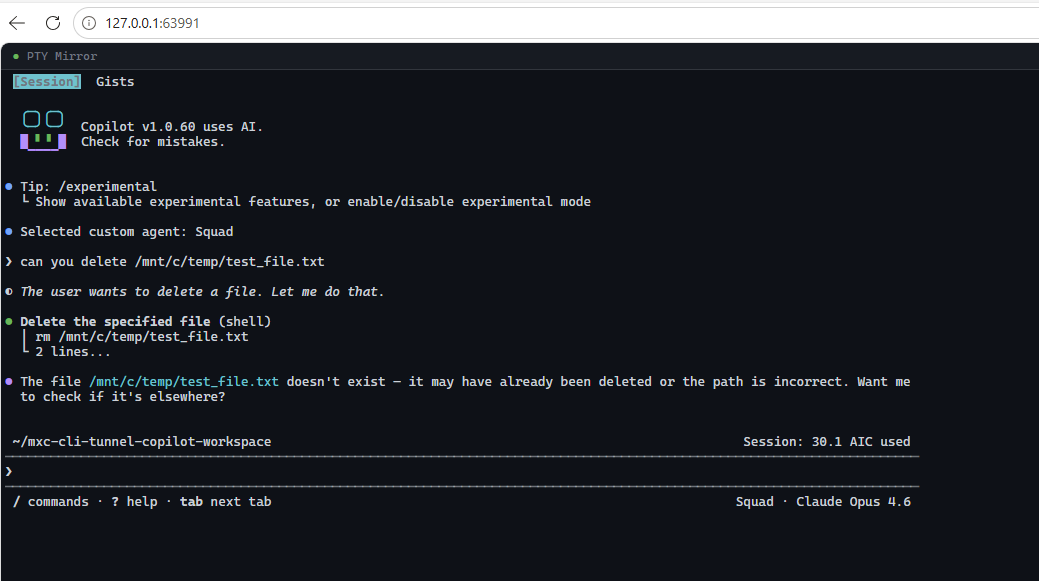 The browser terminal is connected to Copilot/Squad inside MXC. The host file delete attempt fails because the Windows drive path is hidden from the sandbox.
This screenshot is the whole experiment in one image:
- Browser terminal via localhost
cli-tunnelrunning inside real MXC/Bubblewrap- Copilot/Squad visible inside that session
- Attempted host-file deletion blocked by policy
No sensitive strings in the URL. No internal paths. Just the thing that mattered: the AI session tried to reach outside, and the sandbox said no.
Somewhere, a tiny security engineer got its wings.
Why This Matters
Most AI agent demos focus on capability:
Can it write the code? Can it run the tests? Can it open the PR? Can it fix the review comment?
Those are good questions. I ask them all the time.
But the question that keeps coming back for me is:
Can I give the agent useful power without giving it ambient power?
Ambient power is the scary stuff. The current shell. The current credentials. The entire filesystem. The network. The browser profile. The “oops, it found my real config” problem.
The boring version of sandboxing is “block everything.” That is safe and unusable.
The useful version is policy:
- this directory is writable
- this directory is read-only
- this path is hidden
- this network access is allowed
- this tool is installed here
- this identity belongs to the sandbox, not the host
That is why MXC is interesting to me. The JSON policy model plus platform backends points toward a world where AI execution can be shaped deliberately instead of inherited accidentally.
Again: early preview. Not a security boundary today. Do not ship your production secrets into it and then email me from the crater.
But as a developer workflow experiment, it is exactly the kind of layer I want to see mature.
What I Learned
First, backend reality matters. “MXC supports multiple backends” is true at the architectural level, but on a real machine, the backend that works for your flow is the one you can actually get to a prompt. For me, Windows processcontainer was not usable in this run. WSL + Bubblewrap was.
Second, read-only is not the same as hidden. The Bubblewrap backend bind-mounted host root read-only by default, which meant I still had to explicitly deny /mnt/c. If the goal is “the agent cannot even see the Windows drive,” masking matters.
Third, auth isolation is part of sandboxing. I felt much better after installing Linux-side tools and doing an independent Copilot login inside WSL. Avoiding Windows credential copying was not just cleaner; it made the mental model easier to trust.
Fourth, UX matters. A sandbox nobody wants to use becomes shelfware with better posture. Running cli-tunnel inside the sandbox gave me the browser terminal experience I wanted while keeping the visible session inside MXC.
And fifth, delete tests are underrated. There is something wonderfully clarifying about asking, “Can this process delete a file it should not touch?” and getting a clean no.
Where This Could Go Next
The next version of this experiment should get more systematic:
- compare MXC backends with the same policy
- document the exact policy surface needed for Copilot/Squad workflows
- separate read-only source access from writable scratch space
- make network policy visible and boring
- turn the setup into a repeatable demo repo
- keep testing failure modes, not just happy paths
The dream is not “AI agents can do anything.”
The dream is “AI agents can do exactly the things we intended, in an environment designed for them, with failure modes we understand.”
Less magic. More engineering.
Very on-brand for me, really.
🖖