


A team approached me because the performance of one of their orchestrations had dropped. When I looked into it, I found a simple loop that had been running for months and had accumulated millions of history records.
The code kept doing the same thing: reconcile some work, wait, and repeat. The loop stayed small. Its durable history did not.
That is the problem this post is about. A business process can run indefinitely without keeping every cycle in one orchestration generation. ContinueAsNew gives the orchestrator a deliberate boundary so subsequent generations start with bounded history.
But it is prevention, not an external compaction command. It only helps when the orchestrator reaches a compatible boundary. It does not trim an already-large live execution from the client side. So there are really two questions:
- How should a recurring orchestration be written so its history stays bounded?
- What can you do when production instances already have giant histories?
Before we worked out the long-term repair, we suspended an explicit reviewed list of affected orchestrations and resumed selected groups gradually. This was temporary load containment, not a history fix: suspension did not truncate their histories, and resuming could bring the same replay cost and accumulated work back. New starts needed separate gating because suspending existing instances did not stop another starter from creating more.
My earlier replay walkthrough explains why recorded history lets durable code recover, and the follow-up on less obvious Durable Task capabilities covers related execution boundaries. Here, the focus is what happens when useful history becomes too much history.
This is the eternal orchestration pattern: let the process continue, but give each generation a bounded past. Eternal process. Not an eternal scrapbook.
The Process Can Be Eternal. The Generation Doesn’t Have To Be.
Imagine a recurring reconciliation job. It checks a source, applies the next unit of work, records its progress, waits, and checks again.
In these snippets, Checkpoint in C# and checkpoint in Python are durable, application-owned progress markers. A checkpoint might be a committed sequence number, timestamp plus tie-breaker, or stable business key. A watermark is the same idea: a durable statement that everything through a known position has been reconciled.
That is deliberately different from a source continuation token. Pagination tokens may expire or be valid only for a particular query snapshot. Persisting an orchestration does not extend their validity. The ReconcileScan activity below owns source pagination for one finite scan, recognizes when the source has no next page, commits business results idempotently, and returns the next durable checkpoint. Reaching the end of pagination completes that scan; it does not automatically stop the recurring monitor. Stopped is reserved for an actual application or user stop decision.
These are teaching snippets, not complete runnable applications: the ReconcileScan activity implementation, worker registration, client startup, connection settings, retries, and production error handling are intentionally omitted.
Standalone Durable Task .NET SDK: one history that keeps growing
1
2
3
4
5
6
7
8
9
10
11
12
13
14
15
16
17
18
19
20
21
22
23
24
25
26
27
28
29
30
31
32
33
34
35
36
37
38
39
40
41
42
43
44
45
46
47
48
49
50
51
using Microsoft.DurableTask;
using System;
using System.Threading;
using System.Threading.Tasks;

public sealed record ReconciliationState(
    string? Checkpoint,
    TimeSpan Interval,
    bool Stopped = false);

public sealed record ReconciliationResult(
    string? NextCheckpoint,
    bool Stopped);

public sealed class UnboundedReconciliation
    : TaskOrchestrator<ReconciliationState, ReconciliationState>
{
    public override async Task<ReconciliationState> RunAsync(
        TaskOrchestrationContext context,
        ReconciliationState state)
    {
        // This one execution repeats, so every activity and timer stays in the same growing history.
        while (!state.Stopped)
        {
            // Application activity: finish one finite source scan, including its transient
            // pagination, and return only a committed application checkpoint.
            ReconciliationResult scan =
                await context.CallActivityAsync<ReconciliationResult>(
                    "ReconcileScan",
                    state.Checkpoint);

            state = state with
            {
                Checkpoint = scan.NextCheckpoint,
                Stopped = scan.Stopped,
            };

            if (!state.Stopped)
            {
                // Use orchestration time to create a replay-safe durable wait.
                DateTime nextCheck =
                    context.CurrentUtcDateTime.Add(state.Interval);
                await context.CreateTimer(
                    nextCheck,
                    CancellationToken.None);
            }
        }

        return state;
    }
}
Standalone Durable Task Python SDK: the same unbounded loop
1
2
3
4
5
6
7
8
9
10
11
12
13
14
15
16
17
18
19
20
21
22
23
24
25
26
27
28
29
30
31
32
33
34
from collections.abc import Generator
from datetime import timedelta
from typing import Any

from durabletask import task


def unbounded_reconciliation(
    ctx: task.OrchestrationContext,
    state: dict[str, Any],
) -> Generator[task.Task[Any], Any, dict[str, Any]]:
    # This one execution repeats, so every activity and timer stays in the same growing history.
    while not state["stopped"]:
        # Application activity: finish one finite source scan, including its transient
        # pagination, and return only a committed application checkpoint.
        scan = yield ctx.call_activity(
            "ReconcileScan",
            input=state.get("checkpoint"),
        )

        state = {
            "checkpoint": scan["next_checkpoint"],
            "interval_seconds": state["interval_seconds"],
            "stopped": scan["stopped"],
        }

        if not state["stopped"]:
            # Use orchestration time to create a replay-safe durable wait.
            next_check = ctx.current_utc_datetime + timedelta(
                seconds=state["interval_seconds"]
            )
            yield ctx.create_timer(next_check)

    return state
The C# example follows the public TaskOrchestrationContext API, and the Python example follows the standalone OrchestrationContext API. Python orchestrators are generators: durable operations are yielded, not awaited with async/await.
If you want the mechanics behind history and reconstruction, I covered them in what actually happens at a durable await. The short version, also described in the orchestration overview: recorded outcomes let the runtime reconstruct progress without keeping the original method alive.
Here, the question isn’t how that reconstruction works. It’s how much past work one recurring execution should need to reconstruct.
Each recurring cycle can add activity scheduling and completion events, timer events, and other durable actions. The eternal orchestration documentation warns that an endlessly looping orchestration without continue-as-new accumulates history, eventually causing performance problems and excessive memory use.
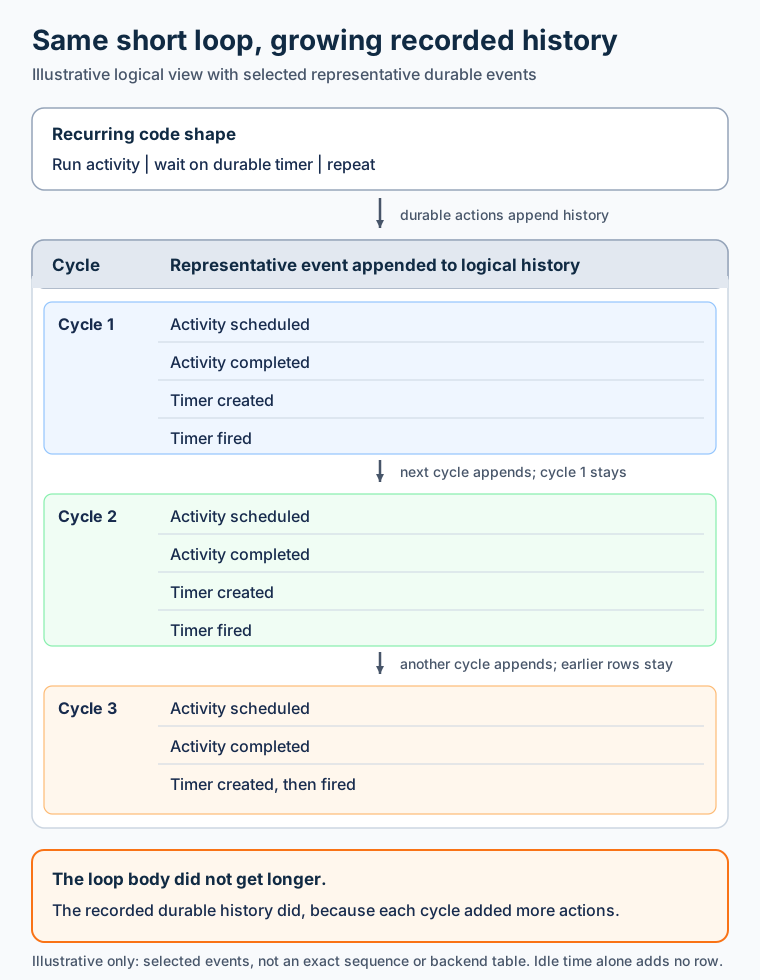
Illustrative logical history, not an actual backend table, dashboard screenshot, complete event sequence, or measured event count. Long idle time by itself does not append rows.
In the production case that prompted this post, the concrete facts were a performance drop and millions of history records accumulated over months. I don’t have a controlled before-and-after measurement that isolates one CPU, latency, or memory number, so I won’t invent one. The practical concern is still clear: every recovery or activation may have much more recorded work to reconstruct before the orchestration can make forward progress.
Notice what doesn’t fix that: assigning the latest result back to the same local variable. You’ve replaced the value in your code. You haven’t reset the orchestration history.
Also, elapsed time isn’t the right proxy. A workflow waiting a long time for one external event is different from a workflow scheduling new durable work repeatedly. Ask how much history it creates, not just how old it is.
ContinueAsNew: Same Process, Next Chapter
That’s where ContinueAsNew comes in.
The eternal orchestration docs describe a new orchestration generation with new input, the same instance ID, and reset orchestration history. They also describe a new execution ID internally.
For the .NET Microsoft.DurableTask API, TaskOrchestrationContext.ContinueAsNew documents the same essential contract: restart with new input and clear the history used for that execution.
Think of this as a logical generation boundary, not “start a random unrelated workflow” and not “reboot the worker.”
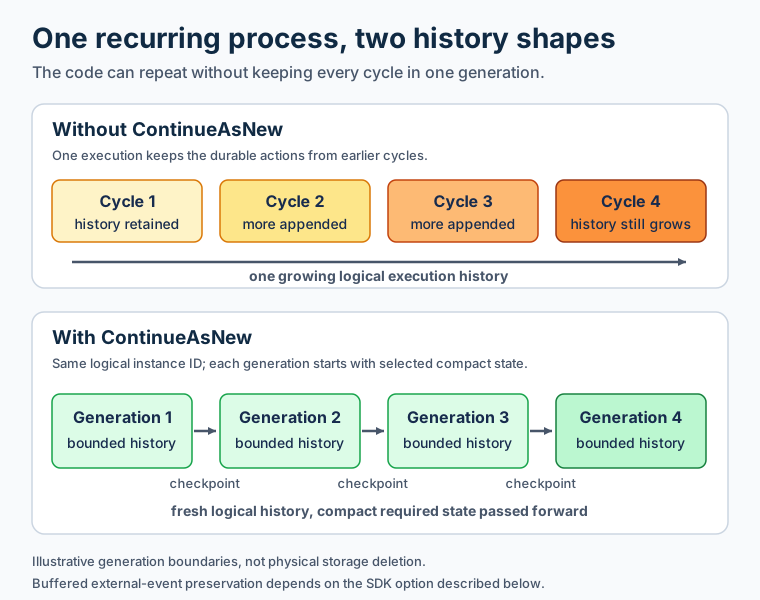
Illustrative logical generation boundaries. The logical instance ID remains the same; physical storage lifecycle and buffered external-event behavior are separate concerns.
It’s also not a promise about physical deletion, backup retention, or when storage space is reclaimed. A reset of orchestration history is an execution semantic. Storage lifecycle and retention need their own provider-specific documentation and policies.
Here is the same scenario with one completed scan and one completion-relative wait per generation. The activity may use several short-lived source pagination tokens while that scan is active, but the orchestration carries only the committed application checkpoint into the next generation.
The bounded snippets reuse the imports and the ReconciliationState and ReconciliationResult types defined above.
Standalone Durable Task .NET SDK: bounded generation
1
2
3
4
5
6
7
8
9
10
11
12
13
14
15
16
17
18
19
20
21
22
23
24
25
26
27
28
29
30
31
32
33
34
35
36
37
38
39
40
41
public sealed class BoundedReconciliation
    : TaskOrchestrator<ReconciliationState, ReconciliationState>
{
    public override async Task<ReconciliationState> RunAsync(
        TaskOrchestrationContext context,
        ReconciliationState state)
    {
        if (state.Stopped)
        {
            return state;
        }

        // Application activity: complete the finite scan and commit its checkpoint.
        ReconciliationResult scan =
            await context.CallActivityAsync<ReconciliationResult>(
                "ReconcileScan",
                state.Checkpoint);

        // Carry only the application checkpoint, cadence, and stop flag.
        ReconciliationState nextState = state with
        {
            Checkpoint = scan.NextCheckpoint,
            Stopped = scan.Stopped,
        };

        if (nextState.Stopped)
        {
            return nextState;
        }

        // Use orchestration time to create a replay-safe durable wait.
        DateTime nextCheck =
            context.CurrentUtcDateTime.Add(nextState.Interval);
        await context.CreateTimer(nextCheck, CancellationToken.None);

        // Request the next generation only after this scan and wait complete.
        context.ContinueAsNew(nextState);
        // Complete this method immediately after requesting the boundary.
        return nextState;
    }
}
Standalone Durable Task Python SDK: bounded generation
1
2
3
4
5
6
7
8
9
10
11
12
13
14
15
16
17
18
19
20
21
22
23
24
25
26
27
28
29
30
31
32
33
def bounded_reconciliation(
    ctx: task.OrchestrationContext,
    state: dict[str, Any],
) -> Generator[task.Task[Any], Any, dict[str, Any]]:
    if state["stopped"]:
        return state

    # Application activity: complete the finite scan and commit its checkpoint.
    scan = yield ctx.call_activity(
        "ReconcileScan",
        input=state.get("checkpoint"),
    )

    # Carry only the application checkpoint, cadence, and stop flag.
    next_state = {
        "checkpoint": scan["next_checkpoint"],
        "interval_seconds": state["interval_seconds"],
        "stopped": scan["stopped"],
    }

    if next_state["stopped"]:
        return next_state

    # Use orchestration time to create a replay-safe durable wait.
    next_check = ctx.current_utc_datetime + timedelta(
        seconds=next_state["interval_seconds"]
    )
    yield ctx.create_timer(next_check)

    # Request the next generation only after this scan and wait complete.
    ctx.continue_as_new(next_state)
    # End this generator immediately after requesting the boundary.
    return next_state
Both versions wait for the activity and timer before rolling over, carry only the state needed by the next generation, and return immediately after continue-as-new. The activity and timer APIs come from the same public SDK surfaces linked above. The .NET repository’s ContinueAsNew integration test and the Python continue_as_new contract both show the immediate-return requirement. Registration is omitted; the Python worker exposes add_orchestrator and add_activity, while the .NET worker registers tasks through AddDurableTaskWorker(...).AddTasks(...).
External events need an explicit rollover policy too. In the pinned .NET SDK, ContinueAsNewOptions.PreserveUnprocessedEvents defaults to true; in the pinned Python SDK, continue_as_new(..., save_events=False) does not carry unprocessed events unless requested. That applies to buffered, unprocessed events, not every signal or task that might be in flight. Do not roll over while required activity results or event-handling work are unresolved. These examples do not wait for a stop event, so Stopped changes only when the application activity returns that decision; it does not react automatically to an external signal.
The important bit is the handoff: the next generation starts from the state you’ve explicitly chosen to preserve. It doesn’t need to replay every previous reconciliation cycle to discover that state.
Don’t schedule another bit of work afterward and hope it belongs to the next chapter.
I’ve also covered using that execution boundary to change workflow versions. That’s a separate capability, with its own backend and compatibility requirements. Here, we need the boundary even when the implementation never changes.
A Fresh Start Doesn’t Make Your Input Smaller
In the examples above, the activity completes a finite scan and returns an application-owned checkpoint. The checkpoint says what business progress has been committed. It is not assumed to be a source continuation token.
Inside that activity, a data source may return a continuation token for the next page. The activity follows those tokens until the source reports the end of the scan, then commits a durable checkpoint or watermark. If a token expires or is tied to a query snapshot, the activity follows that source’s documented restart and reconciliation policy. Durable orchestration persistence cannot make an expired source token valid again.
A compact next-generation input might look conceptually like this:
1
2
3
4
5
{
  "checkpoint": "last-committed-business-position",
  "interval_seconds": 300,
  "stopped": false
}
The interval here is only illustrative, not a recommended cadence.
Now imagine that after every scan, the orchestration also appends every processed record and result to a processed_results list, then passes that whole object to continue-as-new:
1
2
3
4
5
6
7
8
9
10
{
  "checkpoint": "last-committed-business-position",
  "interval_seconds": 300,
  "stopped": false,
  "processed_results": [
    "every result from scan 1",
    "every result from scan 2",
    "and so on"
  ]
}
ContinueAsNew gives the orchestration a fresh execution history. But the object you pass to it becomes the next generation’s input. It doesn’t remove items from that object or make an ever-growing list smaller.
A better split is to have the activity save detailed results in the application’s database or object store, then return only the durable checkpoint and genuinely small state needed for the next cycle. If the orchestration needs to refer to saved details later, it can carry a stable reference rather than the details themselves.
One important distinction: not every activity that looks like logging is merely diagnostic; if it records committed business progress that the application depends on, keep it durable and idempotent. Replay-safe logging is useful for telemetry, but it isn’t a substitute for business persistence.
The end of source pagination means “this scan is complete.” The recurring monitor can wait and begin another scan according to its application policy. It should not silently treat a null token as both “start over immediately” and “stop forever.” Those are different decisions. Likewise, the examples’ Stopped value is a business stop condition, not a synonym for reaching the last page.
That external data still needs a lifecycle. A referenced object must remain available for as long as the workflow may need it, and the activity writing it still needs the application’s usual idempotency and retry design.
Also watch the shape of your “small” state object. Three properties are not small if one of them is a list that grows forever. Resetting history and keeping input bounded are related but separate jobs.
For the Azure Storage provider specifically, the large-payload guidance recommends storing large payloads externally and passing references to avoid repeatedly loading them. Its history-table documentation also explains that this provider loads an instance’s history into memory. Those are provider-specific details; the broader design lesson is simply to bound both the history and the next generation’s input.
Children Help. They Don’t Make the Parent Forget.
Sub-orchestrations are another useful boundary.
The .NET sub-orchestration API documentation explicitly says a child has its own instance ID, history, and status. It also identifies smaller parent history as a way to reduce memory usage and CPU overhead.
So you can put a multi-step reconciliation cycle inside a child. The parent awaits its result rather than hosting all the child’s internal steps in its own history. The sub-orchestration guide describes the child as behaving like an activity from the caller’s perspective: it returns a value or surfaces a failure.
But there’s a catch worth saying out loud:
A parent that calls a new child forever still performs durable work forever.
The child-call lifecycle and returned result aren’t free of parent-side history. Moving the detailed work into children makes that parent history smaller; it doesn’t introduce a reset boundary for the parent.
For a recurring controller, a useful composition is bounded child work, a compact result, and a parent that rolls into a new generation at a deliberate boundary. If the child itself recurs indefinitely, it needs its own history-growth analysis.
And keep child outputs small. Returning the entire detailed report to the parent defeats part of the separation. The Azure Storage provider docs explicitly include sub-orchestrator outputs among the payloads stored in orchestration history.
“Recurring” Isn’t a Scheduling Requirement
Before deciding how to repeat the workflow, decide what repetition actually means.
The periodic example in the eternal orchestration docs does the work, then waits an interval, then continues as new. That’s completion-relative scheduling. If the work takes longer, the next start moves later. It naturally serializes the cycles within that orchestration.
That’s different from “run at the top of every hour.”
For a wall-clock schedule, a timer-triggered starter that launches a finite orchestration may be a better fit. Each scheduled run can have its own instance and bounded history. But you must decide what happens if the previous workflow hasn’t finished: overlap, skip, coalesce, or catch up?
There’s an important Azure Functions detail here. The timer trigger reference says the timer won’t trigger again while an invocation is still running. That is a guarantee about the timer-triggered function invocation.
If that invocation starts an orchestration and returns, the orchestration can still be running when the starter fires again. Preventing overlap between those workflow instances is a separate design problem.
So I wouldn’t reduce this decision to “CRON overlaps; durable loops don’t.” The lifetime of the starter and the lifetime of the work it starts are different things.
Choose a completion-relative durable loop when that cadence and continuity are what you need. Choose separately scheduled finite workflows when those better match the business schedule. Neither choice excuses unexamined history growth inside the workflow.
For a business-cycle example, the subscription-payment section of my real-world Durable Task post advances only after the current cycle is resolved. The useful boundary is a business decision, not just another tick of the clock.
But Mine Already Has a Giant History. Now What?
The bounded design prevents the next instance or generation from repeating the same mistake. It does not compact the production histories that already exist. That second problem needs containment first, then a compatible handoff, drain, retirement, or replacement plan.
First, contain the load
Start with the dashboard for a small reviewed set
For a few known instances, the simplest option is the Durable Task Scheduler dashboard. Open the Orchestrations pane, find the instance, select its instance ID, and choose Suspend. After checking containment and business progress, return to each explicitly approved instance and choose Resume.
The dashboard documents these actions for an individual orchestration. Use the reviewed IDs one at a time and verify each resulting status before moving on.
You don’t need a whole application for an admin task
The standalone Durable Task JavaScript/TypeScript SDK is currently in preview. A short local Node.js script can connect to Azure-managed DTS without deploying a Durable Functions app. The essential control path is small:
1
2
3
4
5
6
7
const state = await client.getOrchestrationState(instanceId, false);

if (action === "suspend") {
    await client.suspendOrchestration(instanceId, "Temporary containment");
} else {
    await client.resumeOrchestration(instanceId, "Approved staged resume");
}
The complete companion admin-instance.mjs validates one explicit instance ID and one suspend or resume action per invocation, checks the current state without fetching payloads, and closes the client. It reads connection configuration from DURABLE_TASK_SCHEDULER_CONNECTION_STRING; do not commit or print that value. A control request still needs a separate status readback before the next operational step.
One provenance note for this recovery section: the incident record establishes that supported client operations were applied programmatically to an approved instance list, but it does not preserve the original wrapper or language. The companion scripts are public teaching examples, not reconstructed incident code. They follow the pinned Azure-managed client creation, client methods, and plain ESM sample.
For a larger reviewed workload, use the SDK query APIs to build a candidate list before changing anything. In .NET, GetAllInstancesAsync with OrchestrationQuery can filter by runtime status, creation window, and instance ID prefix, with paged results. Keep FetchInputsAndOutputs false when you only need IDs and status. The Python SDK also exposes filtered orchestration queries, although its result and pagination behavior differs, so follow the examples for the client you use. The public filtered-query guide shows the supported filters.
Treat that query as discovery, not authorization. Review the candidates, freeze an explicit approved ID list, and recheck each instance’s current status before mutation. Build each resume batch from a separately approved subset. Instances can change while pages are being read, so do not pipe an open-ended query directly into mutation.
How do I find the instances with large histories?
The public dashboard and query documentation doesn’t expose a largest-history filter. Narrow the candidates metadata-first: use orchestration name or tags in the Durable Task Scheduler dashboard, and runtime status, creation-time window, or instance ID prefix with the JavaScript client’s getAllInstances query. Keep inputs and outputs disabled during discovery. Age is only a hint, not a measure of history size.
After a human reviews that metadata and freezes a small approved ID list, the read-only call is straightforward:
1
2
3
4
5
6
7
8
9
const state = await client.getOrchestrationState(instanceId, false);
const history = state
    ? await client.getOrchestrationHistory(instanceId)
    : null;

console.log({
    InstanceId: instanceId,
    ReturnedHistoryEntries: history?.length ?? null,
});
The complete history-report.mjs handles missing instances and per-ID errors, sorts successful counts, and closes the client. getOrchestrationHistory returns the full list of history event objects and returns an empty array when an instance isn’t found, which is why the companion checks state first. For histories with millions of events, downloading that list just to count it can itself consume substantial memory, network bandwidth, and service capacity. Prefer suitable backend diagnostics or bounded inspection where available; this SDK call retrieves the full history. ReturnedHistoryEntries is the number of entries in that returned snapshot, not stored bytes, provider storage size, or a direct replay-work measurement. History may contain sensitive input or output payloads, so keep the list small and reviewed. The dashboard History tab, .NET GetOrchestrationHistoryAsync, and Python get_orchestration_history are alternatives for the same reviewed inspection, with the same need to understand each backend and client’s retrieval behavior.
Whatever client you use, recheck status immediately before an action and read it back afterward. Stop on missing or unexpected results. Resume only separately approved subsets, with workload health and business progress checks between them.
Then, fix the history growth
The code change I want is the bounded C# or Python implementation shown earlier. New instances should start on that implementation and call ContinueAsNew after a bounded amount of work. Deploy it with the SDK and backend’s supported orchestration versioning or a drain strategy so workers serving older histories preserve the durable-action sequence those histories expect.
That deployment doesn’t rewrite an existing history or move a live execution onto the new loop. ContinueAsNew isn’t an external “compact this instance” button. The orchestrator has to reach the call itself; a client can’t force it from outside, and restarting a worker doesn’t erase persisted history.
There is no universal safe retrofit for arbitrary running instances. Adding, removing, or reordering activities, timers, sub-orchestrations, external-event waits, or continuation calls can change replay decisions. A specifically reviewed and tested code change may be replay-compatible with a particular history shape, and an existing compatible control path may provide a safe handoff. This article isn’t claiming or test-proving such a migration for every old history. IsReplaying, durable time, or a version check alone doesn’t make a changed durable-action sequence compatible.
So the practical split is:
- New instances: run the bounded C# or Python implementation.
- Running instances with a verified compatible handoff: let the old implementation reach that handoff and roll over under the versioning contract you tested.
- Running instances without one: keep their compatible old code available while you contain, drain, retire, or replace them deliberately.
Moving versions requires an already safe boundary
Here is one conditional bridge for this specific reconciliation loop. It uses the recorded result of the existing ReconcileScan activity at one fixed point: after the original stop decision and before the next timer that has not yet been recorded. The application adds an optional migration request to the result contract. Historical payloads must deserialize that missing field as null or absent, which you need to verify with the application’s configured serializer and saved payload fixtures.
1
2
3
4
5
6
7
8
9
10
11
12
13
14
15
16
17
18
19
20
21
22
23
24
25
26
27
28
29
30
31
32
33
34
35
36
37
38
39
40
41
42
43
44
45
46
public sealed record MigrationAwareReconciliationResult(
    string? NextCheckpoint,
    bool Stopped)
{
    public string? ContinueAsNewVersion { get; init; }
}

// Inside the existing legacy while loop, keep this call in the same position.
MigrationAwareReconciliationResult scan =
    await context.CallActivityAsync<MigrationAwareReconciliationResult>(
        "ReconcileScan",
        state.Checkpoint);

ReconciliationState nextState = state with
{
    Checkpoint = scan.NextCheckpoint,
    Stopped = scan.Stopped,
};

if (nextState.Stopped)
{
    return nextState;
}

if (scan.ContinueAsNewVersion is string targetVersion)
{
    if (nextState.Checkpoint is null)
    {
        throw new InvalidOperationException(
            "Migration requires a committed checkpoint.");
    }

    // Only a newly recorded result with no later legacy action may take this branch.
    context.ContinueAsNew(new ContinueAsNewOptions
    {
        NewInput = nextState,
        NewVersion = targetVersion,
    });
    return nextState;
}

// Marker absent: preserve the original timer and loop-state ordering.
DateTime nextCheck =
    context.CurrentUtcDateTime.Add(nextState.Interval);
await context.CreateTimer(nextCheck, CancellationToken.None);
state = nextState;
The Python legacy bridge follows the same rule. Existing dictionaries return None from get, so old results retain the original timer path:
1
2
3
4
5
6
7
8
9
10
11
12
13
14
15
16
17
18
19
20
21
22
23
24
25
26
27
28
29
scan = yield ctx.call_activity(
    "ReconcileScan",
    input=state.get("checkpoint"),
)

next_state = {
    "checkpoint": scan["next_checkpoint"],
    "interval_seconds": state["interval_seconds"],
    "stopped": scan["stopped"],
}

if next_state["stopped"]:
    return next_state

target_version = scan.get("continue_as_new_version")
if target_version is not None:
    if next_state["checkpoint"] is None:
        raise ValueError("Migration requires a committed checkpoint")

    # Only a newly recorded result with no later legacy action may take this branch.
    ctx.continue_as_new(next_state, new_version=target_version)
    return next_state

# Marker absent: preserve the original timer and loop-state ordering.
next_check = ctx.current_utc_datetime + timedelta(
    seconds=next_state["interval_seconds"]
)
yield ctx.create_timer(next_check)
state = next_state
This needs a two-phase rollout. First deploy the compatible decoder and bridge to every worker eligible for the old instances, and deploy the routable bounded target, while ReconcileScan never returns a migration version. Drain in-flight turns and worker caches, not just old replicas, and prove that no pre-bridge worker can consume another completion. Only then may the activity code return "2.0" as part of a newly recorded result after it has committed a stable, non-null checkpoint and reconciled uncertain effects. The marker is an activity result, not an environment or clock read inside the orchestrator. It does not make external writes atomic, so ReconcileScan still needs stable operation keys, idempotent effects, and retry-safe reconciliation.
The hard invariant is that no result containing a migration marker has ever been consumed by a non-bridge worker that recorded a timer or any later legacy action. A newly completed activity is not automatically the history frontier. If an old worker records the original timer after receiving the marker, replaying the bridge would diverge at that result.
The logical orchestration name stays the same. NewVersion or new_version changes the version assigned to the next generation; it does not start a different instance ID. In .NET, the pinned SDK’s eternal migration sample registers old and new classes under one name:
1
2
3
4
5
6
7
8
9
10
11
[DurableTask("Reconciliation")] // Existing unversioned registration stays unversioned.
public sealed class ReconciliationLegacyBridge : TaskOrchestrator<ReconciliationState, ReconciliationState>
{
    // RunAsync contains the bridge shown above.
}

[DurableTask("Reconciliation", Version = "2.0")]
public sealed class ReconciliationV2 : TaskOrchestrator<ReconciliationState, ReconciliationState>
{
    // RunAsync is the complete bounded implementation from the first half.
}
If the old instances already carry "1.0" rather than no version, mark the bridge class Version = "1.0" instead. The .NET DurableTask attribute permits the same name with distinct versions, and ContinueAsNewOptions.NewVersion selects the restarted generation’s version. The pinned sample exercises "1" to "2" routing; verify the exact unversioned-to-"2.0" registration against your package and backend rather than assuming the null-version case behaves identically.
The Python registry accepts only one function for a name in one worker, so run separately routed bridge and target workers, each registering the same stable name:
1
2
3
4
5
6
7
8
9
10
11
12
13
14
15
16
17
18
19
from durabletask import worker

# Bridge worker: route the exact persisted legacy version to this function.
bridge_worker.add_named_orchestrator(
    "Reconciliation",
    reconciliation_legacy_bridge,
)

# Target worker: route version "2.0" to the bounded function.
target_worker.add_named_orchestrator(
    "Reconciliation",
    bounded_reconciliation,
)
target_worker.use_versioning(worker.VersioningOptions(
    version="2.0",
    default_version="2.0",
    match_strategy=worker.VersionMatchStrategy.STRICT,
    failure_strategy=worker.VersionFailureStrategy.REJECT,
))
Configure the bridge worker with the SDK’s use_versioning and reject-on-mismatch policy for the version the instances already have. The pinned continue_as_new contract carries new_version; add_named_orchestrator supplies the stable name. Pre-versioning instances can report a null version. Do not relabel those persisted instances as "1.0" in the explanation or configuration; prove the bridge worker’s null-version routing against your backend before enabling migration.
Both target implementations must accept the exact compact state shape emitted by the bridge: the C# ReconciliationState fields and types, or the Python checkpoint, numeric interval_seconds, and stopped keys. The target workers must also register a compatible ReconcileScan activity for their routed version. Verify those contracts with the real serializer and worker configuration before rollout.
This is a conditional technique, not a production-ready universal recipe or a claim about the incident that introduced this post. It still requires replay tests with the real runtime and representative saved histories, including cold replay, a pending activity, a newly completed result with and without the marker, stop-state ordering, and buffered external events. A separate decision-sequence model can help expose the invalid “marker already followed by timer” case, but it is not an SDK replay test. If you cannot prove the recorded prefix, routing, serializer, and state-shape requirements, this is not a safe handoff for those instances.
Replacement is a new instance, not a move
If an old instance can’t safely reach the bounded implementation, a replacement means scheduling a different bounded orchestration from authoritative application progress. It doesn’t transfer the old execution, trim its history, or upgrade it in place.
Only do that when external state can establish the last confirmed checkpoint and reconcile uncertain effects. Use stable business keys and idempotent writes, prevent the old and new owners from both committing new work, and use an explicit replacement instance ID so an ambiguous scheduling result can be looked up instead of blindly retried. If you can’t establish progress without guessing a cursor or overlooking in-flight effects, stop and reconcile manually rather than starting from invented state. Terminating the old orchestration doesn’t roll back effects already in flight.
Purging history is a separate retention and cleanup decision after an instance is safely retired. The purge documentation describes removing stored instance data; it does not make a running orchestration replay with less history or reconstruct a missing checkpoint.
If there is no reliable external checkpoint and no trustworthy way to reconstruct completed business effects, the remaining work may require manual reconciliation and platform support. Guessing a checkpoint and starting over can be worse than keeping the large instance while you investigate.
Long-Lived Doesn’t Have to Mean Ever-Growing
The useful distinction isn’t “short workflows good, long workflows bad.”
It’s this:
Let the business process live as long as it needs to. Give each orchestration generation a bounded amount of history to recover from.
Use continue-as-new where the Durable Functions or Durable Task SDK contract supports it. Carry compact state. Give children meaningful boundaries without assuming they erase their parent’s history. Choose recurrence semantics deliberately. Keep business durability separate from diagnostic convenience.
That’s a design for this replay-based orchestration model, not a claim about every workflow engine.
The next cycle needs to know where to continue. It doesn’t necessarily need the autobiography.
🖖