


In the previous post, we followed an orchestration through its activity awaits and looked at what actually survives: history, not the original worker’s local tasks or suspended method. I ended by promising to explore some of the capabilities people tend to miss in the Durable Task ecosystem.
Well, I’m not the guy who breaks promises :-)
Once you understand how a workflow can keep going without its original worker, a few practical questions follow. Can different parts run on different kinds of workers? Can a workflow that is already running move to a newer implementation? And when something fails after several successful steps, can we repair it without starting the whole business operation again?
I’ll use the standalone Durable Task .NET SDK v1.26.0 with manual registration, without the optional source generator. The code below is based on public API definitions and samples. These are teaching illustrations, not compiled or executed demonstrations. Real activity implementations and connection values are omitted; the shipping example includes host setup and startup. The clients and workers are assumed to be configured for the intended DTS task hub.
Keep the workflow together, split the workers
Suppose order validation is inexpensive, but shipping needs a large integration SDK, different compute, or its own release schedule. I don’t particularly want every validation worker carrying the shipping dependencies just because both activities belong to the same workflow.
The workflow can stay one workflow without making every worker carry every activity.
The distinction is between coordination and where work runs. There are three pieces to keep separate. The registry maps task names and versions to code a worker can run. Filters describe the work that worker asks DTS to send it. An optional worker version policy adds acceptance checks. They need to agree: a filter neither registers a missing implementation nor translates its payload.
Here’s where those pieces live. Solid arrows show interactions between roles; dashed links show configuration used by the worker SDK, not an order of checks. Client and worker roles can share a process. Click to enlarge.
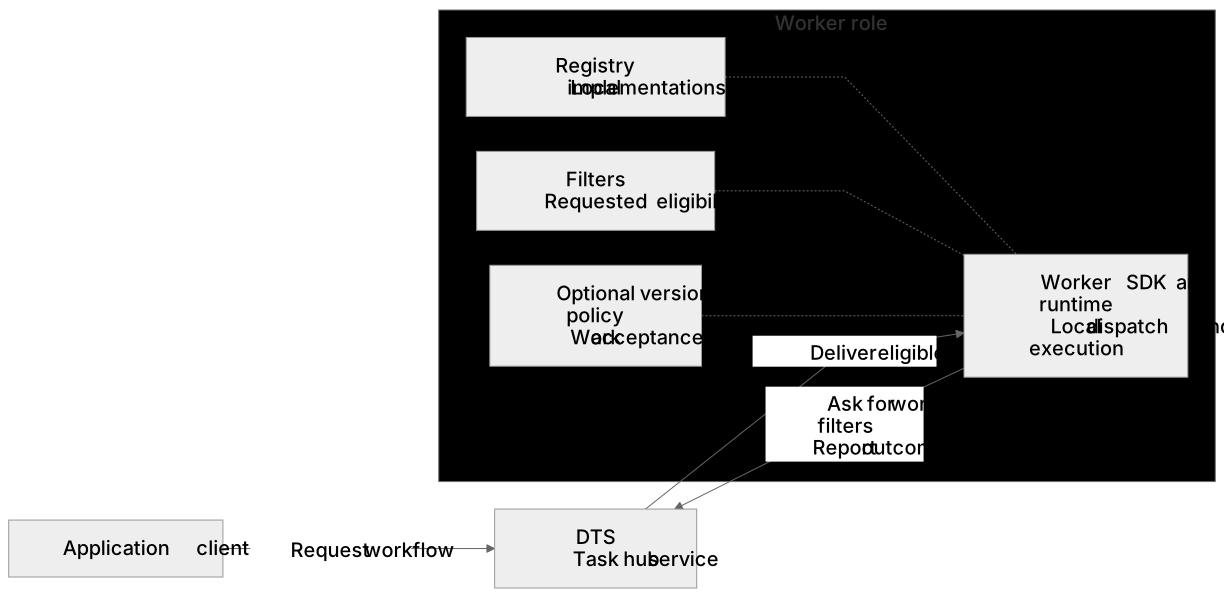
Figure 1A. The client requests an orchestration; the worker requests eligible work and reports outcomes. The registry, filters and optional version policy belong to worker configuration. DTS is shown only through its documented service contract.
An orchestrator still requests activities by name. Work item filtering lets DTS deliver those work items to eligible workers, without putting worker addresses into the workflow.
Here is a small, independently defined orchestration:
1
2
3
4
5
6
7
8
9
10
11
12
13
14
15
using System.Threading.Tasks;
using Microsoft.DurableTask;

public sealed class OrderRouting : TaskOrchestrator<string, string>
{
    public override async Task<string> RunAsync(
        TaskOrchestrationContext context, string orderId)
    {
        string validation = await context.CallActivityAsync<string>(
            "ValidateOrder", orderId);
        string shipping = await context.CallActivityAsync<string>(
            "ShipOrder", orderId);
        return $"{validation}; {shipping}";
    }
}
The validation activity throws if the order is invalid. Its returned string is informational, not an approval flag. The activity implementations are outside this example.
The orchestration knows the logical task name ShipOrder, not the shipping worker’s server address. CallActivityAsync creates an action and a local result task, not a direct call to that host or an immediate durable record. DTS later delivers eligible work; the receiving worker finds its registered implementation and reports the result, which the orchestration uses through history. Shipping workers can move or scale without changing server addresses in the workflow. The activity’s own external connections are still ordinary application networking.
Configure the worker, then start the host
For an ordinary specialist worker, register only its own tasks and let the SDK generate the filters. The shipping project’s Program.cs can look like this. ShipOrderActivity is the project’s existing unversioned TaskActivity<string, string> implementation; register its dependencies in builder.Services as usual before building the host. Set ConnectionStrings:Dts to the shared scheduler and task hub connection value. Its environment variable form is ConnectionStrings__Dts.
1
2
3
4
5
6
7
8
9
10
11
12
13
14
15
16
17
18
19
20
21
22
using System;
using Microsoft.DurableTask.Worker;
using Microsoft.DurableTask.Worker.AzureManaged;
using Microsoft.Extensions.Configuration;
using Microsoft.Extensions.DependencyInjection;
using Microsoft.Extensions.Hosting;

HostApplicationBuilder builder = Host.CreateApplicationBuilder(args);
string connectionString = builder.Configuration.GetConnectionString("Dts")
    ?? throw new InvalidOperationException("Configure ConnectionStrings:Dts.");

builder.Services.AddDurableTaskWorker()
    // Map the durable activity name to this worker's local handler.
    .AddTasks(registry =>
        registry.AddActivity<ShipOrderActivity>("ShipOrder"))
    // Request work for the registered tasks.
    .UseWorkItemFilters()
    .UseDurableTaskScheduler(connectionString);

using IHost host = builder.Build();
// Start the host and keep the worker running until shutdown.
await host.RunAsync();
The worker configuration block registers a worker; it does not start one. Build() creates the host, and RunAsync starts it and keeps it running until shutdown.
ShipOrderActivity still needs to do the real shipping work. Returning a cheerful string is not a shipping integration, however much easier that would make the example.
The other deployments use the same Program.cs pattern, with their own registrations inside AddTasks:
| Worker deployment | Its registration |
|---|---|
| Coordination | registry.AddOrchestrator<OrderRouting>("OrderRouting") |
| Validation | registry.AddActivity<ValidateOrderActivity>("ValidateOrder") |
| Shipping | registry.AddActivity<ShipOrderActivity>("ShipOrder") |
The validation row likewise assumes an existing ValidateOrderActivity : TaskActivity<string, string> implementation and its registered dependencies, with the invalid order behavior described above. Every participating worker explicitly calls .UseWorkItemFilters(), connects to the same scheduler and task hub, and starts its host. For this SDK configuration, that explicit builder call is the filtering setup I rely on, not an assumed default.
The parameterless call generates filters from the completed registry and worker options for that worker when its options are resolved. It does not freeze a list of whichever registrations happen to appear above the call in the file. Finish configuring the host before building and starting it.
What can you select?
The custom filter object is DurableTaskWorkerWorkItemFilters, in Microsoft.DurableTask.Worker. These are properties on that object. Each property holds a collection; the entry types are nested inside DurableTaskWorkerWorkItemFilters.
| Property | Entries | Selects |
|---|---|---|
Orchestrations | OrchestrationFilter, each with Name and a Versions list | Orchestration names and versions. |
Activities | ActivityFilter, each with Name and a Versions list | Activity names and versions. |
Entities | EntityFilter, each with Name only | Entity names, not individual entity keys or operations. |
These next three are calls on the worker builder returned by AddDurableTaskWorker(). They are not members of the filter object.
| Builder call | Behavior |
|---|---|
UseWorkItemFilters() | Generate selections from the completed registry and worker options. |
UseWorkItemFilters(filters) | Use the supplied custom object instead of generating selections. This configures whole collections, not an incremental filter addition. |
UseWorkItemFilters(null) | Disable filtering. This does not pause the worker or mean “receive nothing.” |
You can select multiple names and concrete versions for orchestration and activity work. An entity filter has no version property. This is not a predicate engine for payloads, tenants, instance IDs, hardware, or priorities. There is no documented name glob, regex, or prefix syntax here: use the actual registered name, not Ship*.
Creating new DurableTaskWorkerWorkItemFilters() without populating Orchestrations, Activities or Entities leaves all three collections empty. That is not a documented way to request no work, so don’t rely on it as a pause switch. To stop processing, stop the worker. The .UseWorkItemFilters(null) method call above explicitly disables filtering; it is not a pause switch either.
Optionally advertise less than you register
Sometimes the code a worker contains and the work it should receive are intentionally different. Here, the registry contains ShipOrder and CancelShipment, both at version "1", but the filter advertises only ShipOrder version "1".
The optional example below replaces the worker configuration block in Program.cs: the block that starts with builder.Services.AddDurableTaskWorker() and ends with .UseDurableTaskScheduler(connectionString). Put ShippingSubset.Configure(builder.Services, connectionString, shipOrder, cancelShipment); in that position, after reading the connection string and before builder.Build(). The application supplies shipOrder and cancelShipment as its existing activity instances, with the types shown below. Keep the configuration reading, Build() and await host.RunAsync() in place; do not append a second default worker registration.
1
2
3
4
5
6
7
8
9
10
11
12
13
14
15
16
17
18
19
20
21
22
23
24
25
26
27
28
29
30
31
32
33
34
35
using Microsoft.DurableTask;
using Microsoft.DurableTask.Worker;
using Microsoft.DurableTask.Worker.AzureManaged;
using Microsoft.Extensions.DependencyInjection;

public static class ShippingSubset
{
    public static void Configure(
        IServiceCollection services,
        string connectionString,
        TaskActivity<string, string> shipOrder,
        TaskActivity<string, string> cancelShipment)
    {
        var filters = new DurableTaskWorkerWorkItemFilters
        {
            Activities = new[]
            {
                new DurableTaskWorkerWorkItemFilters.ActivityFilter(
                    "ShipOrder", new[] { "1" }),
            },
        };

        services.AddDurableTaskWorker()
            .AddTasks(registry =>
            {
                registry.AddActivity(
                    "ShipOrder", new TaskVersion("1"), () => shipOrder);
                registry.AddActivity(
                    "CancelShipment", new TaskVersion("1"),
                    () => cancelShipment);
            })
            .UseWorkItemFilters(filters)
            .UseDurableTaskScheduler(connectionString);
    }
}
The versioned registrations supply implementations; the ActivityFilter supplies a name and version selection. This worker can instantiate both activities, but asks to receive only the advertised one. If the workflow needs CancelShipment, an eligible worker elsewhere must serve it.
The caller also needs to request the version you advertised. For this optional example, use this separate orchestration rather than assuming the earlier unversioned OrderRouting call selects version 1:
1
2
3
4
5
6
7
8
9
10
11
12
13
14
using System.Threading.Tasks;
using Microsoft.DurableTask;

public sealed class ShippingRequest : TaskOrchestrator<string, string>
{
    public override Task<string> RunAsync(
        TaskOrchestrationContext context, string orderId)
        => context.CallActivityAsync<string>(
            "ShipOrder", orderId,
            options: new TaskOptions
            {
                Version = new TaskVersion("1"),
            });
}
Register ShippingRequest on an orchestration worker with registry.AddOrchestrator<ShippingRequest>("ShippingRequest"), that worker’s own parameterless filters, and the same task hub and host startup pattern. TaskOptions.Version here requests activity version "1"; it does not register the activity on the caller.
Keep the exact name and version values aligned across the call, filter, and implementation. The SDK’s custom filter validator checks that the selected names are registered in the corresponding work kind. It does not check that every advertised version has an implementation. If you also configure UseVersioning(...), its acceptance policy must agree with those selections. A broader advertisement cannot supply missing code.
For most specialist services, the first pattern is simpler: register only what the role needs and generate its filters. Use the custom subset when that separation is actually useful, not just because another configuration object exists.
What happens between this worker and DTS?
The public SDK and documented service contract give us the useful sequence without needing to know the scheduler’s internal implementation:
Configure the host. Register the local implementations and choose generated or custom filters. In the
GrpcDurableTaskWorkerconstructor, the SDK reads this worker’s named filter configuration. This single line omits the surrounding constructor;nameis the worker configuration name, not an activity name.1
this.workItemFilters = workItemFiltersMonitor?.Get(name);
Request work. The SDK includes the configured eligibility in its work request. This excerpt from
GrpcDurableTaskWorker.Processor.csshows the request construction, with the omitted concurrency and capability fields marked:1 2 3 4 5 6 7
return this.client!.GetWorkItems( new P.GetWorkItemsRequest { // Concurrency and capability fields omitted. WorkItemFilters = this.worker.workItemFilters?.ToGrpcWorkItemFilters(), }, cancellationToken: cancellation);
This is worker SDK code using the public request contract, not the service’s matching implementation. The worker is asking DTS for work, not the orchestrator calling the shipping host.
Receive matching work. DTS delivers work according to the documented matching contract. If no eligible worker is available, that work item stays pending.
Run the registered implementation. In the activity handling path of
GrpcDurableTaskWorker.Processor.cs, the SDK looks up a registered activity using the name and requested version from the received work.scope.ServiceProvidersupplies local dependency injection. Here is the lookup excerpt, with the surrounding handler omitted:1 2 3 4 5 6 7
bool found = this.worker.Factory is IVersionedTaskFactory versionedFactory ? versionedFactory.TryCreateActivity( name, requestedVersion, scope.ServiceProvider, out ITaskActivity? activity) : this.worker.Factory.TryCreateActivity(name, scope.ServiceProvider, out activity);
The final branch supports the other local factory interface; it is not fallback delivery to another worker. Execution happens only when
foundis true. Configured worker version checks still apply, and the worker reports the activity’s outcome through the normal protocol.
Configure the registry and filters before starting the host. For a change, rebuild or restart the worker with the new configuration; mutating a running worker’s filter object is not a documented hot update mechanism. Set the intended filters on every worker in a mixed pool. Enabling them only on the shipper does not restrict an unfiltered worker beside it.
Here’s why that separation matters when a worker is missing. Follow the shipping step of our primary unversioned example, after validation has completed: the validation worker cannot receive ShipOrder, so that work waits until an eligible shipping worker requests it. Its result becomes history for a later orchestration pass. The columns are roles, not required separate machines; arrows show conceptual order, not measured timing. Click to enlarge.
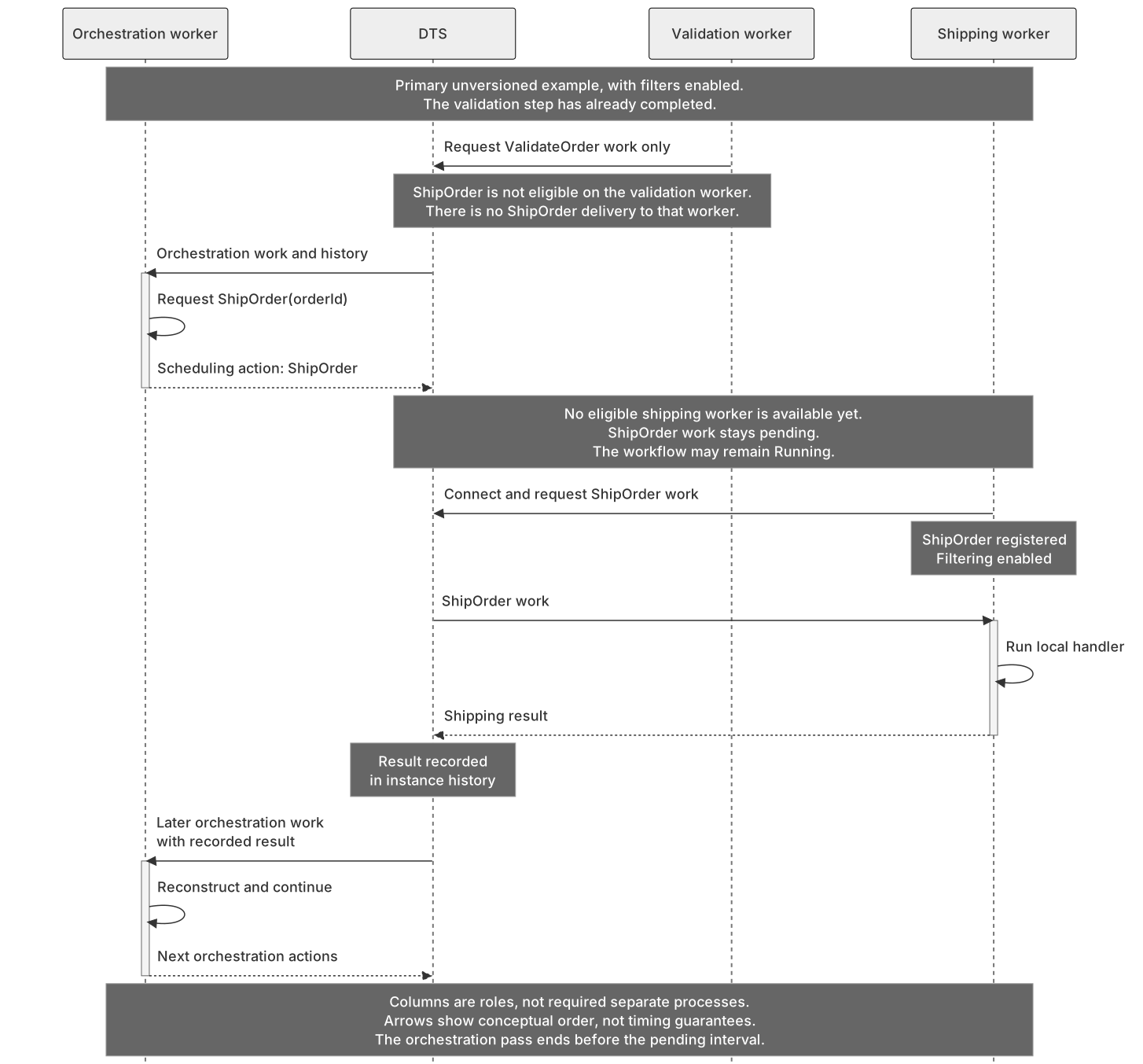
Figure 1B. No eligible shipping worker means a pending work item, not delivery to the validation worker. The workflow may remain Running while it waits. When shipping work is handled, the result reaches the orchestration through history, not a callback to the old invocation. This is the primary unversioned setup, not the optional custom subset.
What happens if the shipping deployment is missing?
With this filtered setup, the shipping work stays pending. The orchestration can still be Running, waiting for that result. There is no fallback that asks the validation worker to improvise a shipping implementation.
That makes deployment order important: deploy the handler before callers begin requesting it, keep task names and versions compatible, and monitor the backlog. Worker specialization gives you independent deployment and scaling choices. It does not configure an autoscaler for you.
One more boundary worth stating: filtering is routing, not authorization or tenant isolation. Worker identities and access controls still matter, as does access to whatever external systems the activities use. Sharing a task hub is not permission to skip those checks.
Keep the instance, change the next execution
Now suppose the workflow lives longer than a release cycle. We have a better implementation, but waiting for every existing instance to finish would be a fairly optimistic deployment plan.
Do we need to create a different workflow instance and somehow transfer the business identity to it?
Not necessarily. First, separate two terms. The instance is the logical workflow addressed by its instance ID. An execution is one generation of that instance. We can keep the instance while deliberately beginning another execution with a new version and a fresh execution history.
The API for that boundary is ContinueAsNew with ContinueAsNewOptions.NewVersion. It is not an assignment to context.Version, and it is not permission to change arbitrary code halfway through replay.
Version and backend scope. The released .NET v1.26.0 SDK exposes this API, and the public standalone migration sample shows the intended routing model. A compatible backend must support the version change, and the standalone worker must forward it. That is not a claim that every backend or every managed DTS deployment has the same feature rollout. Verify support in the environment you intend to use.
The next version can accept a different input shape. Here v1 waits for a count it already computes and puts that value into optional fields on v2’s input. V2 reuses it only when the count still means the same thing for the same immutable batch snapshot. Otherwise it calls its own counting activity. These fields are our chosen handoff, not a way for v2 to reach back into v1’s completed history.
In this example, v1 already calls CountRecordsV1 and ends with a continuation. We change what it passes at that existing boundary. Both counting activities are existing read only TaskActivity<string, long> implementations supplied by the application.
1
2
3
4
5
6
7
8
9
10
11
12
13
14
15
16
17
18
19
20
21
22
23
24
25
26
27
28
29
30
31
32
33
34
35
36
37
38
39
40
41
42
43
44
45
46
47
48
49
50
51
52
53
54
55
56
57
58
59
60
61
62
63
64
65
66
67
68
using System;
using System.Threading.Tasks;
using Microsoft.DurableTask;

public sealed record BatchInputV1(
    string SnapshotReference,
    bool MigrationRequested = false);

public sealed record BatchInputV2(
    string SnapshotReference,
    long? CarriedRecordCount = null,
    string? CountContract = null,
    bool MigrationRequested = false);

public sealed class BatchLoopV1 : TaskOrchestrator<BatchInputV1, long>
{
    public override async Task<long> RunAsync(
        TaskOrchestrationContext context, BatchInputV1 input)
    {
        if (input.MigrationRequested)
        {
            throw new NotSupportedException(
                "The migration payload returned to v1. Check version support.");
        }

        // This activity call was already part of the old execution's sequence.
        long recordCount = await context.CallActivityAsync<long>(
            "CountRecordsV1", input.SnapshotReference);

        context.ContinueAsNew(new ContinueAsNewOptions
        {
            NewVersion = "2",
            NewInput = new BatchInputV2(
                SnapshotReference: input.SnapshotReference,
                CarriedRecordCount: recordCount,
                CountContract: "record-count/v1",
                MigrationRequested: true),
            PreserveUnprocessedEvents = true,
        });

        return recordCount;
    }
}

public sealed class BatchLoopV2 : TaskOrchestrator<BatchInputV2, long>
{
    public override async Task<long> RunAsync(
        TaskOrchestrationContext context, BatchInputV2 input)
    {
        if (input.CarriedRecordCount is long carried
            && carried >= 0
            && input.CountContract == "record-count/v1")
        {
            return carried;
        }

        long recordCount = await context.CallActivityAsync<long>(
            "CountRecordsV2", input.SnapshotReference);

        if (recordCount < 0)
        {
            throw new InvalidOperationException(
                "The counting activity returned an invalid negative count.");
        }

        return recordCount;
    }
}
long? makes missing different from zero. With the matching contract, 0 is a valid carried count and is reused. A missing or negative count, or a different contract, sends v2 to CountRecordsV2. A negative result from that activity fails instead of being accepted as a count.
CountContract is an application compatibility rule: the value must describe this same immutable snapshot using our record-count/v1 definition. The tag is not an SDK check or proof that the input is trustworthy. If the meaning of the count, schema, or business rules changes, validate or translate the carried data, or change the accepted contract and recompute. Presence alone is not enough.
The payload in NewInput must match v2’s serialized input contract. The SDK adapter deserializes the input into the selected implementation’s input type. It is not a CLR cast from BatchInputV1 to BatchInputV2, or an automatic conversion between arbitrary schemas. V1 constructs the new shape, and its fields, value types and serializer settings must agree with v2.
V2 can take different activity paths because it starts another execution rather than replaying v1’s completed history. Its code must still be compatible with its own history as it accumulates. The old local variables, tasks and continuation do not cross the boundary.
Both input types retain SnapshotReference and MigrationRequested. The guard catches a migrated payload routed back to v1 only if the payload and marker arrive and the converter can read them as BatchInputV1. A stricter converter can fail before the guard. The public migration example highlights the backend dependency; this check is not proof of backend or serializer compatibility.
Accepting a version is not the same as implementing it
We need both the worker’s version acceptance policy and the right registered implementation. A worker accepting older work does not magically contain the older code.
Here is the configuration inside an existing Generic Host setup. builder is the host builder, and connectionString identifies the same task hub. countRecordsV1 and countRecordsV2 are the application’s existing TaskActivity<string, long> instances, with their real dependencies supplied by the application:
1
2
3
4
5
6
7
8
9
10
11
12
13
14
15
16
17
18
19
20
21
22
23
24
25
26
27
28
29
30
31
32
33
34
using Microsoft.DurableTask;
using Microsoft.DurableTask.Client;
using Microsoft.DurableTask.Client.AzureManaged;
using Microsoft.DurableTask.Worker;
using Microsoft.DurableTask.Worker.AzureManaged;
using Microsoft.Extensions.DependencyInjection;

builder.Services.AddDurableTaskWorker(worker =>
{
    worker.AddTasks(registry =>
    {
        registry.AddOrchestrator("BatchLoop", new TaskVersion("1"),
            () => new BatchLoopV1());
        registry.AddOrchestrator("BatchLoop", new TaskVersion("2"),
            () => new BatchLoopV2());
        registry.AddActivity("CountRecordsV1", new TaskVersion("1"),
            () => countRecordsV1);
        registry.AddActivity("CountRecordsV2", new TaskVersion("2"),
            () => countRecordsV2);
    });
    worker.UseVersioning(new DurableTaskWorkerOptions.VersioningOptions
    {
        Version = "2",
        DefaultVersion = "2",
        MatchStrategy =
            DurableTaskWorkerOptions.VersionMatchStrategy.CurrentOrOlder,
        FailureStrategy =
            DurableTaskWorkerOptions.VersionFailureStrategy.Reject,
    });
    worker.UseWorkItemFilters();
    worker.UseDurableTaskScheduler(connectionString);
});
builder.Services.AddDurableTaskClient(
    clientBuilder => clientBuilder.UseDurableTaskScheduler(connectionString));
Both classes use the same logical name, BatchLoop, with separate version registrations. This worker’s explicit CurrentOrOlder policy permits version 1 work alongside version 2, and the registry supplies both implementations. Those are two separate requirements.
In this SDK path, an activity call without an explicit TaskOptions.Version inherits the orchestration execution’s version. The two count activities are therefore registered at versions "1" and "2" to match their callers.
Reject sends mismatched work back for another attempt. It does not upgrade the work or guarantee that an eligible worker exists. Keep support for version 1 while executions still need it.
After starting the host, an already resolved DurableTaskClient client can schedule the illustrative version 1 instance:
1
2
3
4
5
6
7
string instanceId = await client.ScheduleNewOrchestrationInstanceAsync(
    "BatchLoop",
    input: new BatchInputV1("snapshot-42"),
    options: new StartOrchestrationOptions
    {
        Version = new TaskVersion("1"),
    });
The starter’s await returns the instance ID after scheduling, not after the workflow finishes. "snapshot-42" is an illustrative reference to immutable data, not a claimed count. The continuation keeps that instance ID and creates a new execution at version 2, using the BatchInputV2 payload v1 constructed.
A separate instance can start directly at version "2" with input: new BatchInputV2("snapshot-42") and Version = new TaskVersion("2") in its start options. With no carried count or contract, it calls CountRecordsV2. That is a direct start, not the migration of the instance above.
Read the next diagram as data flow between two executions of one instance. Follow the count from the awaited v1 activity into NewInput, then follow v2’s reuse check. The fork is application logic: use a compatible carried value, including zero, or run CountRecordsV2. No completed v1 history or live CLR objects move along the arrows. Click to enlarge.

Figure 2. Same instance, new execution, explicit input data. Optional input fields are our handoff contract, not inherited activity results. Unprocessed external events may also be preserved separately. A compatible backend and an eligible registered v2 implementation are required; arrows show logical data flow, not measured execution.
Put the boundary where the workflow already has one
V1 already counts the snapshot before reaching its existing final continuation call. The migration changes the input it carries across that boundary and the requested next version. Preserve the earlier durable calls, their ordering, names, versions, inputs and compatible serialization behavior. Do not insert new work into an earlier replay just because v2 will use a different flow.
Finish and await work whose results matter before continuing. Outstanding operation results can be discarded at the boundary. That does not mean an activity already affecting an external system has been cancelled or rolled back.
PreserveUnprocessedEvents = true is explicit here and is also the default for this .NET option. It preserves unprocessed external events for the next execution; false discards them. The new code must understand both the carried input and any preserved event payloads. Mapping NewInput does not convert those event payloads. Fresh history does not mean an empty workflow with no starting records, and it does not promise that the service purges every diagnostic record.
Finally, return recordCount immediately after ContinueAsNew exits v1’s method. On the supported continuation path, the continuation action and NewInput, not this return value, define the next execution. V1 does not call v2 directly or wait for it to finish. V2’s later return completes this finite example.
This is an action from a running orchestration, not an operator command for reviving a failed one. Putting it in finally is not a reliable plan for recovering an uncaught failure.
Which brings us to the third capability.
Repair a failed instance without rerunning every successful step
Consider an import workflow: extract a batch, transform it, then load it into a destination. Extraction and transformation succeed and their results are recorded. Loading then fails because of a configuration problem.
You fix the configuration. Do you have to request the whole import again?
For an eligible failed instance, rewind provides a more targeted recovery path. It is an explicit operator request after a failure, not ordinary replay, not a retry policy, and not a version migration.
Rewind is more than setting Failed back to Running. The .NET client contract describes a new execution ID for the same instance, with recovery history that lets failed work run again. Compatible orchestration code runs against that history; its old stack is not resumed.
Here is the workflow we’ll follow. The activity results are references to the extracted and transformed data, not large datasets carried through the example:
1
2
3
4
5
6
7
8
9
10
11
12
13
14
15
16
17
18
using System.Threading.Tasks;
using Microsoft.DurableTask;

public sealed record LoadRequest(string BatchId, string ManifestReference);

public sealed class ImportBatch : TaskOrchestrator<string, string>
{
    public override async Task<string> RunAsync(
        TaskOrchestrationContext context, string batchId)
    {
        string extracted = await context.CallActivityAsync<string>(
            "ExtractBatch", batchId);
        string transformed = await context.CallActivityAsync<string>(
            "TransformBatch", extracted);
        return await context.CallActivityAsync<string>(
            "LoadBatch", new LoadRequest(batchId, transformed));
    }
}
Register ImportBatch and the named activity implementations on compatible workers in the same hub. Their actual I/O is omitted. This illustration uses no durable timers and no retry policy that creates durable timers: the current management documentation excludes orchestrations that use durable timers from rewind.
Suppose the loading failure makes this instance Failed. Before requesting recovery, fix the cause and reconcile any partial writes. The loader may have changed the destination before reporting failure. The destination has not agreed to forget that just because we found a useful SDK method.
For this import, recovery looks like this:
ExtractBatch’s successful recorded data reference is reused by replay, without another extraction.TransformBatch’s successful recorded manifest reference is reused, without another transformation.- The failed
LoadBatchwork can be attempted again. Partial destination writes are still there unless the application has reconciled or compensated for them.
The SDK describes replacement history excluding failed activities and sub orchestrations, not clearing every successful result. Relevant failed sub orchestrations can be rewound recursively, and new records are appended as work runs again. This describes the recovery history contract, not physical database deletion or audit retention.
The caller chooses which eligible failed instance to recover, when to request it, and a diagnostic reason. RewindInstanceAsync has no parameter for selecting activities, an event range, an arbitrary checkpoint, replacement input or output, or individual successful results to discard. It is not a history editing API.
An administrative application or recovery automation can use this helper:
1
2
3
4
5
6
7
8
9
10
11
12
13
14
15
16
17
18
19
20
21
22
23
24
25
26
27
using System;
using System.Threading;
using System.Threading.Tasks;
using Microsoft.DurableTask.Client;

public static class ImportRecovery
{
    public static async Task RequestRewindAsync(
        DurableTaskClient client,
        string instanceId,
        string reason,
        CancellationToken cancellation = default)
    {
        OrchestrationMetadata? instance = await client.GetInstanceAsync(
            instanceId, getInputsAndOutputs: false,
            cancellation: cancellation);

        if (instance?.RuntimeStatus != OrchestrationRuntimeStatus.Failed)
        {
            throw new InvalidOperationException(
                "Rewind requires an existing Failed instance.");
        }

        await client.RewindInstanceAsync(
            instanceId, reason, cancellation);
    }
}
reason should describe the repair or reconciliation that actually happened. The state check is a useful preflight, not an atomic lock: another operator can act between the read and the request. The backend still validates eligibility. Rewind is for Failed instances, not Running, Pending, Terminated, or Completed ones.
That does not restore a saved instruction pointer, and it does not automatically change the workflow’s version. Keep the earlier action sequence replay compatible, and keep the referenced data and serialization contracts available.
The next diagram separates the failed execution from the operator’s repair and rewind request. The initial orchestration passes are condensed; the recorded successes are shown so it is clear what the later execution can reuse. There is no arrow that undoes the destination’s writes. Click to enlarge.
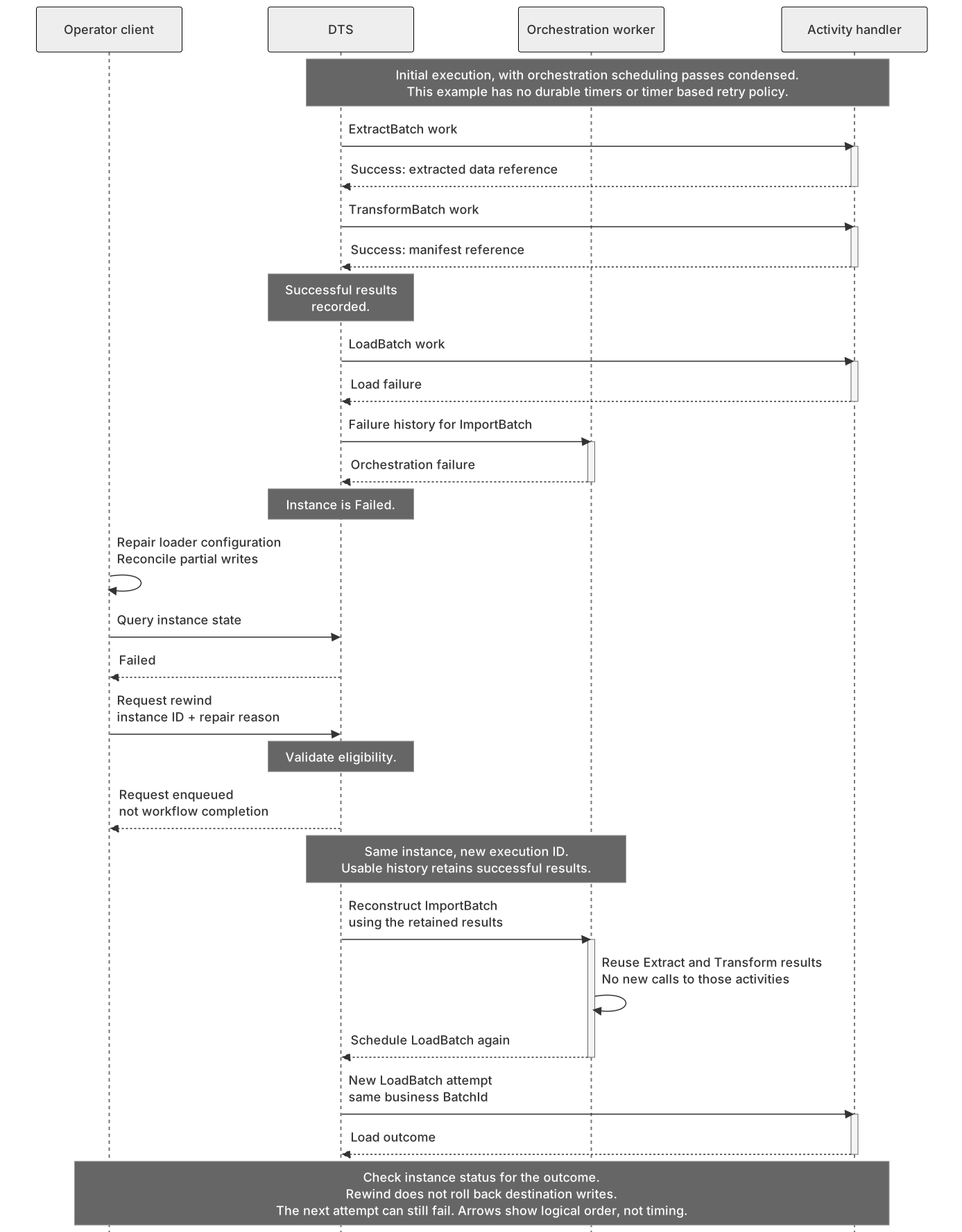
Figure 3. Repair first, then request rewind. Successful recorded results support reconstruction; failed loading work may run again. This is a conceptual successful scheduling path for an eligible instance, not an executed failure test or a guarantee that the next load attempt succeeds.
The important operational detail is what the management await means. RewindInstanceAsync completes when the request is enqueued, not when the import is finished. Query the instance afterward. Cancelling that call cancels enqueueing; it does not undo a rewind that was already accepted. If the request’s outcome is uncertain, inspect the instance rather than blindly repeating the operator action.
This example is scoped to the public .NET API and a backend that supports rewind. Other clients, hosts, or providers should not be assumed to have identical support just because they share a backend name. An unsupported backend can reject the operation.
And please keep a business key for the loading operation. BatchId gives the destination something stable to deduplicate on, if the integration actually implements that contract. Merely passing the field does not create idempotency. An execution ID is a poor replacement here because rewind creates another execution.
Fix what broke, reconcile what may already have happened, then ask the failed instance to continue. Rewind is not external rollback, and a new attempt still has to handle its effects correctly.
The workflow is not the deployment
These capabilities solve different problems. Filtering chooses which workers can execute work. A continuation boundary deliberately moves the same instance into another execution and implementation. Rewind lets an operator request recovery after fixing an eligible failure, using the successful history that is still useful.
None of them removes the need for compatible code and data contracts, or careful handling of external effects. They give us better ways to manage those boundaries without building another workflow coordinator around the workflow coordinator.
That is what I meant by hidden gems. Once history and actions stop looking like magic, the interesting part is what they let us change safely around a running system.
Next, I’ll look at AI agents calling models and tools, and why durability matters when several agents coordinate their work. We’ll look at keeping progress and handling repeated effects in that setting too, with multiagent systems like Squad in mind :-)