


It started with a simple piece of curiosity: when I ask GitHub Copilot to create a dynamic workflow, how does it actually work behind the scenes?
You type a plain-English sentence — “build me a workflow that books a flight, a hotel, and a rental car” — and a moment later, Copilot has registered an executable multi-agent workflow in your session. Very cute. Very magical. Very “look, Mom, the agents planned my vacation.”
Except I don’t like magic in my runtimes. I wanted to know what was actually happening under the hood between my prompt and that running workflow. How does the model even know the workflow API? Is it baked into the model weights? Stuffed into a giant hidden system prompt? Loaded from a secret skill? Where does the generated code live on disk, and what actually executes it?
So I did what I always do when a feature feels like a black box: I started pulling threads. I traced the tool schemas through the CLI binary, inspected the session logs, and opened Procmon to watch which files the process actually touched on disk.
And of course, once I saw how the runtime builds and journals a workflow, the distributed-systems part of my brain (if you read my earlier post on Azure Durable Task Scheduler, you already know where this is going) couldn’t resist asking the next question: what happens if I kill the process right after the hotel is booked, before the rental car agent finishes?
Stick with me. What started as a peek behind the curtain turned into a great lesson in the difference between having a log of what happened and having a durable workflow you can actually resume.
Peeking Behind the Curtain: How Copilot Learns to Write a Workflow
When you ask Copilot to create a dynamic workflow, there’s no magic Markdown compiler turning your English into a state machine. It’s a very practical, three-step handshake between the native CLI runtime and the bundled Copilot SDK.
First, the native runtime exposes the workflow tools (dynamic_workflows_manage and run_dynamic_workflow) to the model through standard tool descriptions and schemas. If you trace the strings in the CLI (1.0.94-3 in my initial trace), they lead straight through the JavaScript bridge into the bundled prebuilds\win32-x64\runtime.node.
And right inside the tool description for dynamic_workflows_manage, the runtime leaves the model a breadcrumb: call operation: "guide" before authoring any workflow code.
So that’s step one. The model calls dynamic_workflows_manage({ operation: "guide" }), and the runtime hands back the local paths to the bundled SDK documentation:
1
2
%LOCALAPPDATA%\Programs\GitHub Copilot\copilot-sdk\docs\workflows.md
%LOCALAPPDATA%\Programs\GitHub Copilot\copilot-sdk\index.d.ts
(Depending on how you installed Copilot CLI, that path might live under %LOCALAPPDATA%\copilot\pkg\win32-x64\<version>\copilot-sdk\docs\workflows.md instead — which is why the guide operation returns the exact path for your active install rather than hardcoding it.)
Step two is refreshingly low-tech: the model simply calls view on that workflows.md path and reads the manual. Literally. The SDK workflow guide enters the context window as a normal tool result, teaching the model the exact shape of defineWorkflow, ctx.step, ctx.agent, and ctx.parallel.
Step three is turning that knowledge into a runnable extension. In the author flow, the model calls dynamic_workflows_manage({ operation: "author", meta, run }), passing the workflow metadata and the JavaScript run function body. The host validates it, wraps it in a small ES module scaffold under the session’s extensions\<name>\extension.mjs folder, drops an .authored-workflow marker next to it, and reloads the extension into the session:
1
2
3
4
5
6
7
import { defineWorkflow, joinSession } from "@github/copilot-sdk/extension";

const workflow = defineWorkflow({
    /* generated meta and run omitted */
});

await joinSession({ workflows: [workflow] });
Notice the clean division of labor: the model writes the meta declaration and the run body; the host writes the import and joinSession boilerplate; and @github/copilot-sdk/extension resolves to the bundled SDK inside the extension host. Creating and registering the workflow doesn’t run it — execution is a separate step via run_dynamic_workflow.
Watching It Happen Live in the CLI
Reading traces is one thing; watching it happen live is much more fun. I spun up a fresh Copilot CLI session (running 1.0.99-2 through cli-tunnel) and asked it to build a Seattle trip-planning workflow — register only, don’t execute yet.
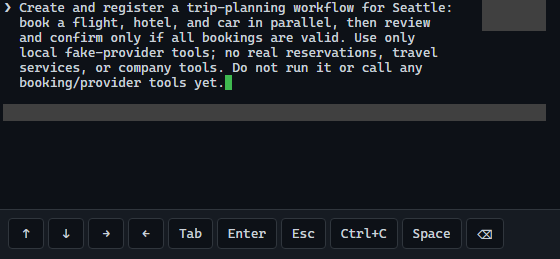
Asking Copilot CLI to create and register the Seattle trip-planning workflow.
Right on cue, the first thing Copilot did was ask permission to read the bundled workflows.md guide from disk:
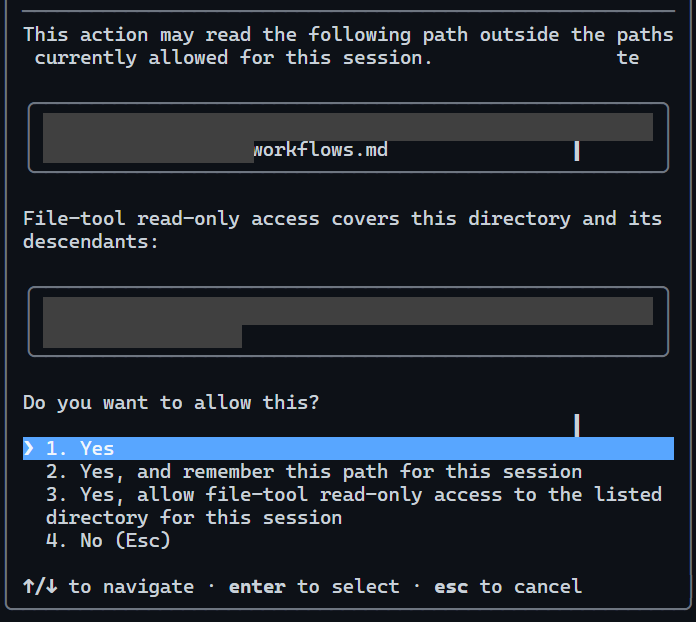
Copilot CLI asking permission to read the bundled copilot-sdk/docs/workflows.md guide before writing a single line of workflow code.
In this newer CLI version (1.0.99-2), instead of the single-shot author call, Copilot used the extension lifecycle directly — guide → scaffold → edit → reload → inspect — and registered seattle-trip-planning with five ctx.step operations (three parallel simulated bookings, a review step, and a guarded confirmation) without executing it:
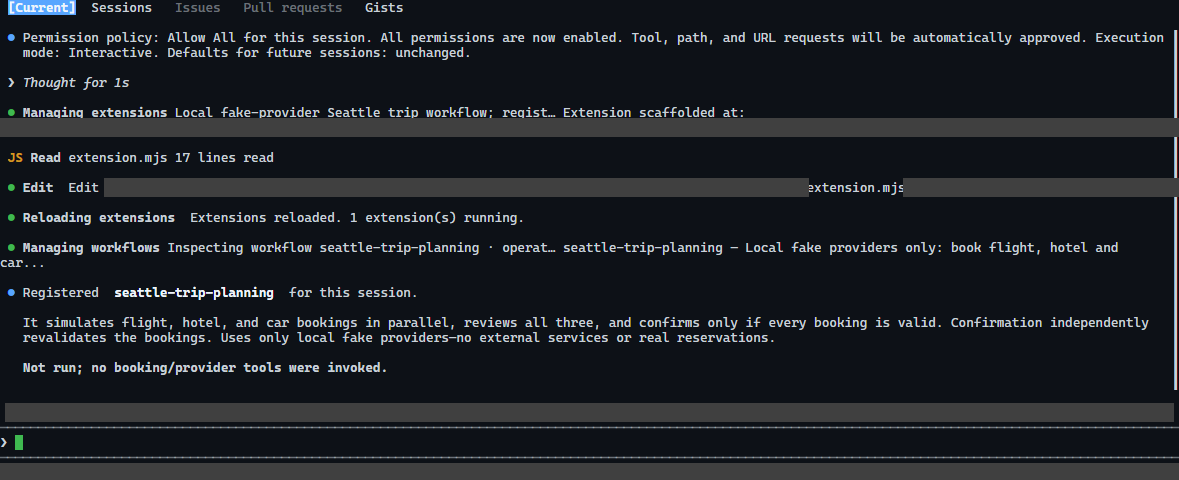
The workflow is scaffolded, reloaded, and verified in the registry — ready to run, with zero bookings made yet.
Because I like to verify what happened behind the curtain, I checked the creation turn from two angles. First, I queried the session’s recorded tool execution log to see the exact sequence of tool calls (guide returning the path → view reading workflows.md → scaffolding the extension → reading and patching extension.mjs):
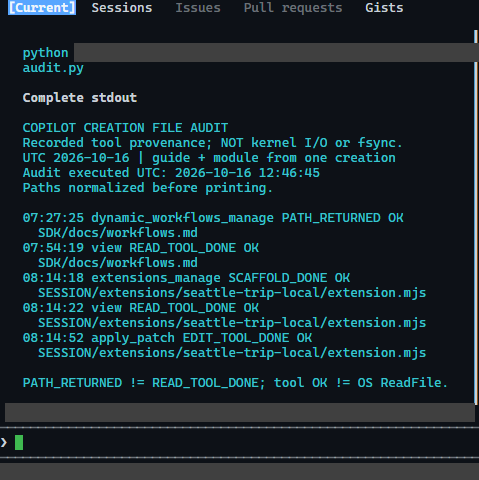
Inspecting the session’s tool log: guide returns the SDK doc path, view reads workflows.md, and the extension scaffold gets patched in place.
And second, because nothing beats OS-level ground truth, I opened Sysinternals Process Monitor (Procmon) and watched the process touch copilot-sdk\docs\workflows.md on disk:
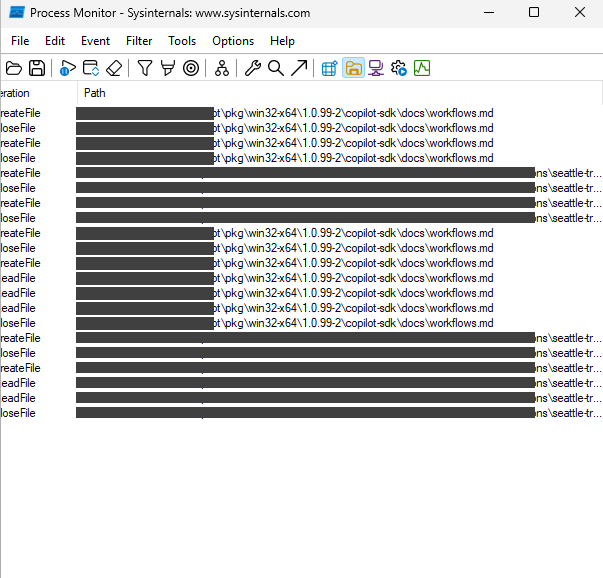
Procmon catching the file system accesses to the installed copilot-sdk\docs\workflows.md guide on disk.
When you run that workflow on the happy path — say, a simulated trip from SFO to Seattle for November 10–14, 2026 — it flies through in one shot and prints a clean booking table:
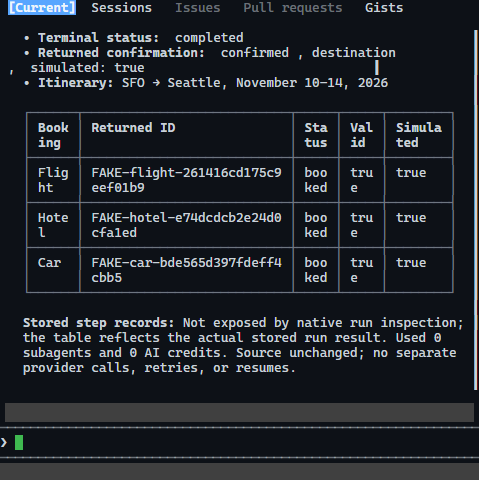
The happy path: all three simulated bookings complete and the trip confirms cleanly on the first attempt.
What Copilot Actually Writes When You Don’t Coach It
Before we break things, it’s worth looking at the code Copilot generated when I gave it an open-ended prompt in a fresh desktop session:
Create a Copilot dynamic workflow that plans a trip: given a destination, book a flight, a hotel and a rental car, review booking results, then confirm. Create/register only, do not execute or make reservations.
I deliberately didn’t mention Durable Task Scheduler, idempotency keys, or replay boundaries. I wanted to see what “natural” Copilot workflow code looks like out of the box.
To its credit, it didn’t write a naive “call three things and print success” script. It set up three parallel booking agents, followed by a fourth review agent, followed by a guarded confirmation step:
1
2
3
4
5
6
7
8
9
const services = ["flight", "hotel", "rental car"];
const results = await ctx.parallel(services.map((service) => () => ctx.agent(
    `Book the ${service} for a trip to ${JSON.stringify(tripDestination)}. ` +
    "Use available booking tools, actual service responses, and only travel details, constraints, and authorization already supplied by the user. " +
    "If essential details, authorization, or booking tools are missing, return needs_input and explain what is needed. " +
    "Return booked only after the travel service confirms the reservation, with its actual confirmation number. " +
    "If the booking fails, return failed with the reason. Never invent a reservation or confirmation number.",
    { label: `Book ${service}`, schema: bookingSchema },
)));
It even added structured schema checks (booked, needs_input, failed), verified that every booking returned a non-empty confirmation number, and had the review agent validate consistency before allowing the final ctx.step("confirm-trip", ...) to confirm the itinerary:
1
2
3
4
5
6
7
8
9
10
if (!allBooked || !review.approved || review.issues.length > 0) {
    return { status: "not_confirmed", destination: tripDestination, bookings, review };
}

return await ctx.step("confirm-trip", () => ({
    status: "confirmed",
    destination: tripDestination,
    bookings,
    review,
}));
As application logic goes, that’s genuinely thoughtful code.
As a durable distributed workflow, though, look closely at what’s missing. There are no provider idempotency keys. There’s no external orchestration state mapping a logical trip to a resumable run. And wrapping the final return object in ctx.step("confirm-trip", ...) checkpoints the final summary — it doesn’t magically wrap the external tool calls happening inside those three parallel ctx.agent(...) calls in durable, idempotent boundaries.
Which brings us to the fun part: pulling the plug.
Pulling the Plug Between “Booked” and “Finished”
Let’s run the crash test. (And before anyone worries about my corporate Amex: all bookings in these tests hit local fake booking providers. The Copilot workflows and agents were real; the airlines were not.)
I ran that exact generated trip workflow on the default local executor (1.0.95-3) and engineered a very specific crash point:
- Flight agent calls the flight tool, gets a simulated reservation, and finishes (
flight = 1). - Hotel agent calls the hotel tool, gets a simulated reservation, and finishes (
hotel = 1). - Car agent reaches the rental car tool — and I hold the request right before it creates the reservation (
car = 0). - While the workflow is mid-flight, I kill the CLI, extension host, and provider processes.
Then I reopened the exact same Copilot session.
Here’s the part that surprised me at first. This wasn’t a “the process died and wiped its memory” failure. The local journal had saved the completed flight and hotel records. The fake provider receipts were sitting right there on disk. Copilot remembered the bookings.
So I asked it to resume the interrupted run. And the runtime came back with a flat refusal:
was interrupted before it settled durably and cannot be resumed
The run was marked error (reason: interrupted, canResume: false). Even worse, the old rental car agent row was still stuck reporting running in storage after the process had died, leaving a phantom live-agent count of 1.
How Copilot Actually Maintains Its Native Ledger (and Why It Still Wasn’t Enough)
To understand why Copilot remembered the bookings but still refused to continue, I looked at how the SDK and native CLI actually maintain workflow state under the hood (anchored in nodejs/src/session.ts and src\runtime\src\workflows\store.rs in the native runtime).
Copilot’s default local workflow runner is not stateless. When a workflow starts, the native runtime mints a runId and an active executionToken for that attempt, and every method on ctx talks back to the native session store over JSON-RPC:
ctx.step(key, producer)is a read-through, write-through memoization cache backed by the native ledger (session.workflow.journal.getandsession.workflow.journal.put).ctx.agent(prompt, options)callssession.workflow.agent, which spawns the sub-agent and records a full lifecycle row (agentId,phaseId,status,resolvedModel,startedAt,completedAt,activeMs, plus consumed sub-agent and token accounting on the run envelope).ctx.logandctx.phasebatch ordered progress lines throughWorkflowProgressBufferand flush them viasession.workflow.log.
Look at the ctx.step implementation in nodejs/src/session.ts — it’s super clean:
1
2
3
4
5
6
7
8
9
10
11
12
13
14
15
16
17
18
19
20
21
22
23
24
25
const cached = await awaitWorkflowOperation(
    () =>
        self.rpc.workflow.journal.get({
            runId: params.runId,
            executionToken: params.executionToken,
            key,
        }),
    controller.signal
);
if (cached.hit) {
    return cached.resultJson;
}

const result = await producer();
await awaitWorkflowOperation(
    () =>
        self.rpc.workflow.journal.put({
            runId: params.runId,
            executionToken: params.executionToken,
            key,
            resultJson: result,
        }),
    controller.signal
);
return result;
So why couldn’t it resume if journal.put and workflow.agent had already written the completed outputs to disk?
Because in the native store, having journal entries on disk is not what makes a run resumable. A run is only marked canResume: true when the attempt settles cleanly at a controlled checkpoint (for example, pauseAtCheckpoint). When you kill the process mid-flight while an executionToken is still active, the runtime sees an ungracefully severed attempt. On rejoin, it marks the run envelope as status: "error", reason: "interrupted", and canResume: false — and any call to session.workflow.resume (resumeFromRunId) gets rejected before it ever touches the step journal.
To verify that directly against journal.get / journal.put, I reproduced the exact same crash boundary in the 1.0.99-2 CLI with a deterministic step-only version (seattle-trip-interruption-demo). All three parallel bookings and the review step finished and were written to the native step journal via session.workflow.journal.put, and the workflow paused at a file gate right before final confirmation (WAITING_FOR_OPERATOR_RELEASE):
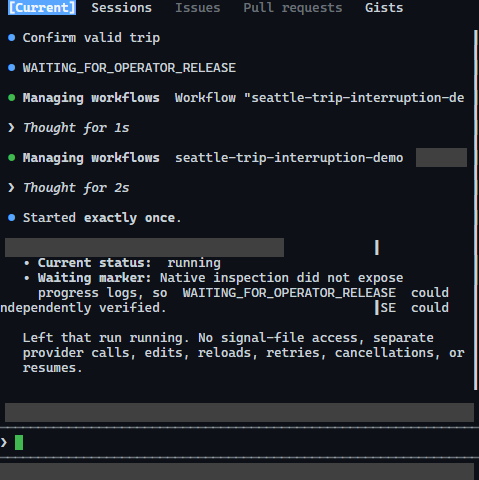
Pausing the workflow right before final confirmation — three bookings and the review step are already completed and saved in the local journal.
I killed the CLI and its workers, reopened the same conversation, and called run_dynamic_workflow with resumeFromRunId for that run. Same result:
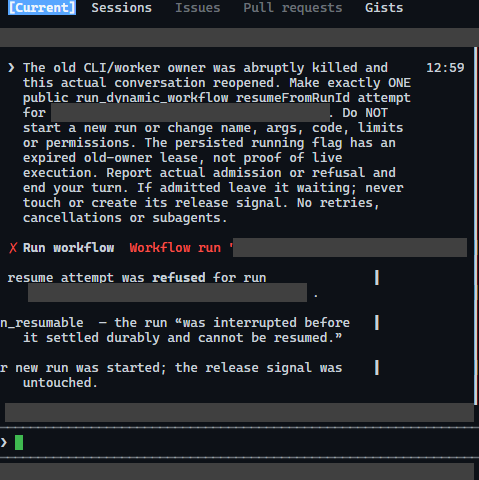
Reopening the session and attempting resumeFromRunId: the journal still has all four completed step results, but the runtime refuses to resume the interrupted run.
All four completed step outputs were still sitting in the database byte-for-byte intact. The ledger remembered the data, but the crashed attempt lost execution authority.
That’s the distinction that’s so easy to miss when you only test the happy path:
Remembering completed work and being able to resume a workflow are two completely different capabilities.
A ledger tells you what happened before the crash. A durable orchestrator knows how to replay that history, re-establish execution authority, and pick up at the exact next step without re-running completed work.
Wiring in Durable Task Scheduler (and Where the Native Boundary Pushes Back)
This is the exact problem space Azure Durable Task Scheduler (DTS) was built for. So I built an experimental fork of copilot-sdk to see what it takes to plug DTS into joinSession.
I added an optional WorkflowExecutor seam so an extension can bring its own durable execution engine while defaulting to normal local behavior if omitted:
1
2
3
4
5
6
7
8
export interface WorkflowExecutor {
    execute(
        definition: WorkflowDefinition,
        invocation: WorkflowInvocation,
        host: WorkflowExecutionHost,
        signal: AbortSignal
    ): Promise<{ result?: JsonValue }>;
}
Under the hood, the architecture splits cleanly into three pieces:
- The client schedules or attaches to a deterministic DTS orchestration instance.
- The worker pulls work items and runs the JavaScript workflow code.
- The scheduler (DTS) persists the orchestration history across process crashes.
When a worker restarts after a crash, the replay adapter (workflow-replay.ts) walks the workflow code against the recorded JSON history in DTS. Every Agent, Step, and Progress call becomes a tracked activity. If DTS already has a recorded completion for step 1, replay returns the cached JSON immediately without re-invoking the agent or step, and advances until it hits the first unseen operation.
How Recovery Actually Works: The Carrier Run Pattern
Here’s the catch, though: WorkflowExecutor lives in the JavaScript SDK host, while resumeFromRunId is gated by the native CLI runtime. Teaching the JavaScript layer about DTS doesn’t magically rewrite the native binary’s rule that an interrupted native run ID is non_resumable.
So how do you recover an interrupted DTS-backed workflow when the native CLI refuses resumeFromRunId?
You use a new native run as a carrier for the existing DTS orchestration instance.
I tested this end-to-end using the official changed-file code review workflow (review-changed.mjs) running against a local DTS emulator. The workflow reviews two files in sequence: a cart-total calculation (which has a bug: reduce missing its initial 0 accumulator) and a discount-price function (which accidentally subtracts a percentage instead of multiplying).
- On Run 1, the first review agent finished analyzing the cart fixture (
492 bytesof structured review output) and DTS checkpointed the completion. - Before the second review agent could finish, I killed the process.
- After reopening, instead of asking the native CLI to resume the dead native run ID, I launched a fresh native carrier run configured via
workflow-dts.tsto attach to the original DTS instance ID (verifying that the workflow scope, arguments, and code hash matched).
It worked like a charm.
The carrier run attached to the existing DTS orchestration, replayed past the first step by reusing the exact 492-byte cart review from DTS history, and spawned only one new agent to finish the discount-file review. Across the crash and recovery, only two workflow agents ever ran — one per file.
Is it seamless UI magic yet? Not quite. Because the carrier is a new native run, the CLI UI doesn’t automatically rehydrate the old Review phase progress bars from the dead run, and you still have to manage your logical run mapping and budgets across attempts (plus make sure your external tools carry idempotency keys if a worker dies right after an API call succeeds). Honest engineering trade-offs — but the core replay mechanics are rock solid.
Where This Leaves Us
I started this whole rabbit hole just wanting to know how Copilot turns a plain-English sentence into a runnable workflow.
What I love about looking under the hood here is how pragmatic the design actually is. There’s no mystery compiler — just a clean guide → view → extension.mjs loop that teaches the model the SDK on demand and registers normal JavaScript into the session. And the local runtime already does the work of journaling step outputs, agent runs, and progress lines as it goes.
Where things get interesting is the gap between keeping a ledger and recovering a live workflow. When a process dies mid-flight, having the previous step results sitting on disk isn’t enough if the runtime can’t safely re-establish execution authority and replay past completed work.
Plugging a WorkflowExecutor seam into copilot-sdk showed just how naturally Azure Durable Task Scheduler fits that gap: you keep the exact same defineWorkflow developer experience, let Copilot author the workflow the way it already wants to, and let DTS handle the replay when reality inevitably pulls the plug.