


This is the real-world version of the pattern I wrote about in When the Cluster Stops Owning the Inner Loop, and Why Aspire Is Quietly Disrupting Platform Engineering: a Kind cluster (Kubernetes running inside Docker containers on your machine) as part of the local topology, not a prerequisite hiding in a README. You can start here without reading that post first; the short version is the same pattern, larger project, real contributor loop.
This post is about turning Argo CD’s local development loop into a debugger-first Aspire AppHost: one graph that starts the cluster state, Redis, the Argo CD control-plane processes, and the UI so F5 reaches real Go code instead of a setup checklist.
Contributing to a mature cloud-native project means surviving its local-dev setup before you can touch the code. The first barrier is not always the architecture. It is the sediment around the architecture: scripts, cluster bootstrap, generated manifests, ports, health checks, and the one setup note you only discover after the thing fails. The useful milestone is the first real breakpoint — the moment the environment has faded enough that you can start understanding the code path you came for.
If Argo CD is your world, Aspire is the part that may be new: an Aspire AppHost is a small program that declares the processes, containers, clusters, endpoints, health checks, and commands that make up a distributed application. If .NET is your world, Argo CD is the GitOps continuous-delivery controller that watches Git repositories and reconciles Kubernetes to match. This loop connects both sides: the whole Argo CD control plane runs as debuggable host processes against a real Kind cluster, driven by one AppHost, with a Go breakpoint that binds when you press F5.
Everything in this post is real code you can clone and run. It lives in my Argo CD fork, on the aspire-dev-loop branch, under contrib/aspire-dev/:
1
2
3
4
git clone https://github.com/tamirdresher/argo-cd
cd argo-cd
git switch aspire-dev-loop
code .
Browse it here: github.com/tamirdresher/argo-cd/tree/aspire-dev-loop/contrib/aspire-dev
Why the Breakpoint Matters
Here is the loop now: you press F5 in VS Code, the Aspire AppHost starts the Argo CD topology, the dashboard opens, every resource settles into Running and Healthy, the UI answers on :4000, and a breakpoint in Go code binds instead of waiting behind a setup guide.
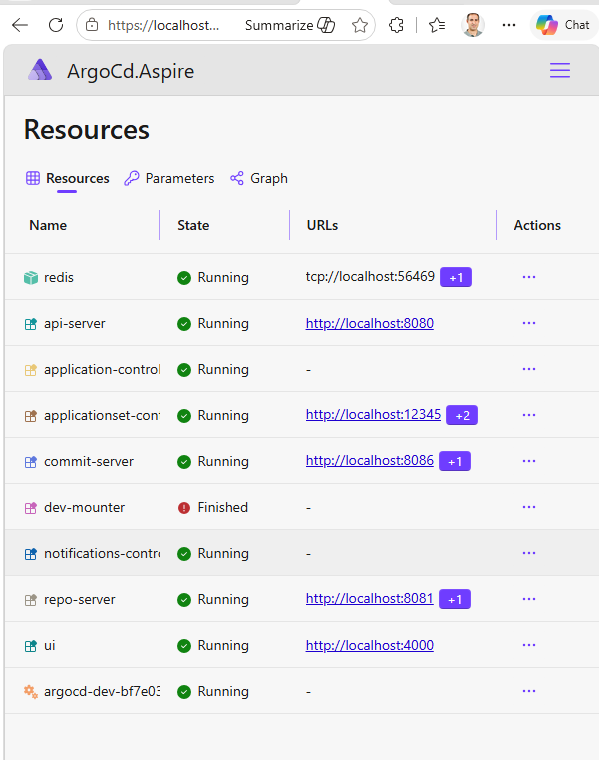
It shows ten resources: a persistent Kind cluster, Redis as a container, dev-mounter as a one-shot setup step, and seven Argo CD control-plane processes running as host executables. The Kind cluster is not pretending to be production. It holds the Kubernetes state this loop actually needs — the CRDs that teach the Kubernetes API server what an Argo CD Application is, the RBAC permissions — Kubernetes role-based access rules — the controllers run under, and argocd-cm, Argo CD’s own configuration ConfigMap — while the code I want to edit stays on my machine, next to VS Code and Delve, Go’s debugger.
That is the whole control plane. api-server on 8080, repo-server on 8081, commit-server on 8086, applicationset-controller on 12345, the UI on 4000, and application-controller and notifications-controller doing their work without an HTTP surface. In practical terms, api-server serves Argo CD’s API, the UI serves the browser, repo-server fetches and renders manifests from Git, and application-controller reconciles Applications against the cluster; the others fill out the same local topology. dev-mounter shows as Finished because it is a one-shot setup step rather than a service.
That is the product. Not the fluent API. Not the architecture diagram I can draw to feel clever. The product is the moment a contributor can stop setting up the world and start understanding the code.
The Contributor Problem in Argo CD
The practical forcing function is easy to name: Argo CD issue #18000 — syncPolicy.DisableHelmChartCache=true. The feature asks for a Helm-source Application to say, “do not cache the chart.” That matters in dev loops. It also matters with OCI Helm registries where charts can be updated in-place without a version bump. If the chart content changes but the version string does not, the cache becomes the enemy.
The standard OSS move is simple enough: clone the repo, follow the contributor guide, and get to the code path behind the feature request. The hard part is that mature cloud-native projects accumulate local-dev sediment: Makefiles, hack scripts, Procfiles, Kind clusters, Tilt, Kubernetes patches, UI dependencies, Corepack shims, generated assets, and one guide linking to another guide that assumes you already ran the thing from the previous guide. None of those pieces is irrational. Each one exists because someone solved a real problem at a real moment.
The problem is what happens after years of real moments: you do not get a clean contributor loop, you get a pilgrimage. Argo CD is a mature CNCF project with serious maintainers, real documentation, real developer workflows, and a codebase that has earned every bit of its operational complexity. That is exactly why the local loop matters: the sooner a contributor gets from “I cloned the repo” to “I am stepping through the code path I care about,” the sooner the project benefits from their attention.
This is the part of open source we under-talk about. We measure time-to-first-issue, time-to-merge, review latency, CI health, and coverage. Those are all useful. But there is another metric hiding underneath them: how long does it take a motivated contributor to reach the first useful breakpoint?
What the Aspire AppHost Runs
Quick refresher before the topology: Aspire is a code-first, polyglot orchestrator for distributed apps. Containers, processes, cloud resources, dependencies, endpoints, health, and startup ordering live together in the AppHost resource graph. The shortest version lives at aspire.dev: compose, debug, and deploy distributed applications from code.
For cloud-native inner loops, the missing piece is often the cluster, and that is where CommunityToolkit.Aspire.Hosting.Kind comes in. It gives the AppHost a real local Kubernetes cluster as a first-class Aspire resource instead of a paragraph in a README that says, “Before you start, create a cluster and apply these things.”
Kind Holds State; Host Processes Stay Debuggable
The Argo CD topology is deliberately split: Kind holds state, Redis runs in a container, and the editable Argo CD processes run as host executables. The cluster does not run the Argo CD Deployments in this loop. It provides the Kubernetes API, CRDs, ConfigMaps, Secrets — Kubernetes objects for sensitive values — and state texture the controllers need; the code I want to edit runs on my machine, close to the debugger.
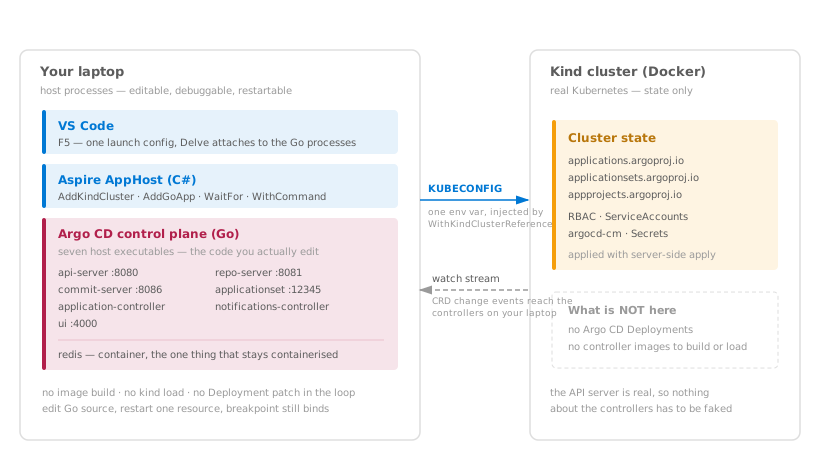
The Cluster Bootstrap Lives in the Graph
The actual cluster wiring in this branch is small. The AppHost derives a per-checkout cluster name, renders the Argo CD state manifest, then creates a persistent Kind cluster and applies that generated manifest:
1
2
3
4
5
6
7
8
9
10
11
12
13
14
15
16
17
18
// Give each checkout a stable, repo-derived cluster name.
var kindClusterName = ArgoCdClusterName.Resolve(repoRoot);

// Render only the Kubernetes state Argo CD needs locally: CRDs, RBAC, ConfigMaps, Secrets.
var stateManifestPath = ArgoCdManifestSet.RenderStateOnlyManifest(
    Path.Combine(AppContext.BaseDirectory, "generated", "argocd-state.yaml"),
    enableDex);

// Model the Kind cluster as part of the Aspire graph, then apply the generated manifest.
var cluster = builder
    .AddKindCluster(kindClusterName)
    .WithClusterLifetime(ClusterLifetime.Persistent)
    .WithManifest(stateManifestPath);

// Put contributor operations on the resource that owns them.
cluster
    .WithDeleteClusterCommand()
    .WithAdminCredentialCommand();
That whole thing is still just a fluent builder: choose the cluster identity, generate the Kubernetes state that Argo CD needs, create the cluster, apply the manifest, and attach contributor commands, all in typed C# under a debugger and in the same program that describes the rest of the local system. Not bash. Not Terraform. Not a README ritual with three “important” notes that only become important after you miss one.
The killer method in that snippet is WithManifest(stateManifestPath).
WithManifest turns the cluster bootstrap into part of the resource graph. When the cluster is ready, Aspire applies the generated state manifest, using server-side apply, Kubernetes’ field-aware apply mode, for the resources Argo CD needs. Health reflects the manifest resource, and downstream processes that call .WaitFor(cluster) unblock only after the cluster and its state are ready for them.
The generated manifest is not a mystery blob. The AppHost renders it from a deliberately small, hand-curated set of files from Argo CD’s own manifests/ tree:
1
2
3
4
5
6
7
8
9
10
11
12
13
14
15
16
17
18
19
public static readonly IReadOnlyList<string> Crds =
[
    Path.Combine("manifests", "crds", "application-crd.yaml"),
    Path.Combine("manifests", "crds", "applicationset-crd.yaml"),
    Path.Combine("manifests", "crds", "appproject-crd.yaml"),
];

public static readonly IReadOnlyList<string> ConfigAndRbac =
[
    Path.Combine("manifests", "base", "config", "argocd-cm.yaml"),
    Path.Combine("manifests", "base", "config", "argocd-cmd-params-cm.yaml"),
    Path.Combine("manifests", "base", "config", "argocd-secret.yaml"),
    Path.Combine("manifests", "base", "config", "argocd-rbac-cm.yaml"),

    // ServiceAccounts, Roles, RoleBindings, ClusterRoles, and ClusterRoleBindings...
    Path.Combine("manifests", "base", "repo-server", "argocd-repo-server-sa.yaml"),
    Path.Combine("manifests", "cluster-rbac", "server", "argocd-server-clusterrole.yaml"),
    Path.Combine("manifests", "cluster-rbac", "server", "argocd-server-clusterrolebinding.yaml"),
];
That list is the split made concrete. It contains state only: CRDs, RBAC, ConfigMaps, Secrets, and service accounts. It deliberately never includes a Deployment, StatefulSet, Service, or NetworkPolicy, because every Argo CD workload runs as a host process instead. The cluster holds Kubernetes reality; the laptop holds the editable code.
This branch still carries a small local extension because the package version I am using does not yet include the manifest API I need. The upstream work is CommunityToolkit/Aspire#1481, which is the piece that makes manifest application, including server-side apply, a first-class part of the Kind integration rather than local AppHost ceremony.
Startup order is part of that same topology. Every component that reads Kubernetes configuration waits for the Kind cluster and its state manifest, while commit-server is correctly excluded because it never talks to Kubernetes. Namespace wiring lives there too: the local processes run in default, and the generated state lines up with that expectation.
That is the difference I care about. The README can still explain the loop, but the graph carries the loop. A .WaitFor(cluster) edge is not glamorous; it is exactly the kind of platform detail that makes a contributor loop feel reliable.
The other half is the Argo CD component itself. The cluster exists, Redis exists, and then the AppHost adds repo-server as a Go host process:
1
2
3
4
5
6
7
8
9
10
11
12
13
14
15
16
17
18
19
20
21
22
23
24
25
26
27
28
29
30
public static IResourceBuilder<GoAppResource> AddArgoCdRepoServer(
    this IDistributedApplicationBuilder builder,
    IResourceBuilder<RedisResource> redis,
    string? gitVerifyWrapperDirectory = null)
{
    const string component = "repo-server";
    var resource = builder.AddGoApp("repo-server", ArgoCdRepository.Root, PackagePath)
        .WithHttpEndpoint(port: 8081, targetPort: 8081, name: "http", isProxied: false)
        .WithHttpEndpoint(port: 8084, targetPort: 8084, name: "metrics", isProxied: false)
        .WithHttpHealthCheck("/healthz", endpointName: "metrics");

    var args = new List<object>
    {
        "--loglevel", "debug",
        "--port", "8081",
    };
    AppendFlagIfEnvSet(args, "--otlp-address", "ARGOCD_OTLP_ADDRESS");

    // ... coverage, GPG, TLS, SSH, plugin socket, and optional Git wrapper paths elided ...

    resource = resource
        .WithAppArgs(args.ToArray())
        .WithEnvironment("ARGOCD_FAKE_IN_CLUSTER", "true")
        .WithEnvironment("ARGOCD_BINARY_NAME", "argocd-repo-server")
        .WithEnvironment("FORCE_LOG_COLORS", "1")
        .WithRedisServer(redis)
        .WithRedisPassword(builder, redis);

    return resource;
}
AddGoApp is the important verb: it runs repo-server from the checkout, not from a built image. ARGOCD_FAKE_IN_CLUSTER=true lets that host process behave as though it were running inside Kubernetes while it talks to the real Kind API server through the kubeconfig Aspire provides. The health check probes /healthz on the metrics endpoint at 8084, not the main gRPC/HTTP port at 8081, because that is the endpoint the component actually exposes for health. And because this is a Go app resource, the same declaration is what makes the process debuggable: on F5, Aspire hands it to the Go debugger instead of asking Docker to rebuild an image.
The AppHost line that uses it is just as direct:
1
2
3
4
var repoServer = builder
    .AddArgoCdRepoServer(redis, gitVerifyWrapperDirectory)
    .WithKindEnvironment(cluster)
    .WaitFor(redis);
Dashboard Commands as Contributor Tools
Once that graph is visible, the dashboard is not just a prettier ps. The Kind cluster resource also carries the two contributor operations that should be close to the cluster itself: show the admin credentials, and delete the cluster cleanly. In the normal Kubernetes loop there is nowhere obvious to put a button, so these operations usually become shell incantations in docs. Attached to the resource, they become discoverable, cross-platform, and owned by the same tool that owns the lifecycle.
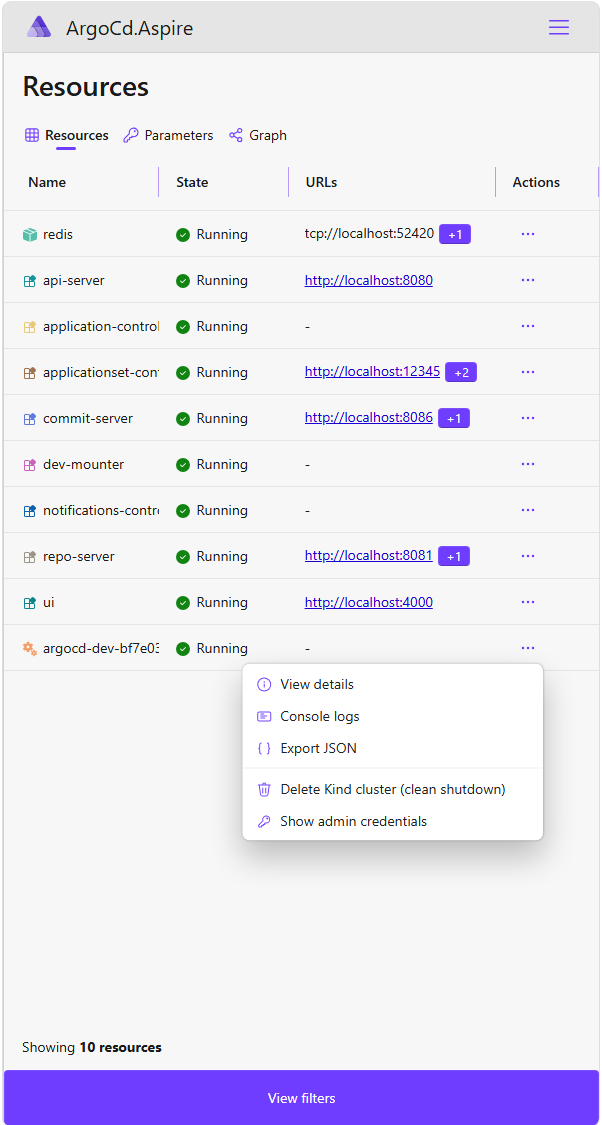
They appear in the resource’s context menu, directly below the built-in View details, Console logs, and Export JSON entries — which is exactly where someone would look for them without being told.
The registration lives next to the cluster declaration:
1
2
3
cluster
    .WithDeleteClusterCommand()
    .WithAdminCredentialCommand();
Show admin credentials
The credential command runs kubectl against the generated kubeconfig, reads the argocd-initial-admin-secret, and decodes the password in managed code instead of asking every contributor to remember the right shell pipe for their operating system:
1
2
3
4
5
6
7
8
9
10
11
12
13
14
15
16
17
18
19
20
21
22
23
24
25
26
27
28
29
30
31
32
33
34
35
36
37
38
39
40
41
42
43
44
45
46
47
48
49
50
51
52
53
54
55
56
57
58
builder.WithCommand(
    name: "show-admin-credentials",
    displayName: "Show admin credentials",
    executeCommand: async _ =>
    {
        var kubeconfigPath = builder.Resource.KubeconfigPath;
        var (exitCode, stdout, stderr) = await RunAsync(
            "kubectl",
            [
                "--kubeconfig", kubeconfigPath,
                "-n", Namespace,
                "get", "secret", SecretName,
                "-o", "jsonpath={.data.password}",
            ]);

        if (exitCode != 0)
        {
            var failureText = string.IsNullOrWhiteSpace(stderr) ? stdout : stderr;

            if (failureText.Contains("NotFound", StringComparison.OrdinalIgnoreCase))
            {
                return CommandResults.Success(
                    "No admin password required.",
                    $"Secret '{SecretName}' was not found in namespace '{Namespace}'. " +
                    "The dev loop's api-server runs with --disable-auth=true (matching the " +
                    "Procfile entry), so the UI and API can be used without logging in. If " +
                    "you re-enabled auth manually, create the secret and re-run this command.",
                    CommandResultFormat.Text,
                    true);
            }

            return CommandResults.Failure(
                $"kubectl get secret {SecretName} -n {Namespace} failed.",
                failureText,
                CommandResultFormat.Text);
        }

        var encodedPassword = stdout.Trim();

        // ... empty password and malformed base64 handling elided ...

        var decodedPassword = Encoding.UTF8.GetString(Convert.FromBase64String(encodedPassword));

        return CommandResults.Success(
            "Admin credentials",
            $"Username: admin\nPassword: {decodedPassword}",
            CommandResultFormat.Text,
            true);
    },
    new CommandOptions
    {
        Description =
            "Decodes and shows the Argo CD admin password from the " +
            "argocd-initial-admin-secret Secret (cross-platform, no shell pipe). Reports " +
            "that no password is needed when the dev loop's --disable-auth=true is active.",
        IconName = "Key",
        UpdateState = _ => ResourceCommandState.Enabled,
    });
That NotFound branch matters. This loop starts api-server with --disable-auth=true, matching Argo CD’s local Procfile entry, so the initial admin Secret often is not present because no password is needed. The command treats that as a successful answer: use the UI and API without logging in. If auth is re-enabled later, the same command still returns the decoded admin password without requiring base64 -d, PowerShell object plumbing, or a contributor guessing which shell the docs assumed.
Delete Kind cluster (clean shutdown)
The teardown command owns the opposite end of the loop. It runs kind delete cluster --name <name>, then best-effort removes the generated kubeconfig so stale local state does not hang around after the cluster is gone:
1
2
3
4
5
6
7
8
9
10
11
12
13
14
15
16
17
18
19
20
21
22
23
24
25
26
27
28
29
30
31
32
33
34
35
36
37
38
39
40
41
42
43
44
45
builder.WithCommand(
    name: "delete-cluster",
    displayName: "Delete Kind cluster (clean shutdown)",
    executeCommand: async _ =>
    {
        var clusterName = builder.Resource.Name;
        var kubeconfigPath = builder.Resource.KubeconfigPath;
        var (exitCode, stdout, stderr) = await RunAsync(
            "kind",
            ["delete", "cluster", "--name", clusterName]);

        var kubeconfigCleanupWarning = TryDeleteKubeconfig(kubeconfigPath);

        if (exitCode != 0)
        {
            var failureText = string.IsNullOrWhiteSpace(stderr) ? stdout : stderr;
            if (kubeconfigCleanupWarning is not null)
            {
                failureText = $"{failureText}\n{kubeconfigCleanupWarning}";
            }

            return CommandResults.Failure(
                $"kind delete cluster --name {clusterName} failed.",
                failureText,
                CommandResultFormat.Text);
        }

        var successText = kubeconfigCleanupWarning is null
            ? stdout
            : $"{stdout}\n{kubeconfigCleanupWarning}";

        return CommandResults.Success(
            $"Kind cluster '{clusterName}' deleted.",
            successText,
            CommandResultFormat.Text,
            true);
    },
    new CommandOptions
    {
        Description =
            "Deletes this Kind cluster now (synchronously). Run this BEFORE 'aspire stop' " +
            "for a guaranteed clean teardown — see README 'Known limitations'.",
        IconName = "Delete",
        UpdateState = _ => ResourceCommandState.Enabled,
    });
The important difference is ownership. Process shutdown is allowed to move on quickly, which means an async cleanup hook may not finish before the host is gone. Resource commands are awaited by the dashboard and the CLI, so deletion becomes an operation the tool owns to completion. The README can still explain what happens, but the button is the thing a contributor can use.
Health Checks That Mean Something
Green should mean the endpoint a contributor needs is actually answering, not merely that a process launched. That is why the AppHost wires explicit checks with WithHttpHealthCheck(path, endpointName: ...): api-server checks /api/version, repo-server checks /healthz on its metrics endpoint at port 8084, commit-server checks /healthz on its metrics endpoint at port 8087, and the UI checks /.
applicationset-controller is the honest wrinkle: its /healthz and /readyz return 404, so the check uses /metrics on port 12345. That proves the process is serving HTTP, not that the controller has declared itself ready. application-controller and notifications-controller do not serve HTTP at all, so they do not get pretend health checks bolted on for symmetry. Symmetry is nice in diagrams; lies are less nice in repos.
The result is exactly the direction I want: Aspire marks the resource healthy only after the endpoint is already answering. That is a conservative signal rather than an early green light, and early is where dashboards stop being trustworthy.
That is the earned claim: seven Go control-plane components as host executables, Redis as a container, a Kind cluster holding state only, the UI answering on :4000, api-server answering /api/version, and F5 hitting a Go breakpoint. The AppHost does not make Argo CD simple. Good. Argo CD is not simple. The AppHost makes the local topology visible enough that the health signal means what it says.
Try It Yourself
Once the AppHost is running, the loop is useful because you can drive it like a real Argo CD installation while the controller code stays local and debuggable.
Start the AppHost and point kubectl at the cluster
Press F5 in VS Code, or start it from a terminal:
1
2
cd contrib/aspire-dev
aspire run
aspire run keeps the AppHost in the foreground and streams its output, which is what you want while working. Either way, the AppHost writes a kubeconfig for the Kind cluster it created:
1
2
$env:KUBECONFIG = "$env:LOCALAPPDATA\Temp\aspire-kind\<cluster-name>\kubeconfig.yaml"
kubectl get nodes
A healthy cluster looks like this:
1
2
NAME                                      STATUS   ROLES           AGE    VERSION
argocd-dev-bf7e035b73ad-control-plane     Ready    control-plane   2d9h   v1.36.1
The cluster name is derived from the repository path. That gives each checkout a stable cluster name, and two different checkouts get two different clusters. If you need the exact name, aspire describe shows it.
The age in that output is also part of the design. This is a persistent Kind cluster, created with ClusterLifetime.Persistent, so it survives stopping and starting the AppHost. Cluster creation is the slow part of the loop; keeping the cluster means the next run can spend its time on the processes I am actually editing.
Apply a real Argo CD Application
Create a guestbook.yaml file with Argo CD’s canonical guestbook sample:
1
2
3
4
5
6
7
8
9
10
11
12
13
14
15
16
17
18
19
20
apiVersion: argoproj.io/v1alpha1
kind: Application
metadata:
  name: guestbook
  namespace: default
spec:
  project: default
  source:
    repoURL: https://github.com/argoproj/argocd-example-apps
    targetRevision: HEAD
    path: guestbook
  destination:
    server: https://kubernetes.default.svc
    namespace: guestbook
  syncPolicy:
    automated:
      prune: true
      selfHeal: true
    syncOptions:
    - CreateNamespace=true
Then apply it:
1
kubectl apply -f guestbook.yaml
The easy detail to miss is metadata.namespace: default. This loop runs the control plane against default, not the conventional argocd namespace. If you put the Application in argocd, this local controller will never pick it up. That is the trap most likely to catch someone who already knows Argo CD, exactly because the convention is so familiar.
CreateNamespace=true means Argo CD creates the destination namespace for the guestbook workload.
Watch it reconcile
1
kubectl get application guestbook -n default -w
The Application walks through OutOfSync / Missing, then Synced / Progressing, and finally Synced / Healthy. After that, ask Kubernetes what is actually running:
1
kubectl get all -n guestbook
1
2
3
4
5
6
7
8
9
10
11
NAME                                READY   STATUS    RESTARTS   AGE
pod/guestbook-ui-5d6468fd55-g5gvp   1/1     Running   0          3m32s

NAME                   TYPE        CLUSTER-IP    EXTERNAL-IP   PORT(S)   AGE
service/guestbook-ui   ClusterIP   10.96.7.225   <none>        80/TCP    3m32s

NAME                           READY   UP-TO-DATE   AVAILABLE   AGE
deployment.apps/guestbook-ui   1/1     1            1           3m32s

NAME                                      DESIRED   CURRENT   READY   AGE
replicaset.apps/guestbook-ui-5d6468fd55   1         1         1       3m32s
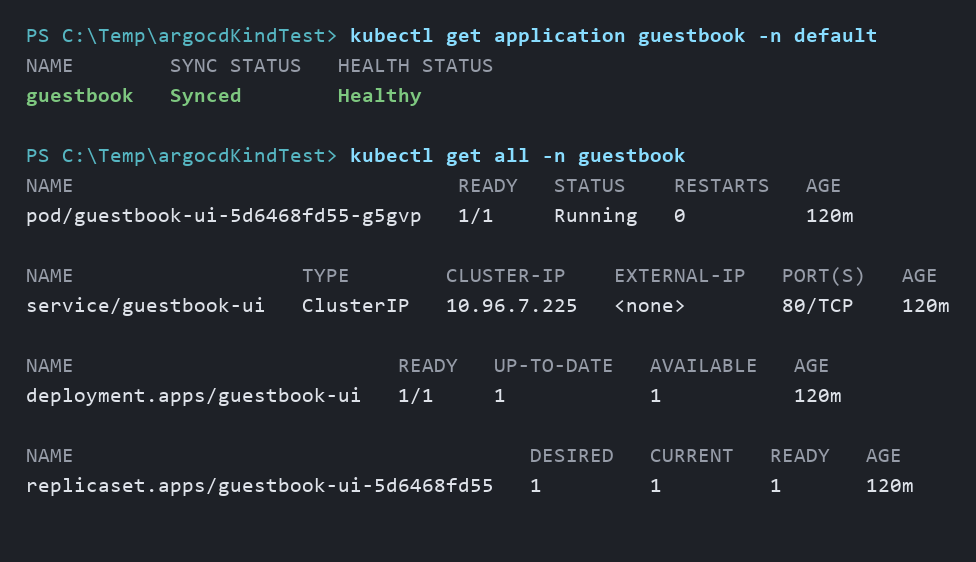
That output is the point of the loop. A controller cloned a Git repository, rendered its manifests, and created ordinary Kubernetes objects. Nothing in it looks special: a Pod, a Service, a Deployment, and a ReplicaSet, all shaped exactly like a normal Kubernetes workload.
The difference is where the controller is running. It is a process on the laptop, under a debugger, with a breakpoint available in controller/appcontroller.go during the reconcile. Set that breakpoint before you apply the Application, and you can catch the sync in flight instead of trying to reason about it after the fact.
Clean up
Use the Delete Kind cluster (clean shutdown) dashboard command from the previous section when you want to remove the persistent cluster. That keeps cleanup attached to the resource that owns the cluster, instead of turning teardown back into a separate shell ritual.
End-to-End Testing the Real GitOps Loop
Everything above was driven by hand. The same graph can be driven by a test.
This is the part that tends to surprise people coming from the Kubernetes side. The AppHost is not a script that happens to start some processes — it is a model of the application, and Aspire can hand that model to a test project. DistributedApplicationTestingBuilder builds the same graph the dashboard shows, starts it, and gives the test typed access to every resource in it: wait for api-server to become healthy, ask Aspire for the URL it allocated, read the Kind cluster’s kubeconfig path. No hardcoded ports, no separate docker-compose file for CI, no second definition of the environment that drifts from the first.
So the environment you debug and the environment you test are the same declaration. That is what makes a genuine end-to-end test practical here rather than aspirational.
Running the full loop is still the only proof that the loop runs. But the useful testing split is not “graph tests versus real runs.” It is cheap checks for the topology and one real local run for the behavior nothing cheaper can prove.
The cheap tests still matter. ResourcesWithHttpEndpoints_HaveHealthChecks checks that every resource with an HTTP endpoint has a health check annotation, so health stays part of the topology the next time someone adds an endpoint. That runs without Docker, Kind, Go builds, or network access.
But the interesting test is the expensive one: WhenCanonicalGuestbookApplicationIsApplied_ThenArgoCdSyncsItAndKindRunsIt. It is gated behind ARGOCD_ASPIRE_E2E=1 because it needs Docker, Kind, Go, kubectl, Node/pnpm, and outbound access to GitHub. On this branch, it takes about six minutes. That is not “run this every time you save a file” feedback. It is pre-merge or nightly confidence.
The real test file keeps some of the plumbing in helpers because that is the right shape for maintainable test code. For the post, here is the same test with the mechanics inlined so you can see what it is actually proving.
Step 1: Start the AppHost and Wait for Argo CD
First, the test starts the real AppHost. No mocked API server, no fake cluster, no “trust me, the controller would have started.” It builds the same Aspire model a contributor uses and waits for the Argo CD control plane the same way you would: are the servers up?
1
2
3
4
5
6
7
8
9
10
11
12
13
14
15
16
// Build the same AppHost a contributor starts from VS Code or the CLI.
await using var builder = await DistributedApplicationTestingBuilder
    .CreateAsync<Projects.ArgoCd_Aspire_AppHost>();

// The Kind cluster is part of the Aspire model, so the test can use its kubeconfig.
var cluster = builder.Resources.OfType<KindClusterResource>().Single();

await using var app = await builder.BuildAsync(cancellationToken);
await app.StartAsync(cancellationToken);

// Wait for the Argo CD control plane, not just for processes to exist.
await app.ResourceNotifications.WaitForResourceHealthyAsync("repo-server", cancellationToken);
await app.ResourceNotifications.WaitForResourceHealthyAsync("commit-server", cancellationToken);
await app.ResourceNotifications.WaitForResourceHealthyAsync("api-server", cancellationToken);
await app.ResourceNotifications.WaitForResourceAsync(
    "application-controller", KnownResourceStates.Running, cancellationToken);
That is already more valuable than a topology assertion. The real AppHost has to build, the fixed ports have to be free, the host processes have to launch on the current OS, and Aspire has to resolve the endpoints it modeled.
Step 2: Apply the Guestbook Application
Then the test writes a real Argo CD Application manifest and applies it with kubectl against the Kind kubeconfig. The Application points at Argo CD’s canonical guestbook sample, enables automated sync, and asks Argo CD to create the target namespace.
1
2
3
4
5
6
7
8
9
10
11
12
13
14
15
16
17
18
19
20
apiVersion: argoproj.io/v1alpha1
kind: Application
metadata:
  name: aspire-e2e-guestbook-<unique-suffix>
  namespace: default
spec:
  project: default
  source:
    repoURL: https://github.com/argoproj/argocd-example-apps
    targetRevision: HEAD
    path: guestbook
  destination:
    server: https://kubernetes.default.svc
    namespace: argocd-aspire-e2e-guestbook
  syncPolicy:
    automated:
      prune: true
      selfHeal: true
    syncOptions:
    - CreateNamespace=true
1
2
3
4
5
// Create the Argo CD Application through the Kubernetes API, just like a real user would.
await Kubectl(
    "apply",
    "-f", applicationManifestPath,
    "--kubeconfig", cluster.KubeconfigPath);
Now the test has stopped checking whether the graph is plausible and started checking whether the GitOps loop works: Argo CD has to fetch from GitHub, render the guestbook manifests, and reconcile them into the local cluster.
Step 3: Ask Argo CD What It Synced
Next, the test asks Argo CD through its own API. The important detail is that Aspire resolves the api-server endpoint from the model, so the test does not hardcode localhost:8080 and then pretend that is the same thing as the running topology.
1
2
3
4
5
6
7
8
9
10
11
12
13
14
15
16
17
// Aspire resolves the api-server endpoint from the model — no hardcoded localhost:8080.
var argoCd = app.CreateHttpClient("api-server", "http");

// Poll until the Application reports Synced and Healthy.
var response = await argoCd.GetAsync(
    $"/api/v1/applications/{applicationName}?appNamespace=default&refresh=normal",
    cancellationToken);

using var document = JsonDocument.Parse(
    await response.Content.ReadAsStringAsync(cancellationToken));
var status = document.RootElement.GetProperty("status");

Assert.Equal("Synced", status.GetProperty("sync").GetProperty("status").GetString());
Assert.Equal("Healthy", status.GetProperty("health").GetProperty("status").GetString());

// status.resources[] is what Argo CD believes it manages.
var managed = status.GetProperty("resources");
The assertion is intentionally exact. The real test requires exactly these managed objects:
Deployment/guestbook-uiService/guestbook-ui
Both must be Synced, and each must be Healthy when Argo CD reports health for it. requireExactSet: true matters because it catches a partial sync and an accidental extra object, not just a total failure.
One Argo CD API detail was worth learning in the real loop: /api/v1/applications/{name}/resource-tree looks obvious, but here it consistently returns a 500 with error getting cached app resource tree: EOF because it is backed by Argo CD’s Redis-cached tree. status.resources[] on the Application object itself is stable, so the test reads that instead. That is the kind of detail you only get from running the actual system.
Step 4: Ask Kubernetes What Is Actually Running
This is the step that matters most. Argo CD grading its own homework proves nothing. A controller saying “Synced” is useful, but the cluster is the system of record for whether a workload is actually running.
So the test asks Kind directly:
1
2
3
4
5
6
7
8
9
10
11
12
13
14
15
16
17
18
19
20
// Argo CD believing a sync worked is not the same as the workload running.
await Kubectl(
    "wait",
    "--for=condition=available",
    "deployment/guestbook-ui",
    "-n", "argocd-aspire-e2e-guestbook",
    "--timeout=180s",
    "--kubeconfig", cluster.KubeconfigPath);

// Read the actual Kubernetes Deployment from the cluster.
var deployment = await KubectlGetJson(
    "deployment",
    "guestbook-ui",
    "-n", "argocd-aspire-e2e-guestbook",
    "--kubeconfig", cluster.KubeconfigPath);

Assert.Equal(1, deployment.Spec.Replicas);
Assert.Equal(1, deployment.Status.ReadyReplicas);
Assert.True(deployment.Status.AvailableReplicas >= 1);
Assert.Equal("guestbook-ui", deployment.Spec.Selector.MatchLabels["app"]);
The real code also checks the Service/guestbook-ui: it must select app=guestbook-ui and expose port 80 to target port 80. That extra service check is not decorative. It catches the difference between “the Deployment eventually became available” and “the guestbook shape Argo CD applied is actually usable.”
This is the useful boundary. Building the resource graph in memory can prove the shape of the system: which resources exist, what waits for what, which endpoints carry health checks. It cannot prove that a preferred port became the actual port, that a Windows process can launch a helper executable, or that a real guestbook Application reaches Healthy. The graph was correct; the values were wrong.
Step 5: Open the UI with Playwright
The UI test uses the same scenario and then opens the real Argo CD UI with Playwright. Again, Aspire resolves the endpoint from the model; the test does not guess the browser URL.
1
2
3
4
5
6
7
8
9
10
11
12
13
14
15
16
17
// Aspire resolves the UI endpoint too.
using var uiClient = app.CreateHttpClient("ui", "http");

using var playwright = await Playwright.CreateAsync();
await using var browser = await playwright.Chromium.LaunchAsync(new() { Headless = true });
var page = await browser.NewPageAsync();

await page.GotoAsync(
    new Uri(uiClient.BaseAddress!, "applications").ToString(),
    new PageGotoOptions { WaitUntil = WaitUntilState.NetworkIdle });

// api-server runs with --disable-auth=true, so there is no login step.
Assert.DoesNotContain("/login", page.Url);

await Expect(page.GetByText(applicationName).First).ToBeVisibleAsync();
await Expect(page.GetByText("Synced").First).ToBeVisibleAsync();
await Expect(page.GetByText("Healthy").First).ToBeVisibleAsync();
The real test clicks into the application detail page, also checks for guestbook-ui, and saves a screenshot under contrib/aspire-dev/.e2e/, which makes UI failures much easier to diagnose after the fact.
Why Agents Can Use the Same Loop
There is another consequence hiding in the same shape: anything an agent can execute and observe, it can start to work with. A setup guide is neither. A traditional cloud-native inner loop assumes a human who can read between the lines: install these tools, run this script, remember the Windows note halfway down the next page, and if the controller does not start, try to guess which generated file you missed. That is hard enough for a person on day one. For an agent, it is mostly fog. It cannot reliably know whether step four worked, why a pod is unhealthy, or which of six diagnostic commands answers “is the system up yet?”
An AppHost gives the loop a surface a machine can actually drive. aspire start and aspire stop are one entry point for the whole topology. aspire describe and aspire ps expose current state, health, endpoints, and URLs as structured output. aspire logs <resource> gets the logs for the thing that failed without first knowing whether that thing is a container, a host process, or a Kubernetes component. And the topology tests let the agent check the shape of the environment in milliseconds without Docker, Kind, or a prayer to the laptop fan.
That is not theoretical hand-waving. The same surface is useful to a developer and to an agent because the environment exposes the work instead of hiding it in prose. If api-server cannot start because configmap "argocd-cm" not found, aspire logs api-server is a direct path to the clue. If aspire describe says something is healthy, a real HTTP request can verify whether anything is actually listening. If health turns green before the endpoint serves, polling both signals makes the gap visible. If the cluster state is in question, kind get clusters and a Kubernetes query answer it without someone remembering which page of the guide mentioned the cluster name.
None of this makes the hard parts free. The end-to-end GitOps test works, but five minutes plus Docker, Kind, Go, and network access is a real cost. A machine-readable environment does not mean every workflow belongs in the keystroke loop, or that every workflow is now automatable. It means the observable parts are observable by anyone: the maintainer, the contributor who joined last week, and the agent that has no tribal knowledge at all. In that sense, an agent is just the most extreme newcomer. If the loop is discoverable enough, has one entry point, reports structured state, and keeps its operations with the code, then optimizing for the confused human on day one turns out to produce something a machine can drive too.
Practical Local Development Notes
One practical note for large Go repos: dlv debug compiles with optimizations disabled, which means it uses a different build-cache entry from go build, so a cold debug build of Argo CD’s ./cmd can take several minutes. The launch configuration sets DCP_IDE_REQUEST_TIMEOUT_SECONDS in .vscode/launch.json, so the debug session gets the time budget this repo needs.
The launch config also keeps "dashboardBrowser": "openExternalBrowser", which makes F5 open the Aspire dashboard as part of the loop instead of turning the dashboard URL into another thing to copy from a terminal.
One more local-development thing: every dlv debug run leaves a __debug_bin*.exe next to the package being debugged. In this repo, they are large debug binaries, so .gitignore excludes them. Not a grand architectural point. Just the kind of repo hygiene that keeps the inner loop from leaving souvenirs in the working tree.
How the Contribution Is Packaged
The work lives inside my Argo CD fork itself: https://github.com/tamirdresher/argo-cd, on the aspire-dev-loop branch, under contrib/aspire-dev/. That placement is the point. Argo CD already has a contrib/ convention, so this is not a side experiment that has to live forever next to the real project — it can be proposed upstream as an actual contribution candidate. The fix to the onboarding problem can live in the project that has the onboarding problem.
Living in-tree also removes a class of problem outright. When the AppHost sits in a separate repository, something has to find the Argo CD checkout it is supposed to orchestrate, and you end up solving path discovery before you can solve anything real. In-tree, the repo root is structurally known.
The layout is plain on purpose, because the point is to see the contribution path instead of admire the scaffolding:
1
2
3
4
5
6
7
contrib/aspire-dev/
├── ArgoCd.Aspire.slnx
├── global.json
├── README.md
├── ArgoCd.Aspire.AppHost/
├── ArgoCd.Aspire.Hosting.Kind.Extensions/
└── ArgoCd.Aspire.AppHost.Tests/
Moving the AppHost in-tree deleted an entire class of “find the other repo” problems. The repo root is structurally known as ../../.. from the AppHost project, resolved at build time through MSBuild metadata instead of discovered at runtime by filesystem archaeology. That is the same lesson as the AppHost itself: if a path, dependency, startup order, or prerequisite is part of the system, model it where the system can see it instead of asking the reader to remember it.
The same dashboard commands are where this stops being a pretty graph and starts feeling like contributor tooling. The Kind cluster resource wires commands directly in AppHost.cs: show admin credentials and delete the Kind cluster cleanly. Those are exactly the kinds of buttons serious projects eventually grow: seed data, rotate a secret, force a resync, and cleanly tear down local state.
The happy path is now the thing a contributor should see first: clone, switch branch, open in VS Code, press F5.
VS Code prompts for the recommended extensions because the repo includes .vscode/extensions.json, and the important ones for this loop are microsoft-aspire.aspire-vscode and golang.go. If the launch entry ever disappears, you do not have to hand-type JSON: press Ctrl+Shift+P, run Aspire: Configure launch.json, and let the extension write the AppHost entry. In the current checkout, .vscode/launch.json already points at contrib/aspire-dev/ArgoCd.Aspire.AppHost/ArgoCd.Aspire.AppHost.csproj, sets the longer DCP timeout, opens the dashboard, and gives the contributor the F5 path.
One clone. No path wiring. No script whose main job is to go fetch the real project from somewhere else. The command-line path still exists for automation and constrained machines, but it is no longer the ceremony at the front door.
Conclusion
Here is the careful version of the disruption claim: Aspire does not replace Kubernetes, and that is not the interesting sentence. I do not want a local orchestrator pretending production does not exist. I do not want to hide the cluster from platform engineers. The cluster is the thing. Kubernetes is still where the CRDs live, where the API server enforces reality, where controllers observe state, and where production texture matters.
The interesting sentence is this: Aspire makes Kubernetes’ outside modellable in code. By “outside” I mean all the things around the cluster that every serious cloud-native project needs before a contributor can do useful work: the local cluster, the manifests, the sidecars, the supporting containers, the host processes, the UI, the dependency ordering, the ports, the health checks, the generated state, the commands, the little readiness rituals, and the “please run this before that” knowledge that slowly migrates into documentation because documentation is where pain goes when we have not modeled it yet.
The setup doc is the smell, even though a good README is still important. I love a good README. But if the README is carrying topology, lifecycle, dependency ordering, health verification, and environment-specific caveats, then the README is doing work that belongs in a program.
The same rule applies one layer below the AppHost. VS Code’s workspace recommended extensions move “install the Aspire and Go extensions” out of prose and into .vscode/extensions.json, so newcomers get prompted by the editor instead of punished by a missed paragraph. A dev container can take that further: the SDK, Go toolchain, Kind, kubectl, Delve, Node, pnpm, and extensions can all be described in devcontainer.json and built for the contributor, locally or in Codespaces. The setup guide stops being a document people follow and becomes a file the machine follows.
An executable AppHost is better than a paragraph that says “first create a Kind cluster.” A fluent builder call is better than a shell snippet that applies a manifest and hopes everyone remembers when it should happen. A .WaitFor(cluster) edge is better than “wait until the cluster is ready” as tribal instruction. A launch setting checked into the repo is better than a troubleshooting note that only helps after the first F5.
That is why WithManifest is more than a convenience method. It is the archetype. It says the install-configure-verify sequence belongs in the resource model. Server-side apply says the resource model must carry the ordinary Kubernetes realities too. WithPortMapping, WithWorkerNodes, and WithKubernetesVersion are the same kind of API when a project needs them. Each one moves a piece of local platform ceremony out of prose and into code.
And once it is code, it can be debugged. It can be reviewed. It can be reused. Most importantly, it can be inherited by the next contributor without them having to rediscover why the guide has a warning box in paragraph eleven.
The Kind integration is not Argo CD-specific. Any project with Kubernetes state plus host processes can benefit from the same shape. Operators. Controllers. CLIs that talk to the API server. UIs that expect services to exist. Test harnesses that need a real cluster but do not need every edit to become a container image.
The pattern is: keep real state real, run editable code close to the debugger, and let the AppHost model the topology between them.
That is not a .NET-only idea either. Aspire’s AppHost can be TypeScript or JavaScript. The C# examples exist because that ecosystem got the first wave of docs and integrations, but the concept is not “platform engineers must become .NET developers.” Platform engineers who live in JS or TS should be able to model local topology in the language they already use. Again: aspire.dev is the place to track the current language and integration story.
The deeper point is onboarding, because every minute a contributor spends fighting local setup is a minute they are not spending understanding the code. Maintainers should care about that. Not as a kindness, although kindness is underrated. They should care because setup friction selects against contribution. It punishes the people who are motivated enough to help but not yet steeped in the project’s accumulated rituals.
A debugger-first AppHost is not just nicer; it is a maintenance strategy. It makes the local topology visible. It makes assumptions executable. It makes prerequisites fail fast. It makes “what is running?” answerable from a dashboard instead of five terminals. It turns “follow the guide carefully” into “run the graph and let the graph tell you what is missing.”
That is the disruption I mean. No keynote thunder. No “replace your platform” sticker. No pretending Kubernetes got simple because I wrote a fluent API around Kind. Just a quiet shift where a whole category of pain becomes optional.
The healthier loop is the one where the real system runs locally, the topology is explicit, and the repo itself carries the edges, timeouts, apply mode, and health checks the next contributor needs.
Next time, I want the loop to look like this:
1
2
3
4
git clone https://github.com/tamirdresher/argo-cd
cd argo-cd
git switch aspire-dev-loop
code .
Then VS Code recommends the extensions, F5 starts the AppHost, the dashboard opens, and the contributor gets the graph, logs, project-specific commands, and a real Go breakpoint.
That is days into minutes, but more importantly it is the onboarding fix living inside the project that needs it.