


This post builds the smallest version of the loop that still shows the whole thing: a real Kind cluster, a real CRD, and a Go reconciler running where I can debug it. In follow-up posts I take the same pattern somewhere harder — a real cloud-native project with a genuine contributor-onboarding problem — and I also show the AppHost written in TypeScript for readers who do not live in .NET.
There is a very specific smell in platform engineering: the setup guide that has become the system.
You know the one. It starts friendly. Install these tools. Run this script. Start this cluster. Apply this manifest. If you are on Windows, read the note halfway down the next page. If the UI fails, run this other command. If the controller does not start, maybe you missed a generated file from a guide that linked here from a guide that assumed you already ran the first guide.
At some point you are not debugging the code anymore. You are debugging your eligibility to begin, so I wanted to show the opposite loop.
So in this post we are going to build a minimal Kubernetes operator from scratch. Not a fake one. Not a console app pretending to be a controller. A real controller-runtime operator watching a real CRD in a real Kind cluster, creating a real ConfigMap, and updating real Kubernetes status. Kind is Kubernetes running inside Docker containers on your machine: a real, disposable cluster with a genuine API server that kubectl and the same client libraries talk to.
Then we are going to run the operator as a host process under Aspire, press F5, set a breakpoint in Reconcile(), apply a custom resource, and step through the code, which is the whole trick.
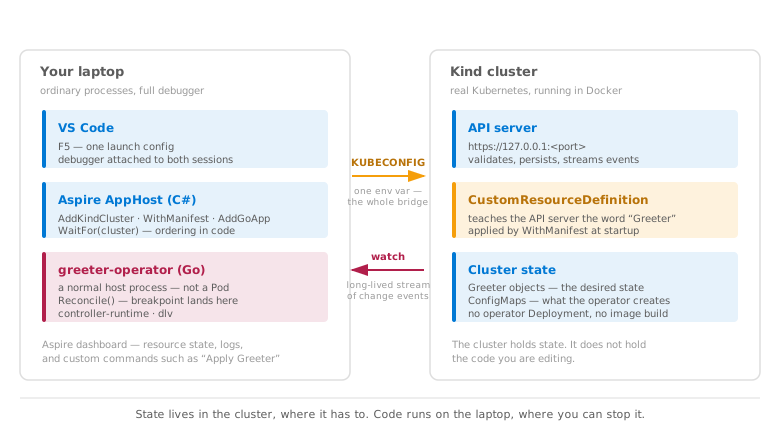
Here is the shape of the thing, because the split is the point:
Why I think this matters beyond one operator
If you have not lived in Kubernetes operator land, the closest .NET analogy is an IHostedService that watches a queue or table full of desired state and keeps reality caught up. Kubernetes turns the API server into that table; the rows are objects of a type you define, and the loop wakes up from a watch instead of a timer. In this post that object is a Greeter with a name, and the operator makes sure Kubernetes has a ConfigMap — a small config object — containing the greeting. Someone creates a Greeter, the operator notices, and the ConfigMap appears. That is why people write operators: they teach Kubernetes new nouns, like certificates or Argo CD Applications, and reconcile them into existence.
The Greeter itself does almost nothing — it reads a name, writes a ConfigMap, and reports status — and that is the point, because the loop around it is where I think Aspire starts to disrupt platform engineering and DevOps.
The dirty secret in platform engineering is that the inner loop for cloud-native work is still terrible. If you are building an operator, a controller that runs this reconcile loop, an admission webhook, or contributing to a CNCF project, the default loop is usually: build a container, push it somewhere or load it into Kind, apply a Deployment, wait for the Pod (Kubernetes’ unit of running containers), tail logs with kubectl, realize you typo’d the thing you were trying to inspect, and then do the whole little ceremony again. We got very good at automating that ceremony, but the iteration is still measured in minutes when the code change deserved seconds.
Tools like Tilt, Skaffold, DevSpace, and Garden make that loop faster, and they matter, but my point is narrower: they usually improve the speed of a deploy-to-iterate loop while Aspire changes the shape of the loop. The cluster becomes a dependency your app talks to, not the place your editable code has to live during every edit. The controller can run as a native host process with a debugger attached, against a real Kubernetes API server, while the cluster still holds the CRDs, which are the custom Kubernetes types, along with the resources and API semantics that make the test honest.
This is the part I think platform engineers and DevOps folks often do not ask for, because the tooling has trained us not to imagine it. Nobody asks for a debugger inside an operator when attaching one to a Pod feels like a production; you learn to live with print statements and logs. Nobody asks for a dashboard button that creates test resources, because retyping kubectl apply already feels like the price of admission until WithApplyGreeterCommand() turns it into a resource action. Nobody asks for the cluster to be a declared dependency of the app instead of ambient environment, because “make sure Kind is running first” has been normalized into every README we have ever written. And nobody asks to pause a C# AppHost and a Go reconciler together under one debugger, because the old loop made that sound like science fiction with a bad YAML appendix. That is the real argument for Aspire here. It does not just make a known painful step faster; it makes previously unreasonable workflows feel ordinary, and people do not miss capabilities they have never had. A bad inner loop does not merely waste time, but quietly deletes options from your mental model.
That change sounds small until you have onboarded someone to a serious cloud-native repo. The onboarding doc stops being the system. “Clone, F5” can replace a 40-step README where half the steps are really dependency ordering in disguise. A new contributor should spend their first hour understanding the controller, not proving that their laptop is worthy of the local development temple.
The DevOps side is interesting for the same reason. The AppHost model that gives you the local graph is also the model Aspire uses at the other end: aspire publish can generate deployment artifacts such as Helm charts, and aspire deploy can take that model toward real clusters when you configure the environment. That does not mean this post is a production deployment story, and it does not mean Aspire replaces every Tilt or Skaffold workflow. I am talking about the inner loop, because that is where the pain actually lives and where small friction compounds into fewer contributors.
The piece that made this practical for this series is CommunityToolkit.Aspire.Hosting.Kind. It is now published on NuGet as 13.4.1-beta.687, and it gives Aspire a real Kind cluster as a first-class resource: it shows up in the dashboard, it creates and manages the cluster, it gives dependent apps a KUBECONFIG, the cluster connection info Kubernetes clients read, and it cleans up according to the lifetime you choose. I had the pleasure of being one of the contributors to it alongside Andrey and Matt, which I am quietly proud of and which turned out to be a very good way to learn the codebase.
While writing these posts I ran into one capability the package does not have yet — applying raw Kubernetes YAML to the cluster once it is ready — so I built a small version locally for the samples and sent a fuller one upstream. It is waiting to be merged as I write this, which is why the samples carry a tiny extensions file with a note to delete it once that lands. The rest of this post is the smallest honest example I could build: one CRD, one reconciler (the code that does the matching), one Kind cluster, and one debugger-first loop that shows the shape before you press F5.
Act 1 — So what does it take to build a Kubernetes operator?
A Kubernetes operator is just a controller with opinions, which is the least scary definition I know. It watches Kubernetes state, usually through a Custom Resource Definition, and reconciles the world toward the desired state. Someone applies a resource that says, “I want this thing.” The operator wakes up and says, “Fine, let me make the rest of Kubernetes look like that.”
In production, that pattern is incredibly powerful. In local development, it can become a small ritual.
Everything in this post lives in tamirdresher/aspire-kubernetes-operator-sample if you would rather read code than prose, or clone it and press F5 while you read. It contains the Go operator, the C# AppHost, and the TypeScript one, and nothing else.
The traditional path looks familiar if you have spent time in this space: run kubebuilder init, generate the API types, generate CRDs, write the reconciler, build an image, create a Kind cluster, load the image into Kind, patch a Deployment, apply RBAC, apply the CRD, tail pod logs, and then attempt to attach a debugger through enough indirection that you begin to envy people who debug CSS.
Kubebuilder is still the standard entry point I would recommend. It gives you the project shape, the markers, the generated files, the manager bootstrap, and all the things that keep you from forgetting one mundane-but-important piece.
For this post, though, I wanted the smallest possible operator where every moving part is visible. No generated project maze. No image build. No controller Deployment. Just the parts Kubebuilder would have produced anyway: types, CRD, manager, reconciler.
The example keeps the contract down to one field: a Greeter custom resource has spec.name, and when you apply it, the operator creates a ConfigMap named greeting-{name} in the same namespace with one key, message: "Hello, {name}!".
Tiny operators are useful because they do not distract us. If this one is easy to run, observe, and debug, then the same loop applies when the reconciler creates Deployments, Services, certificates, cloud resources, finalizers, webhooks, or whatever else your platform team has lovingly turned into Tuesday.
The important thing is the shape. There is no build step to describe, which is rather the point:
1
2
3
git clone https://github.com/tamirdresher/aspire-kubernetes-operator-sample.git
cd aspire-kubernetes-operator-sample
code .
Then set a breakpoint in the reconciler and press F5. Aspire restores, builds, and starts everything — the Kind cluster, the CRD, and the Go operator under a debugger — as one operation. If you would rather stay in a terminal, aspire run does the same thing without the debugger attached.
Kubernetes stores the CRD and the custom resources. The operator code does not run inside the cluster during the inner loop. It runs on my machine as an Aspire resource, with KUBECONFIG pointed at Kind.
So instead of “change code, build image, load image, redeploy pod, tail logs,” the loop becomes: open the folder, press F5, apply the resource, and watch the breakpoint hit. I know, suspiciously humane.
Act 2 — Build
Here is the complete mental model of the project: apphost/AppHost.cs is the Aspire resource graph, config/greeter-crd.yaml is the Kubernetes CRD, examples/greeter-sample.yaml is the sample custom resource, operator/api/v1alpha1/greeter_types.go defines the Go API types, operator/controllers/greeter_controller.go is the reconcile loop, operator/main.go starts the controller-runtime manager, and the AppHost references the published CommunityToolkit.Aspire.Hosting.Kind package plus one tiny local extensions file for the bits that have not landed upstream yet.
The actual operator is tiny. The interesting part is not that it took a heroic amount of code. The interesting part is that it did not.
The API shape
First, the Go types. These are the shape Kubernetes accepts and stores. Spec is what the user asks for. Status is what the operator reports back after reconciling.
From operator/api/v1alpha1/greeter_types.go:
1
2
3
4
5
6
7
8
9
10
11
// GreeterSpec describes the greeting to materialize.
type GreeterSpec struct {
	Name string `json:"name"`
}

// GreeterStatus reports the last ConfigMap reconciled for a Greeter.
type GreeterStatus struct {
	ConfigMapName  string      `json:"configMapName,omitempty"`
	Message        string      `json:"message,omitempty"`
	LastReconciled metav1.Time `json:"lastReconciled,omitempty"`
}
That is the contract. A Greeter has a name. The controller writes back the ConfigMap name, the generated message, and the last reconcile timestamp.
The group/version is just as small. From operator/api/v1alpha1/groupversion_info.go:
1
2
3
4
5
6
7
8
9
10
11
var GroupVersion = schema.GroupVersion{Group: "hello.tamirdresher.dev", Version: "v1alpha1"}

var SchemeBuilder = runtime.NewSchemeBuilder(addKnownTypes)

var AddToScheme = SchemeBuilder.AddToScheme

func addKnownTypes(scheme *runtime.Scheme) error {
	scheme.AddKnownTypes(GroupVersion, &Greeter{}, &GreeterList{})
	metav1.AddToGroupVersion(scheme, GroupVersion)
	return nil
}
And here is the CRD Kubernetes sees. Trimmed to the shape that matters — the OpenAPI schema also declares apiVersion, kind, metadata, and a status subresource, which are the same in every CRD ever written (full file in the repo):
1
2
3
4
5
6
7
8
9
10
11
12
13
14
15
16
17
18
19
20
21
22
23
24
25
26
27
28
29
30
31
32
33
apiVersion: apiextensions.k8s.io/v1
kind: CustomResourceDefinition
metadata:
  name: greeters.hello.tamirdresher.dev
spec:
  group: hello.tamirdresher.dev
  scope: Namespaced
  names:
    plural: greeters
    singular: greeter
    kind: Greeter
    shortNames: [greet]
  versions:
    - name: v1alpha1
      served: true
      storage: true
      subresources:
        status: {}
      schema:
        openAPIV3Schema:
          type: object
          required: [spec]
          properties:
            spec:
              type: object
              required: [name]
              properties:
                name:
                  type: string
                  minLength: 1
                  maxLength: 240
                  pattern: '^[a-z0-9]([-a-z0-9]*[a-z0-9])?$'
            # ... apiVersion, kind, metadata, status ...
Nothing mystical yet. We told Kubernetes there is a new namespaced resource called Greeter under hello.tamirdresher.dev/v1alpha1, and its spec has one required string.
That is the first operator lesson: the scary part is not the CRD. The CRD is a schema.
The behavior lives in the reconciler, which is where the operator finally stops being a schema and starts doing work.
The reconcile loop
Here is the whole Reconcile method. This is the heart of the post and, honestly, the part I want every platform engineer to stare at for a minute.
From operator/controllers/greeter_controller.go:
1
2
3
4
5
6
7
8
9
10
11
12
13
14
15
16
17
18
19
20
21
22
23
24
25
26
27
28
29
30
31
32
33
34
35
36
37
38
39
40
41
42
43
44
func (r *GreeterReconciler) Reconcile(ctx context.Context, req ctrl.Request) (ctrl.Result, error) {
	logger := log.FromContext(ctx)

	var greeter hellov1alpha1.Greeter
	if err := r.Get(ctx, req.NamespacedName, &greeter); err != nil {
		if apierrors.IsNotFound(err) {
			return ctrl.Result{}, nil
		}
		return ctrl.Result{}, err
	}

	configMapName := fmt.Sprintf("greeting-%s", greeter.Spec.Name)
	message := fmt.Sprintf("Hello, %s!", greeter.Spec.Name)

	configMap := &corev1.ConfigMap{
		ObjectMeta: metav1.ObjectMeta{
			Name:      configMapName,
			Namespace: greeter.Namespace,
		},
	}

	operationResult, err := controllerutil.CreateOrUpdate(ctx, r.Client, configMap, func() error {
		if configMap.Data == nil {
			configMap.Data = map[string]string{}
		}
		configMap.Data["message"] = message
		return controllerutil.SetControllerReference(&greeter, configMap, r.Scheme)
	})
	if err != nil {
		return ctrl.Result{}, err
	}

	if operationResult != controllerutil.OperationResultNone || greeter.Status.ConfigMapName != configMapName || greeter.Status.Message != message {
		greeter.Status.ConfigMapName = configMapName
		greeter.Status.Message = message
		greeter.Status.LastReconciled = metav1.Now()
		if err := r.Status().Update(ctx, &greeter); err != nil {
			return ctrl.Result{}, err
		}
		logger.Info("updated greeter status", "configMap", configMapName)
	}

	return ctrl.Result{}, nil
}
Read it from top to bottom and the operator becomes much less mysterious.
First, r.Get(ctx, req.NamespacedName, &greeter) fetches the custom resource that triggered the reconcile. If it was deleted, Kubernetes returns NotFound, and the controller returns an empty ctrl.Result{}. There is nothing to do.
Then the reconciler calculates desired state: ConfigMap name, message text, namespace.
Then controllerutil.CreateOrUpdate does the idempotent part. If the ConfigMap does not exist, create it. If it already exists, update the data. Either way, make sure message equals the desired greeting.
The owner reference is the tiny line that earns its keep later:
controllerutil.SetControllerReference(&greeter, configMap, r.Scheme)
That tells Kubernetes, “this ConfigMap belongs to this Greeter.” Delete the Greeter, and Kubernetes garbage collection can clean up the ConfigMap. No separate cleanup job. No haunted orphan resources. Just ownership.
Finally, the reconciler updates status. That is how a user can ask Kubernetes, “what did the operator do?” and see configMapName, message, and lastReconciled on the Greeter itself.
The controller registration is also tiny:
1
2
3
4
5
6
func (r *GreeterReconciler) SetupWithManager(mgr ctrl.Manager) error {
	return ctrl.NewControllerManagedBy(mgr).
		For(&hellov1alpha1.Greeter{}).
		Owns(&corev1.ConfigMap{}).
		Complete(r)
}
This tells controller-runtime to watch Greeters, own ConfigMaps, and call this reconciler, which is the “oh” moment. Operators are not magic. They are a loop around Get, desired state, CreateOrUpdate, owner references, and status.
The hard part is usually not the code. The hard part is the local environment we make people drag around the code.
The manager bootstrap
The manager is the process that talks to Kubernetes, registers schemes, starts health checks, and runs the controller. Most of operator/main.go is the boilerplate every controller-runtime program has — flag parsing, scheme registration, health probes, and a lot of if err != nil { os.Exit(1) }. Here is the part that matters, with the ceremony elided (full file in the repo):
1
2
3
4
5
6
7
8
9
10
11
12
13
14
15
16
17
18
19
20
21
22
23
24
25
func main() {
	// ... flag parsing, logger setup ...

	mgr, err := ctrl.NewManager(ctrl.GetConfigOrDie(), ctrl.Options{
		Scheme:                 scheme,
		Metrics:                metricsserver.Options{BindAddress: metricsAddr},
		HealthProbeBindAddress: probeAddr,
	})
	// ... error handling ...

	if err := (&controllers.GreeterReconciler{
		Client: mgr.GetClient(),
		Scheme: mgr.GetScheme(),
	}).SetupWithManager(mgr); err != nil {
		ctrl.Log.Error(err, "unable to create controller", "controller", "Greeter")
		os.Exit(1)
	}

	// ... healthz and readyz checks ...

	if err := mgr.Start(ctrl.SetupSignalHandler()); err != nil {
		ctrl.Log.Error(err, "problem running manager")
		os.Exit(1)
	}
}
Notice what is not here: no container assumptions. No in-cluster config requirement. ctrl.GetConfigOrDie() follows the normal Kubernetes client configuration path, and the Aspire AppHost sets KUBECONFIG for the process.
So the operator is a normal Go process. It just happens to be talking to a real Kubernetes API server.
This is where Aspire enters, because the local environment becomes something the code can model instead of something the README has to plead with you to remember.
The AppHost money shot
Here is the AppHost shape I wanted all along: Kind cluster, CRD bootstrap, Go operator, dependency ordering, and dashboard metadata in one file.
The important update since I first wrote this draft is that the Kind integration is no longer something you clone or vendor from source. It is a real NuGet package now:
1
<PackageReference Include="CommunityToolkit.Aspire.Hosting.Kind" Version="13.4.1-beta.687" />
That is the right starting point today. Install the package, then add a small local extensions file only for the gaps this sample still needs.
From apphost/AppHost.cs, the shape becomes this:
1
2
3
4
5
6
7
8
9
10
11
12
13
14
15
16
17
18
19
20
21
22
23
using Aspire.Hosting;
using Aspire.Hosting.Go;

GreeterPrerequisites.ValidateOrThrow();

var builder = DistributedApplication.CreateBuilder(args);
var repoRoot = Path.GetFullPath(Path.Combine(AppContext.BaseDirectory, "..", "..", "..", ".."));
var operatorDir = Path.Combine(repoRoot, "operator");

var cluster = builder
    .AddKindCluster("dev-cluster")
    .WithClusterLifetime(ClusterLifetime.Persistent)
    .WithManifest(Path.Combine(repoRoot, "config", "greeter-crd.yaml")) // local extension for now; see note below
    .WithApplyGreeterCommand()
    .WithDeleteGreetersCommand();

builder
    .AddGoApp("greeter-operator", operatorDir)
    .WithEnvironment("KUBECONFIG", cluster.Resource.KubeconfigPath)
    .WithEnvironment("GOFLAGS", "-mod=mod")
    .WaitFor(cluster);

builder.Build().Run();
This is the part that makes me grin: builder.AddKindCluster("dev-cluster") creates or reuses the local Kind cluster. The package owns the cluster lifecycle, Kubernetes version pinning, worker-node shape, persistent lifetime, Kind config, references to other Aspire resources, Helm charts, and the publish/deploy path through builder.AddKubernetesEnvironment(name).WithKind().
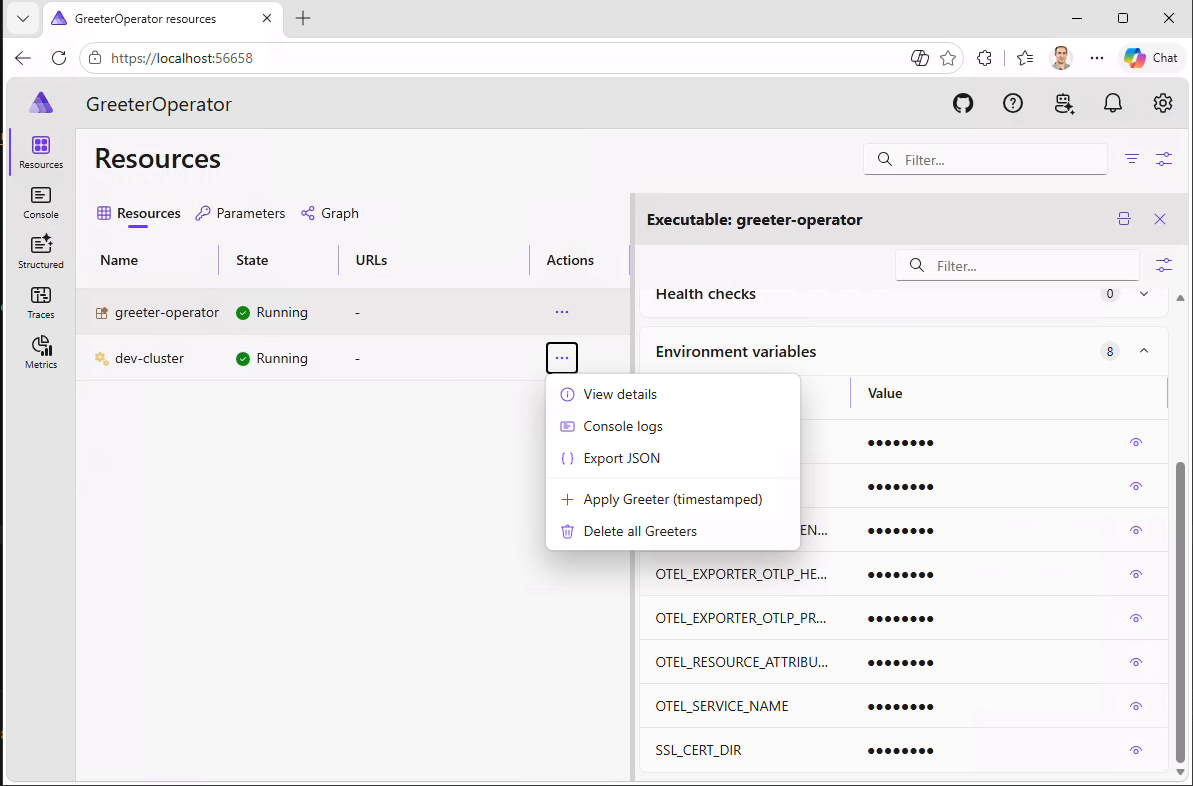
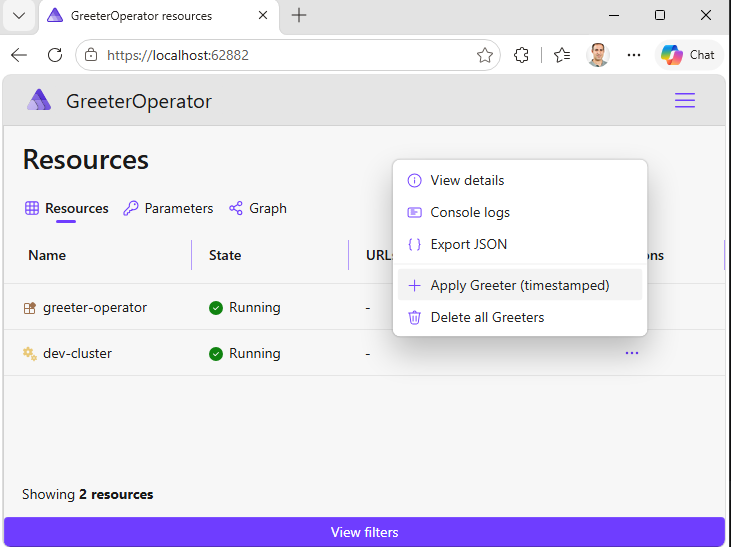
WithApplyGreeterCommand() and WithDeleteGreetersCommand() are mine, and they are the reason the dashboard has buttons on it. In the screenshot above they sit in the dev-cluster context menu, right below the built-in View details, Console logs, and Export JSON entries — which is exactly where a contributor would look for them without being told.
Aspire lets you attach commands to any resource with WithCommand, and they show up in the dashboard’s context menu next to the built-in Start and Stop actions. That turns out to be one of the most useful and least advertised things in the whole model, because the dashboard stops being a read-only status page and becomes the place where you drive the loop. Here is the whole thing:
1
2
3
4
5
6
7
8
9
10
11
12
13
14
15
16
17
18
19
20
21
22
23
24
25
26
27
28
29
30
31
32
33
34
35
36
37
38
39
40
41
42
43
44
45
46
47
48
49
50
public static IResourceBuilder<KindClusterResource> WithApplyGreeterCommand(
    this IResourceBuilder<KindClusterResource> builder)
{
    ArgumentNullException.ThrowIfNull(builder);

    builder.WithCommand(
        name: "apply-greeter",
        displayName: "Apply Greeter (timestamped)",
        executeCommand: async _ =>
        {
            var stamp = DateTimeOffset.Now.ToString("yyyyMMdd-HHmmss");
            var crName = $"greeter-{stamp}";
            var specName = $"tamir-{stamp}";

            var yaml = $"""
                apiVersion: hello.tamirdresher.dev/v1alpha1
                kind: Greeter
                metadata:
                  name: {crName}
                  namespace: default
                spec:
                  name: {specName}
                """;

            var (exitCode, stdout, stderr) = await RunKubectlAsync(
                ["--kubeconfig", builder.Resource.KubeconfigPath, "apply", "-f", "-"],
                yaml);

            if (exitCode != 0)
            {
                var failureText = string.IsNullOrWhiteSpace(stderr) ? stdout : stderr;
                return CommandResults.Failure(
                    $"kubectl apply failed for {crName}.", failureText, CommandResultFormat.Text);
            }

            return CommandResults.Success(
                $"Applied {crName} (spec.name={specName})",
                stdout.Trim(),
                CommandResultFormat.Text,
                true);
        },
        new CommandOptions
        {
            Description = "Applies a timestamped Greeter custom resource to trigger the operator reconcile loop.",
            IconName = "Add",
            UpdateState = _ => ResourceCommandState.Enabled,
        });

    return builder;
}
There are a few details worth pointing out. The command builds YAML in memory and pipes it to kubectl apply -f - over stdin, so there is no temp file to write or clean up. It reuses builder.Resource.KubeconfigPath from the Kind resource, which means it automatically talks to the right cluster without me hardcoding anything. It returns a CommandResults.Success or Failure that the dashboard renders, so a failed apply shows the actual kubectl error instead of failing silently. And IconName accepts any Fluent UI icon name, which is a small thing that makes the menu look like it belongs.
The timestamp is the part that makes it genuinely useful rather than merely convenient. Every click produces a new Greeter with a new name, so every click is a fresh trip through Reconcile() with a value I can watch change in the debugger. Clicking twice and seeing tamir-20260727-151653 then tamir-20260727-151720 arrive at the breakpoint is a much better demonstration than reapplying the same static YAML and squinting at whether anything happened.
I wrote the companion WithDeleteGreetersCommand() about thirty seconds later, for the obvious reason that clicking Apply eleven times leaves you with eleven Greeters.
This is the kind of thing nobody asks for, because in the normal Kubernetes loop there is no surface to put a button on. Once there is one, every project grows a few: seed test data, rotate a secret, trigger a migration, force a resync. They are a few lines each and they live with the code rather than in someone’s shell history.
The one method in that snippet that does not ship in 13.4.1-beta.687 is WithManifest(path). In this sample it lives in a tiny local extension file. When the cluster is ready, it applies config/greeter-crd.yaml, and .WaitFor(cluster) keeps the operator from starting before the CRD exists.
Package status, July 2026:
WithManifest(path)is the local gap. I upstreamed the richer version in CommunityToolkit/Aspire#1481, where it appears ascluster.AddManifest(name, path)andcluster.AddManifestFromContent(name, yaml), with.WithNamespace(...),.WithRecursive(),.WithServerSideApply(...),.WithFieldManager(...), CRD wait timeout/behavior, apply timeout, kustomize auto-detection, and API-reachability probing. That PR is at 174 tests now, which is a nice reminder that the local version is just enough for the sample; the upstream version is the reviewed, package-quality API. Once it lands in a package, the local extensions file goes away and this sample becomes just the NuGet reference plus the AppHost.
Then the Go integration turns the controller into a first-class Aspire resource. AddGoApp comes from Aspire.Hosting.Go, so Aspire runs the operator from source, wires environment variables, captures logs, exposes it in the dashboard, and gives the VS Code Aspire extension enough resource metadata to attach the right debugger automatically.
And then .WaitFor(cluster) is doing real work. The operator should not start before the cluster exists and the CRD bootstrap has completed. Instead of encoding that in a README paragraph called “Important: run this first,” the dependency lives in the graph, and dependency graphs are better than README paragraphs at not forgetting.
Actually running it
Everything below assumes Docker Desktop is running, because Kind is Kubernetes-in-Docker and nothing works without it. Beyond that you need the .NET 10 SDK, Go 1.23 or newer, kind and kubectl on your PATH, and Delve installed with go install github.com/go-delve/delve/cmd/dlv@latest — one gotcha there is that it lands in $(go env GOPATH)\bin, which on a default Windows setup is C:\Users\<you>\go\bin and is frequently not on PATH.
You also need two VS Code extensions. The first is golang.go, and the second is Microsoft’s official Aspire extension:
1
code --install-extension microsoft-aspire.aspire-vscode
Without the Aspire one, VS Code has no idea what an AppHost is, and you end up hand-rolling a coreclr launch configuration that points at a built DLL. Every Aspire-in-VS-Code tutorial assumes you have it and almost none of them say so out loud, which is a small example of the same friction this post is complaining about.
The nice part is that none of this has to live in a wiki page that nobody reads. A .vscode/extensions.json file makes VS Code prompt newcomers to install exactly these two the moment they open the folder, and this sample ships one. Take it further with a dev container and the whole environment — the .NET SDK, Go, kind, kubectl, Delve, and the extensions — is described in devcontainer.json and built for the contributor automatically, whether they open it locally or in GitHub Codespaces. The setup guide stops being a document people follow and becomes a file the machine follows, which is the same shift this whole post is about, applied one level up.
The launch configuration is a single entry, and you do not have to type it. Press Ctrl+Shift+P, run Aspire: Configure launch.json, and the extension writes it for you:
1
2
3
4
5
6
7
8
9
10
11
{
  "version": "0.2.0",
  "configurations": [
    {
      "name": "Debug Aspire AppHost",
      "type": "aspire",
      "request": "launch",
      "program": "${workspaceFolder}/apphost/GreeterOperator.AppHost.csproj"
    }
  ]
}
Note that program points at the AppHost csproj rather than the workspace folder. The extension’s generated snippet uses ${workspaceFolder}, but the Go debugging playground in the Aspire repo points at the project file, and that is the shape that works reliably.
Set a breakpoint on line 36 of operator/controllers/greeter_controller.go:
1
configMapName := fmt.Sprintf("greeting-%s", greeter.Spec.Name)
Line 36 rather than the top of Reconcile() because r.Get() has already populated greeter by then, so the Variables panel shows real fields instead of a zero value.
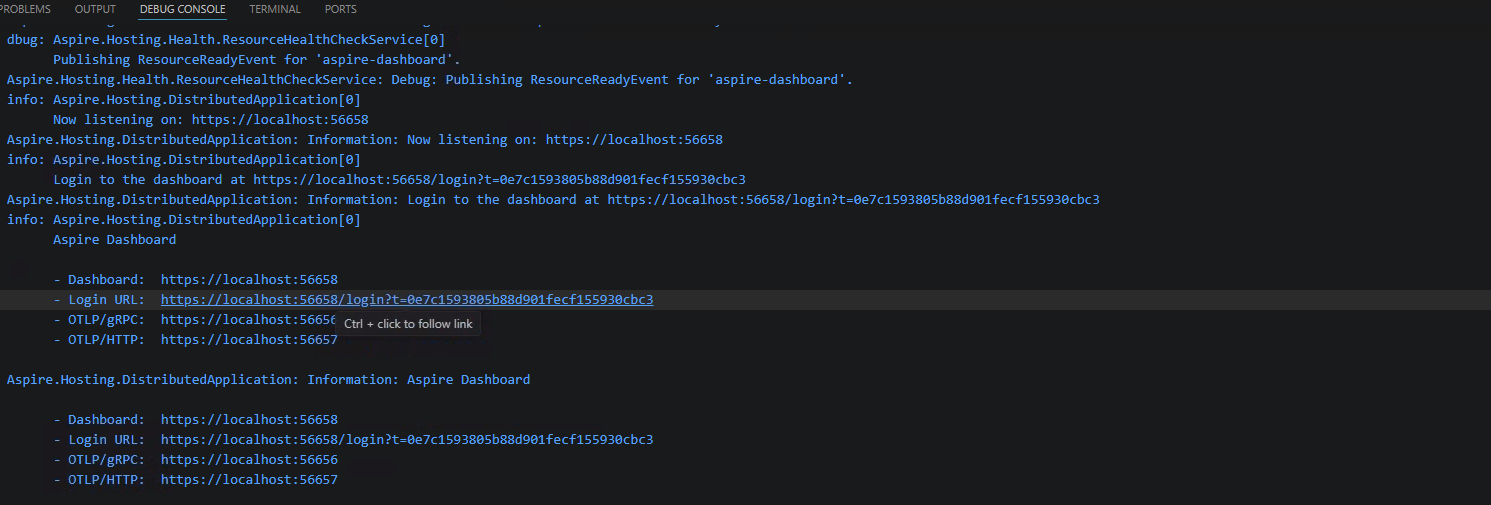
Then press F5 and wait for the dashboard. Aspire prints the dashboard URL to the Debug Console as it starts, and the Login URL line is the one you want — it carries a one-time token, so following it signs you straight in. Ctrl+click it and the browser opens on the resources page:
Then click Apply Greeter (timestamped) on the cluster resource. The breakpoint hits, and the Call Stack shows two debug sessions side by side: the C# AppHost running, and the Go operator paused. One keypress, two languages, one cluster.
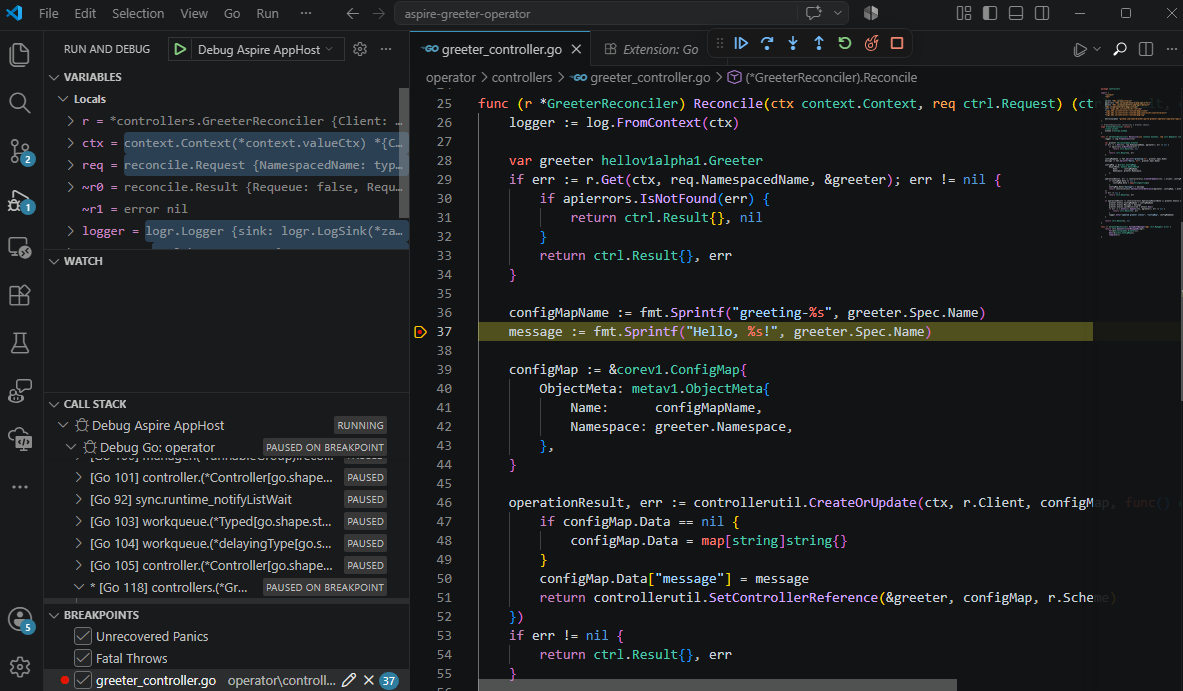
The command applies a Greeter whose name carries the current timestamp, so each click sends a new value through Reconcile() and you can watch greeter.Spec.Name change without touching a terminal. That button is itself just an extension method calling WithCommand:
1
2
3
4
5
6
var cluster = builder
    .AddKindCluster("dev-cluster")
    .WithClusterLifetime(ClusterLifetime.Persistent)
    .WithManifest(Path.Combine(repoRoot, "config", "greeter-crd.yaml"))
    .WithApplyGreeterCommand()
    .WithDeleteGreetersCommand();
One parameter worth getting right. The third argument to AddGoApp is packagePath, and a Go package is a directory rather than a file, so AddGoApp("greeter-operator", operatorDir) is correct and AddGoApp("greeter-operator", operatorDir, "./main.go") is not — even though the second one runs.
That distinction matters more than it looks, because the same value is passed to go run, dlv debug, and go build alike. go run accepts a filename quite happily, so the operator starts and reconciles and everything appears healthy, but dlv debug cannot use a filename, and the resulting debug configuration is rejected. The symptom is an Invalid debug adapter error, a 500 from the extension’s run_session endpoint, and then the resource exiting with code 2 after printing Go’s usage banner, because the orchestrator falls back to launching the process without arguments.
Our main.go sits at the module root next to go.mod, so omitting the third argument and letting it default to the module root is what you want. If your Go resource runs fine but refuses to break at a breakpoint, that parameter is the first thing to check.
Wait, how did that actually work?
The part that feels slightly illegal is that the operator is not in the cluster. It is an ordinary process running on my laptop, and it holds an open HTTP connection to the Kubernetes API server. Kubernetes is perfectly fine with that, because a controller is not special because of where it runs. It is special because it can authenticate, read the state it cares about, and write the changes it is responsible for. Production controllers usually run as Pods because that is the operationally sensible place for them, but the API server does not require that arrangement during development.
The entire bridge is one environment variable: .WithEnvironment("KUBECONFIG", cluster.Resource.KubeconfigPath). The Kind integration creates or reuses the cluster, writes a kubeconfig to a temporary location, and hands that path to the Go process. Inside that file is the API server address, which looks like https://127.0.0.1:<random-port> because Kind publishes the control-plane container’s Kubernetes port back to the host. The file also contains the client certificate material the process needs to authenticate, so from the operator’s point of view this is just a normal Kubernetes client talking to a normal Kubernetes API server.
That is why the Go code does not contain an Aspire-specific secret handshake. ctrl.GetConfigOrDie() follows the same convention every controller-runtime program follows: it checks for an explicit flag, then KUBECONFIG, then ~/.kube/config, and then the in-cluster service-account tokens mounted into a Pod. In this loop it succeeds at step two and never reaches the in-cluster path. That is the useful trick hiding in plain sight, because the same binary can run unchanged as a Pod later or as a laptop process now.
Before any of that matters, Kubernetes has to know what a Greeter is. A CRD is the document that teaches the API server a new noun, and before WithManifest applies greeter-crd.yaml, asking for a Greeter returns a 404 because the API server has never heard of that type. After the manifest lands, the API server stores Greeters, validates them against the schema, serves them through the usual REST API, and treats them enough like built-in resources that controller-runtime can watch them without caring that they were invented five minutes ago.
This is also why .WaitFor(cluster) is not decorative. If the operator starts too early, it tries to watch a type the API server has not been taught yet, and then the inner loop fails in the least romantic way possible: the code is fine, the cluster is fine, and the ordering is wrong. By putting .WaitFor(cluster) on the Go resource, the AppHost says, in executable form, “do not start the controller until the cluster and its bootstrap manifests are ready.” That sentence belongs in code rather than in a README warning with three exclamation marks.
Once the manager starts, ctrl.NewControllerManagedBy(mgr).For(&Greeter{}) opens the important connection. Under the covers, controller-runtime issues a long-lived watch request to the API server and leaves it open. That is the Starting EventSource line in the logs. From then on, Kubernetes streams create, update, and delete events for Greeters down that connection, the same way it would stream them to a controller running inside the cluster.
Now the dashboard button has something to disturb. The command runs kubectl apply with the same kubeconfig, sends a timestamped Greeter to the API server, and the API server validates it against the CRD schema before persisting it. The watch sees the new object and sends an event to controller-runtime, controller-runtime puts the object’s namespace and name on a work queue, and a worker calls Reconcile(). Notice that the request passed to Reconcile() is not the full object; it is only a namespace and name, which is why line 29 fetches the Greeter and line 36 is the good breakpoint. By the time execution reaches that line, the object has been read back from the API server and the Variables panel finally has something interesting to show.
1
2
3
4
5
6
7
Dashboard button
  └─ kubectl apply -f -            (uses KUBECONFIG)
      └─ API server (in Kind container): validate against CRD, persist
          └─ watch event streamed over the open connection
              └─ controller-runtime work queue
                  └─ Reconcile() — running on your laptop
                      └─ your breakpoint
Normally that last step happens inside a Pod inside a node container, so changing one line means rebuilding an image, loading it into Kind, restarting the Deployment, and tailing logs while telling yourself this is fine. It is fine, in the way airport security is fine. Here the state lives in the cluster where it must, and the code runs on the laptop where I can stop it, inspect locals, and try again without pretending a container image is the only honest way to execute Go. Kubernetes never notices the difference, because from its point of view a controller is just an authenticated HTTP client with a long-lived watch.
The ritual collapsed into a solution file, and that matters more than this Greeter’s job of turning a name into a ConfigMap, because the workflow is the thing I wanted to expose.
Once this loop exists, you can add the parts real operators need: finalizers, status conditions, multiple CRDs, watches over owned resources, webhooks, metrics, leader election, or integration tests that bring the whole topology up and prove reconciliation end to end.
You can also take an existing operator project and do the same thing over a weekend: keep the CRDs and Kubernetes state in Kind, run the controller as a host process, wire it through Aspire, and make the dashboard the place where contributors see what is happening.
That is the platform-engineering disruption I actually care about: not a new abstraction for production, but a better inner loop for the people maintaining the abstractions everyone else depends on.
The Greeter keeps the domain simple enough that the loop stays visible. In the argo-cd post, I take the same pattern to a real cloud-native project and tell the story of why I ended up building this in the first place.
For now, I am happy with the tiny thing: a CRD, a reconciler, a Kind cluster, a debugger, and no image build in the loop. That is a very good start.