


My family relative makes sponge puppets. Hedgehogs, ice cream cones, crocodiles, a one-meter giant carrot — the whole kindergarten supply chain, handmade.
She was born in Argentina, lives in Israel. She speaks Hebrew, but Spanish is her language — it’s where she thinks, argues, and prices sponge fish hats. Usually my wife translates for her when she needs something done in Hebrew.
We built her a Wix store: teivathadimion.com — תיבת הדמיון, “Box of Imagination.” My wife and I set it up together — all in Hebrew, because that’s the market. And then the real problem started.
She sends me product photos over email. In Spanish. With prices in shekels. And descriptions like “Helado americano 120 שקל.”
I am not going to manually upload sponge puppets to Wix every time my phone buzzes.
So I Did What Any Reasonable Software Architect Would Do
I assigned an AI agent team to work for my family relative.
Not a chatbot. Not a “let me help you use Wix” assistant. A fully autonomous team that monitors email, processes images, creates products on Wix, and replies in Spanish — all without any human in the loop.
Here’s what actually happens now:
- She emails a photo of a new puppet to a dedicated Gmail address
- An AI agent checks Gmail every 3 minutes
- It downloads the image, reads the Spanish email for the product name and price
- Opens Wix Dashboard in a browser, creates the product with a Hebrew name, Hebrew description, correct category, mandatory legal disclaimers, and the uploaded photo
- Replies in Spanish: “Hola! Ya subí el producto 🎉”
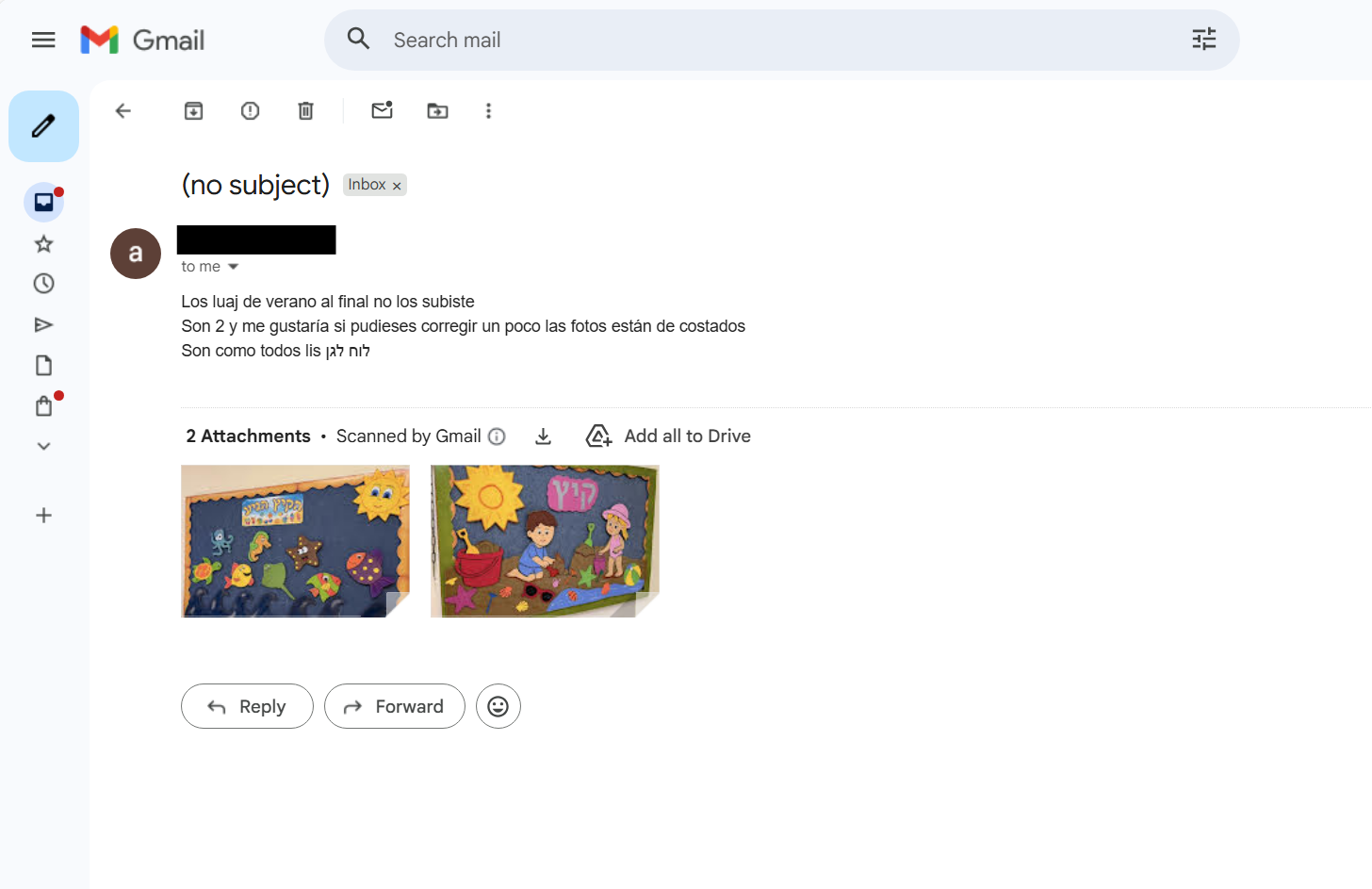 The email — Spanish instructions, Hebrew product names, two product photos attached. The agent takes it from here.
No code deployed. No Wix API integration. No app. Just a browser automation agent that reads email, understands context in three languages, and does the actual work.
Across multiple sessions, it created 114 products. Sponge fish hats. Hanukkah boards with separate candles. A vegetable garden set. Finger puppets. Story books. Summer activity boards. And it handled corrections — “delete those four, keep only the set,” “rename צלחות to פלטות,” “wrong photo, replace it.”
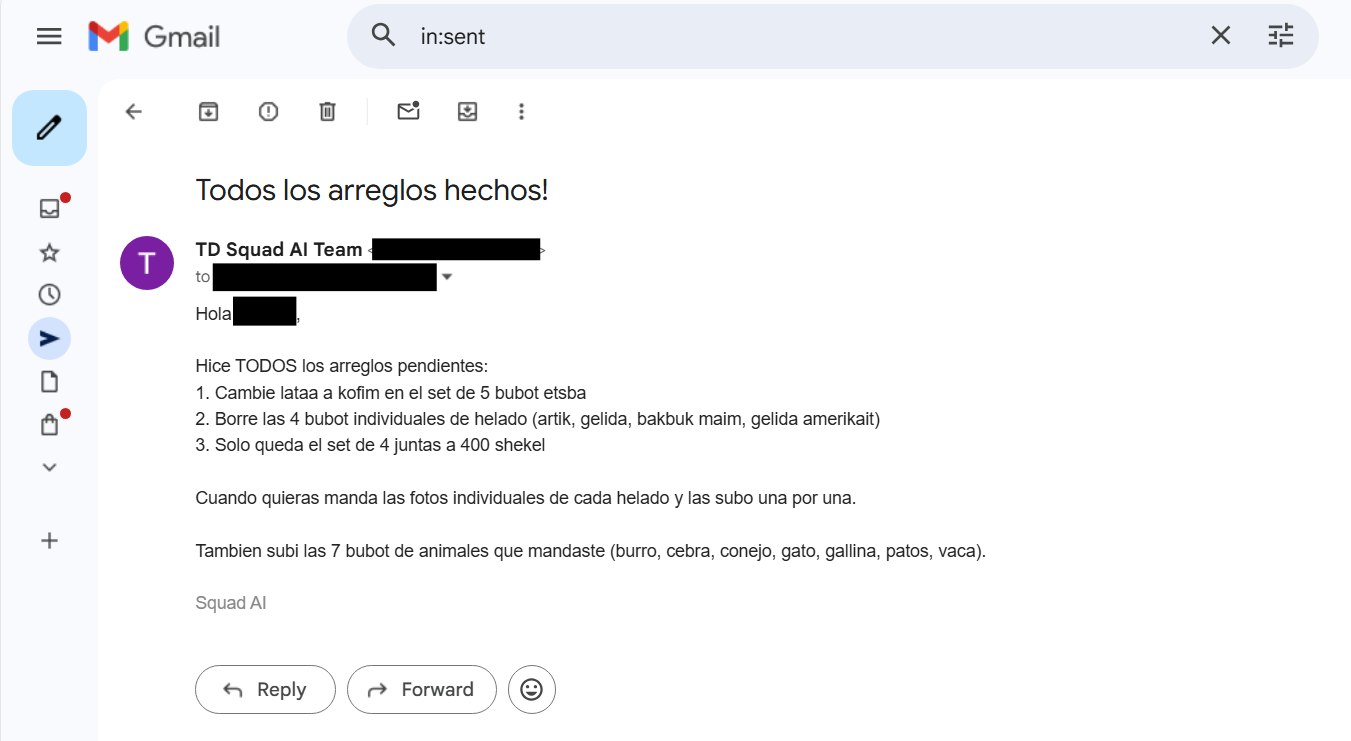 The agent replies in Spanish with a detailed summary of all corrections made — renames, deletions, bundle creation. Signed “Squad AI.”
The Trilingual Pipeline
This is the part that I think is genuinely interesting from an architecture perspective. The system operates in three languages simultaneously, and none of them are optional:
Spanish — The input language. Her emails arrive in Spanish with product names, descriptions, and pricing. The confirmation replies go back in Spanish because that’s what she’s comfortable with. She shouldn’t have to change anything about how she communicates.
Hebrew — The store language. Product names, descriptions, categories, legal disclaimers — everything on teivathadimion.com is in Hebrew because the customers are Israeli parents buying kindergarten supplies. The agent translates the Spanish product descriptions into natural Hebrew, not machine-translated garbage. “Helado americano” becomes “גלידה אמריקאית” — with the right tone for a children’s product listing.
English — The tooling language. Gmail’s interface, Wix Dashboard, Playwright selectors, the agent’s own reasoning — all in English. The LLM thinks in English, navigates in English, but reads Spanish and writes Hebrew without breaking a sweat.
Nobody learned a new language. Nobody learned Wix. And my wife doesn’t have to translate product descriptions at dinner anymore.
How It Actually Works (The Technical Bits)
Under the hood, this is Playwright browser automation orchestrated by an AI agent. No APIs, no SDKs — just a browser doing what a human would do, except faster and without complaining.
The Gmail Monitor
The agent opens Gmail in a Playwright-controlled browser, navigates to the inbox, and looks for unread emails from her. When it finds one, it:
- Reads the email body — extracting the product name, description, and price from Spanish text
- Downloads all attached images (more on the “all” part later — it wasn’t always straightforward)
- Marks the email as read so it doesn’t process it again
The polling loop runs every 3 minutes. It’s not elegant. It doesn’t need to be. Gmail doesn’t have a push notification API that works nicely with browser automation, so we poll. Like cavemen. Effective cavemen.
The Wix Product Creator
This is where the Playwright automation gets interesting. The agent navigates to the Wix Dashboard — not the Wix API, the actual Dashboard UI in a browser. It:
- Goes to the “Add Product” page
- Fills in the product name in Hebrew (translated from the Spanish email)
- Writes a Hebrew description that reads naturally — not “Sponge puppet of hedgehog” but “בובת ספוג קיפוד — מתאימה לגני ילדים ופעוטונים”
- Sets the price in Israeli shekels (₪)
- Uploads the product photo from the email attachment
- Assigns the correct collection/category
- Adds mandatory legal disclaimers (Israeli consumer protection requires certain disclosures)
- Publishes the product
All through the browser. Click by click, field by field. If you watched the screen, you’d see the mouse moving, text being typed, buttons being clicked. Like a ghost operating the computer. A very productive ghost.
The Reply
After creating the product, the agent composes a reply to the original email — in Spanish — confirming the upload. “Hola! Ya subí el producto [product name] a la tienda. El precio es ₪[price]. 🎉”
She replies “Dale perfecto!” and goes back to making puppets. As far as she’s concerned, someone very helpful is on the other end of that email.
What Went Wrong (Because Something Always Does)
Let me be honest: this wasn’t a clean “it worked on the first try” story. Several things broke along the way.
The Cleardot Problem
Gmail has this lovely habit of including tiny transparent tracking pixels in emails — cleardot.gif, 1x1 pixel images embedded inline. When the agent tried to “download all images from the email,” it would happily download these invisible pixels alongside the actual product photos. So we’d end up with a sponge hedgehog hat and a transparent 1x1 GIF both uploaded to Wix.
The fix was teaching the agent to filter images by size — anything under a reasonable threshold gets ignored. It’s a hack, but it’s the kind of hack that works perfectly for this use case.
The CC Problem
At one point, she started CC’ing someone on her emails. The agent’s reply would go to all recipients, which was fine — except it confused the reply chain and the agent started processing the same email thread multiple times. Duplicate products everywhere.
The fix was tracking processed email IDs so the agent wouldn’t re-process threads it had already handled.
The Wix Dashboard Navigation
Wix’s Dashboard isn’t static. It’s a React SPA that loads dynamically, rearranges elements based on your plan and store status, and has slightly different page structures depending on whether you’re on the “quick add” flow or the “full product editor.” The agent would sometimes navigate to the wrong page and try to fill fields that didn’t exist on that particular view.
We solved this by being very specific about which Wix URL to navigate to directly — bypassing the dashboard navigation entirely and going straight to the product creation form. When in doubt, use a direct URL. Don’t trust SPAs to render the same thing twice.
Photo Upload Timing
Wix’s image uploader is asynchronous. You click “upload,” a dialog appears, you select the file, and then… you wait. The image processes on Wix’s servers before the product can be saved. The agent would sometimes try to save the product before the image finished processing, resulting in products with no photo.
The fix: wait for the upload confirmation element to appear before proceeding. Playwright’s waitForSelector with the right selector. Simple in hindsight, maddening to debug.
The Corrections Workflow
Creating products is only half the story. A real store needs maintenance — price changes, name corrections, photo replacements, product deletions. And she handles all of that the same way she handles everything else: by sending an email in Spanish.
The Bundle Incident
One of my favorite moments. She had listed four individual items — let’s say four different animal puppets. Then she decided they should be sold as a set instead. One email: “Borra los cuatro animales y ponelos como un conjunto, 150 שקל.” (Delete the four animals and put them as a set, ₪150.)
The agent:
- Navigated to Wix Dashboard
- Found and deleted each of the four individual products
- Created a new bundle product with all four photos
- Set the price to ₪150
- Replied in Spanish confirming the change
From a single email thread. Four deletions, one creation, one confirmation. Dale perfecto.
The other corrections were just as smooth — each one driven by a single email:
- Price corrections — “The last three products should be ₪40 instead of ₪30.” Three products updated, one reply.
- Rename — “Cambié de opinión — las צלחות deben ser פלטות.” Spanish and Hebrew mixed mid-sentence. The agent found the product, renamed it, confirmed in Spanish.
- Photo replacement — “The crocodile photo is wrong, use this one.” Old photo removed, new one uploaded, done.
All of these corrections happened through email. She never opened Wix. She never logged into anything. She just sent emails in Spanish describing what she wanted, and it happened.
114 Products and Counting
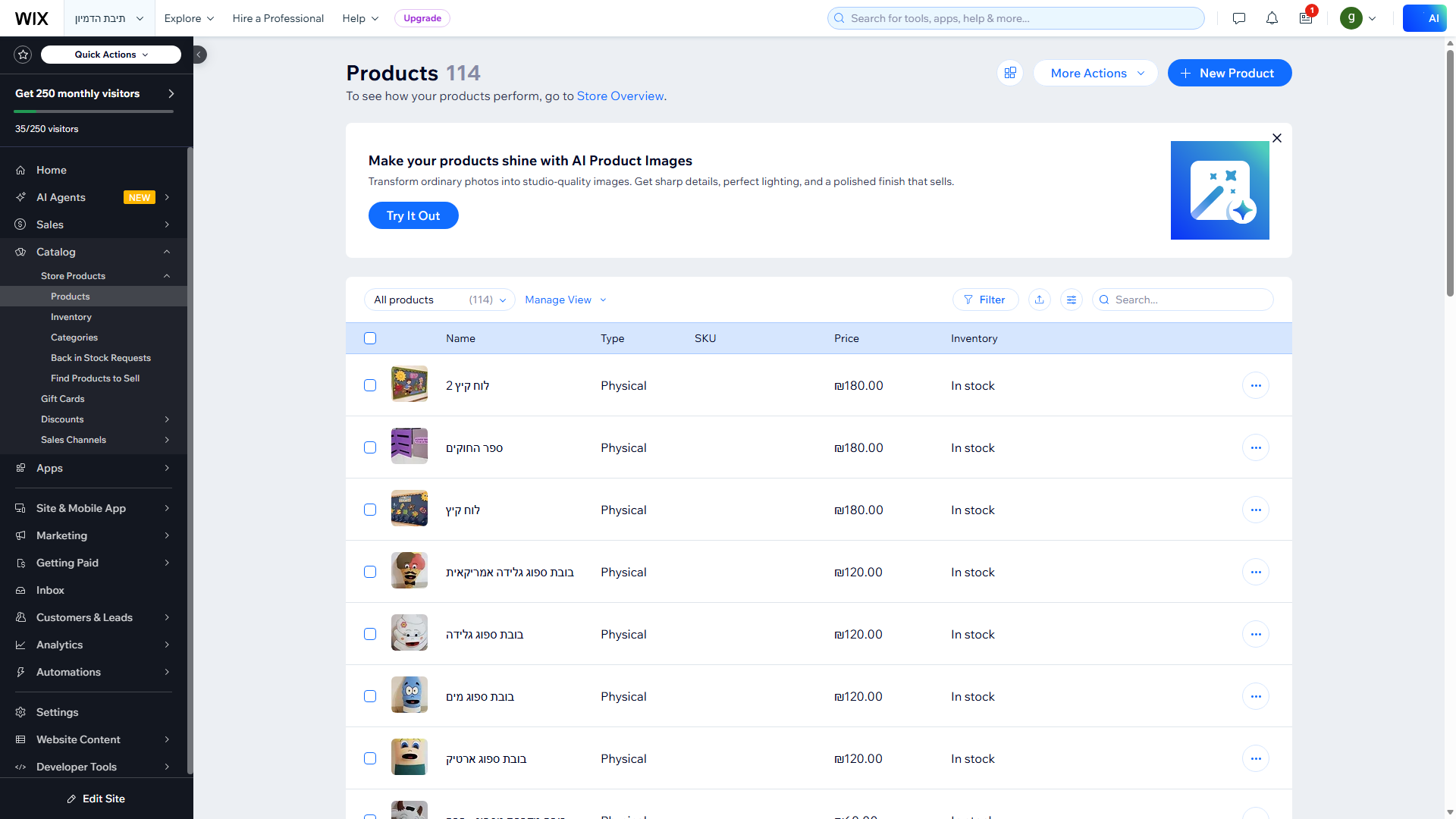 114 products on the Wix Dashboard — all created, categorized, and priced by AI agents from Spanish emails
Over multiple sessions, the agents processed her emails and built out a full product catalog. The categories include:
- בובות ספוג (sponge puppets) — hedgehogs, crocodiles, fish, ice cream cones, carrots
- כובעים (hats) — fish hats, animal hats, fruit hats
- לוחות חגים (holiday boards) — Hanukkah boards, Purim boards, summer boards
- ספרי סיפורים (story books) — handmade illustrated books
- בובות אצבע (finger puppets) — small puppets for storytelling
- משחקים (games) — vegetable garden sets, activity boards
- פלטות (platters) — themed serving platters (formerly known as צלחות, see above)
Each product has a Hebrew name, Hebrew description, price in shekels, at least one photo, and the required legal disclaimers. The agent didn’t just translate — it wrote product descriptions that sound like a real Hebrew e-commerce listing. “בובת ספוג קיפוד בעבודת יד — מתאימה לגני ילדים, פעוטונים ומתנות ליום הולדת” isn’t something Google Translate would produce.
 The live store — teivathadimion.com. All Hebrew, all created from Spanish emails. The customers have no idea.
“Dale Perfecto!”
Here’s the thing that gets me every time. She has no idea she’s talking to an AI.
She thinks I’m the one on the other end of that email — that I’m sitting at my computer, diligently uploading her sponge hedgehogs to Wix, translating her descriptions into Hebrew, setting prices, choosing categories.
The funniest confirmation was when the agent handled the big correction batch — deleting four products, recreating them as a bundle, updating three prices, renaming a product, and replacing a photo — all from one email thread. Her response: “Dale perfecto!”
Roughly translated: “Cool, perfect!”
She reviewed the store, saw that everything was exactly as she wanted, and moved on with her day. The entire interaction — from her email to the completed changes — took about 15 minutes. If I’d done it manually, it would have taken me an hour. And I would have complained about it at dinner.
Why This Matters More Than Code Review
If you’re building AI agents and only thinking about developer workflows — you’re missing the bigger picture.
I spend my days thinking about AI agent architectures, multi-agent coordination, distributed systems problems. My whole blog series is about scaling AI-native software engineering. Those are interesting problems and I love solving them.
But the most impactful thing my AI agents have done isn’t code review, test generation, or automated PR triage. It’s helping my family relative sell sponge hedgehog hats to kindergartens.
Think about that for a second. She doesn’t know what an API is. She doesn’t know what Playwright is. She doesn’t know what an LLM is. She has never opened the Wix Dashboard. She communicates exclusively through email, in her preferred language, about a subject she’s an expert in — handmade children’s products.
Everything between her expertise and a functioning online store is glue. And glue is exactly what AI agents are good at.
The trilingual pipeline isn’t a technical demo. It’s a real person running a real business through an interface (email) she’s been using for decades, in a language (Spanish) she thinks in, selling products in a language (Hebrew) she doesn’t naturally write in, on a platform (Wix) she’s never touched. No training. No onboarding. No “let me show you how to use the dashboard.”
Don’t let a human do a machine’s work.
My family relative knows what she made, what it costs, and how to take a photo. Everything else is glue. And I’d rather have a machine handle the glue than spend my evenings uploading sponge crocodiles to Wix.
The real unlock is when AI agents help the people who would never, ever use developer tools. The people who communicate through email, think in a different language than the one their business operates in, and have deep domain expertise but zero interest in learning product management UIs.
She doesn’t need to understand how her store works. She needs the store to understand how she works.
That’s the difference between a tool and an agent. A tool requires you to learn it. An agent learns you.
What’s Next
She still sends emails. The agent still processes them. Products keep going up. Corrections keep getting made. The store grows.
I’m thinking about adding inventory management — when she sells a puppet at a kindergarten fair, she could email “Vendí 3 cocodrilos” and the agent could update stock levels. And maybe order notifications — when someone buys from the website, the agent could email her in Spanish with the order details and shipping address.
But honestly? The system as it is already does exactly what it needs to do. She makes puppets. The agent manages the store. I pretend to be helpful.
That’s not a demo. That’s Tuesday. 🖖